


Overview
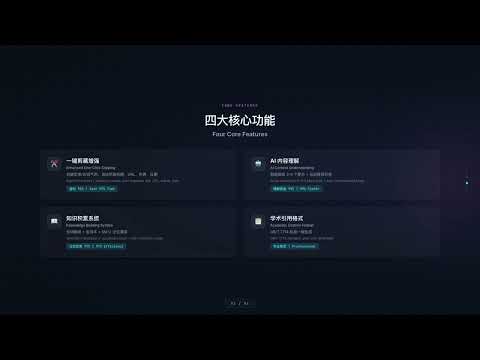
flomo 专属 AI 增强伴侣。侧边栏一键提炼网页长文摘要,生成 GB/T 7714 参考文献格式;支持划词翻译、网页生词智能高亮与科学记忆漫游复习。
Quick flomo - AI 阅读笔记 & 划词翻译 & 生词本 📖 收藏夹不该是灵感的坟墓,查过的生词也不该转头就忘。 你是否也经常遇到这些困扰? • 📚 网页干货太长没时间读,随手丢进收藏夹,然后永远落灰; • 🌍 浏览外文文献或资讯,生词反复查、反复忘,在真实语境中依然不认识; • 📝 收集素材写论文/报告时,内容找不到出处,手动拼写引用格式既繁琐又易出错; • 🔀 频繁在网页和笔记软件之间来回切换,严重打断专注阅读的“心流”。 Quick flomo 是专为深度阅读者、研究者与 flomo 爱好者打造的原生 Chrome 侧边栏伴侣。它不仅仅是一个剪藏工具,更是一套无缝融入网页浏览的「AI 阅读吸收 + 词汇深度内化 + 原子化知识沉淀」工作流。 ━━━━━━━━━━━━━━━━━━━━━━━━━━━━ 🎉 v1.6.2 新版特性 ━━━━━━━━━━━━━━━━━━━━━━━━━━━━ 1. 💳 国内直充支付体验升级:接入安全便捷的支付宝直充通道,Pro 月卡仅需 ¥9.9,扫码即付、单次结算无任何自动扣费套路。 2. ⚡ DeepSeek 双模型强力加持:新增 DeepSeek Flash(高速经济)与 DeepSeek Pro(深度推理),长文总结与知识提炼更快更深刻。 3. 🛡️ 支付台账与历史记录体验优化:精准去重订单记录,优化多语言套餐文案与购买指引,支付后即时刷新生效。 4. 📜 GB/T 7714 学术引用与生词高亮稳定性增强:全端统一 Pro 权益体系与防漂移架构,确保深度阅读心流不中断。 ━━━━━━━━━━━━━━━━━━━━━━━━━━━━ 💡 三大真实使用场景:它能如何帮你? ━━━━━━━━━━━━━━━━━━━━━━━━━━━━ 1️⃣ 深度长文阅读:由厚读薄,从“囤积信息”到“即刻吸收” • 【AI 核心提炼】:一键提取万字长文、行业报告或学术文章的核心脉络与关键观点,秒抓精髓。 • 【智能标签推荐】:AI 根据文章内容自动建议结构化标签(如 #知识管理 #商业分析),分类井井有条。 • 【边读边记同步】:直接在侧边栏记录当下的个人感悟与思考,一键生成结构化卡片推送到 flomo,真正把别人的信息转化为自己的认知资产。 2️⃣ 沉浸式外文阅读:划词即译 + 网页生词高亮 + 科学记忆漫游 • 【即划即译】:选中外文单词或段落,即刻弹出多引擎精准翻译(支持大模型 AI 深度解析、Google 翻译、百度翻译等)。 • 【一键收入生词本】:遇到生词一键收藏,自动收录原句上下文与释义。 • 【独家网页生词高亮】:以后当你浏览任何英文网页时,生词本里的词汇会自动呈现高亮/波浪线标记!在不同的真实语境中反复重逢,自然激活记忆。 • 【科学记忆漫游】:基于 SM-2 艾宾浩斯记忆算法,在侧边栏像刷卡片一样轻松复习,让生词真正变成你的长期词汇。 3️⃣ 严肃写作与素材调研:规范学术出处,一键生成标准引用 • 【自动元数据抓取】:自动识别网页标题、URL、作者、发布日期等关键信息。 • 【一键 GB/T 7714 引用】:告别繁琐的手动拼接,一键生成标准学术引用格式,同步附在 flomo 笔记底部,学术研究与报告撰写严谨规范、溯源无忧。 ━━━━━━━━━━━━━━━━━━━━━━━━━━━━ ✨ 为什么选择 Quick flomo? ━━━━━━━━━━━━━━━━━━━━━━━━━━━━ 🌿 原生侧边栏(Side Panel)架构 不覆盖网页主体,不破坏排版,右侧常驻无感呼出。支持快捷键 Alt+Shift+F(Mac: Option+Shift+F)一键唤起。 ⚡️ 极致轻量与专注 没有臃肿多余的社交功能,专注于阅读、翻译与记录本身,真正做到“随手记、随时查、无压力”。 🔒 数据隐私 100% 属于你 直连 flomo 官方 API,你的笔记内容不经过任何第三方中转服务器存储,确保个人数字资产绝对私密安全。 💎 开箱即用,丰俭由人 免费用户每月享有充沛基础额度与完整核心功能;重度学习者更可升级 Pro 会员解锁无上限生词本、网页生词智能高亮、记忆漫游复习及充沛 AI 积分。 ━━━━━━━━━━━━━━━━━━━━━━━━━━━━ 👥 谁最适合使用 Quick flomo? ━━━━━━━━━━━━━━━━━━━━━━━━━━━━ • 💡 flomo 核心用户 / 卡片笔记践行者:搭建个人第二大脑,实现灵感与阅读素材的原子化沉淀。 • 🎓 学生、研究生与科研人员:高效阅读文献、生成规范论文引用、积累专业外语词汇。 • ✍️ 内容创作者、行业分析师与知识工作者:快速消化行业资讯、搭建高质量写作素材库。 • 🌏 外语学习者与原版阅读爱好者:在真实语境中攻克生词,建立可复习的生词体系。 ━━━━━━━━━━━━━━━━━━━━━━━━━━━━ 🚀 3 步极简上手指南 ━━━━━━━━━━━━━━━━━━━━━━━━━━━━ 1. 安装扩展后,点击浏览器右上角图标或按下 Alt+Shift+F 唤起侧边栏; 2. 在设置中粘贴你的 flomo API 地址(登录 flomo 网页版 → 设置 → API 获取); 3. 浏览网页,开始享受划词翻译、AI 提炼与一键沉淀到 flomo 的流畅体验! 让每一次阅读都有回响,让每一份思考都有沉淀。立即安装体验吧!
5 out of 51 rating
Details
- Version1.6.2
- UpdatedSeptember 16, 2026
- FeaturesOffers in-app purchases
- Size1.66MiB
- Languages2 languages
- DeveloperWebsite
Email
support@shadow.wang - Non-traderThis developer has not identified itself as a trader. For consumers in the European Union, please note that consumer rights do not apply to contracts between you and this developer.
Privacy

This developer declares that your data is
- Not being sold to third parties, outside of the approved use cases
- Not being used or transferred for purposes that are unrelated to the item's core functionality
- Not being used or transferred to determine creditworthiness or for lending purposes
Support
For help with questions, suggestions, or problems, visit the developer's support site