


總覽
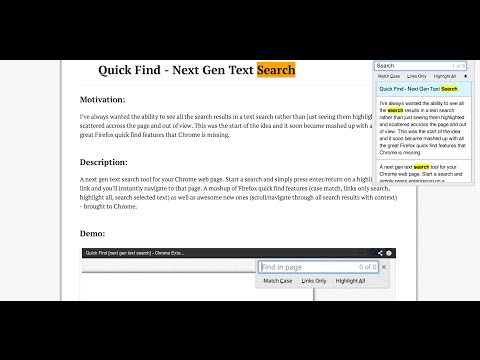
Port of Firefox Quick Find features + awesome new ones. Search results in one location. Navigate to links in just a few keystrokes.
For a more easily readable description please visit: https://github.com/peterdotjs/quick-find **** Change Log: 0.0.14 - Manifest v3 support 0.0.13 - Updated reference url 0.0.12 - Added ability to change default shortcut keys 0.0.11 - Fixed issue where search is broken in Chrome 40. Motivation -------------------- I’ve always wanted the ability to see all the search results in a text search rather than just seeing them highlighted and scattered across the page and out of view. This was the start of the idea and it soon became mashed up with all the great Firefox quick find features that Chrome is missing. If you like it please rate it and if you have any feature requests, questions or bugs you file it here: https://github.com/peterdotjs/quick-find/issues Demo ------------ https://www.youtube.com/watch?v=x2PEyTyJ6iM Description -------------------- Next generation text search. A new text search tool for your Chrome web page. Start a search and simply press enter/return on a highlighted link and you’ll instantly navigate to that page. A mashup of Firefox quick find features (case match, links only search, highlight all, search selected text) as well as awesome new ones (scroll/navigate through all search results with context) - brought to Chrome. SHORCUT KEYS --------------------------- Getting started ----------------------------- / or ctrl + shift + f : forward slash or ctrl+shift+f will open Quick Find menu ' : single quote key will open Quick Find menu in links mode (only links are searched) esc : escape key will close Quick Find menu Menu navigation ------------------------------- ↑ or ↓ : navigate results by using up or down arrow keys enter or return : pressing enter on highlighted menu with link will navigate to the link Search Options ----------------------------- alt + a : toggle highlight all results mode alt + c : toggle match case mode alt + l : toggle links mode Tips ------------------- Quick Find search box is pre-populated with any selected/highlighted text prior to opening the search menu. Toggle occurs only when cursor focus is on the Quick Find menu. Limitations ------------------------- Extension only works on sites that allow content scripts. The chrome webstore page itself for example doesn't even allow content scripts to be run. After you've installed it make sure you are using it on a newly loaded or refreshed page. The script won’t be loaded on existing tabs without a refresh. Quick find does not search through iframes, script, or code html elements. When results show up in same html element, will be shown only as one result. Other website shortcuts or extensions may conflict with these shortcuts. A future enhancement can be to select your own shortcuts to open the menu. Additional Notes ------------------------------- Anonymous page view tracking is used to improve the extension and user experience. You can opt out in the options menu. Chrome is a trademark of Google Inc. Use of this trademark is subject to Google Permissions.
4.1 分 (滿分 5 分)135 個評分
詳細資料
- 版本0.0.14
- 已更新2024年6月10日
- 提供者Peter Shin
- 大小260KiB
- 語言English (United States)
- 開發人員
電子郵件
pdotjs@gmail.com - 非交易商這位開發人員並未表明自己是交易商。歐盟地區的消費者請注意,消費者權利不適用於你和這位開發人員之間簽訂的合約。
隱私權

「Quick Find for Google Chrome™」已揭露下列關於收集及使用資料的資訊。 如需更多詳細資訊,請參閱開發人員的《privacy policy》。
Quick Find for Google Chrome™ 會處理下列資料:
這位開發者就你的資料做出下列聲明:
- 除經核准的用途外,不會將你的資料販售給第三方
- 不會基於與商品核心功能無關的目的,使用或轉移資料
- 不會為了確認信用度或基於貸款目的,使用或轉移資料
支援
如有疑問或建議,請使用電腦版瀏覽器開啟這個頁面