


Übersicht
Port of Firefox Quick Find features + awesome new ones. Search results in one location. Navigate to links in just a few keystrokes.
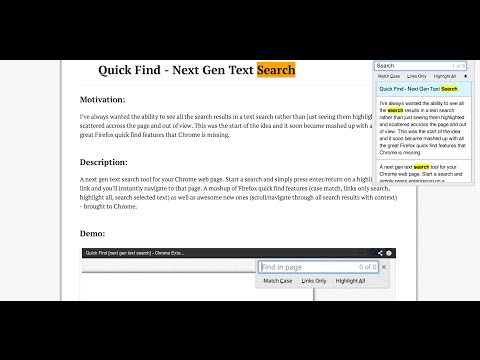
For a more easily readable description please visit: https://github.com/peterdotjs/quick-find **** Change Log: 0.0.14 - Manifest v3 support 0.0.13 - Updated reference url 0.0.12 - Added ability to change default shortcut keys 0.0.11 - Fixed issue where search is broken in Chrome 40. Motivation -------------------- I’ve always wanted the ability to see all the search results in a text search rather than just seeing them highlighted and scattered across the page and out of view. This was the start of the idea and it soon became mashed up with all the great Firefox quick find features that Chrome is missing. If you like it please rate it and if you have any feature requests, questions or bugs you file it here: https://github.com/peterdotjs/quick-find/issues Demo ------------ https://www.youtube.com/watch?v=x2PEyTyJ6iM Description -------------------- Next generation text search. A new text search tool for your Chrome web page. Start a search and simply press enter/return on a highlighted link and you’ll instantly navigate to that page. A mashup of Firefox quick find features (case match, links only search, highlight all, search selected text) as well as awesome new ones (scroll/navigate through all search results with context) - brought to Chrome. SHORCUT KEYS --------------------------- Getting started ----------------------------- / or ctrl + shift + f : forward slash or ctrl+shift+f will open Quick Find menu ' : single quote key will open Quick Find menu in links mode (only links are searched) esc : escape key will close Quick Find menu Menu navigation ------------------------------- ↑ or ↓ : navigate results by using up or down arrow keys enter or return : pressing enter on highlighted menu with link will navigate to the link Search Options ----------------------------- alt + a : toggle highlight all results mode alt + c : toggle match case mode alt + l : toggle links mode Tips ------------------- Quick Find search box is pre-populated with any selected/highlighted text prior to opening the search menu. Toggle occurs only when cursor focus is on the Quick Find menu. Limitations ------------------------- Extension only works on sites that allow content scripts. The chrome webstore page itself for example doesn't even allow content scripts to be run. After you've installed it make sure you are using it on a newly loaded or refreshed page. The script won’t be loaded on existing tabs without a refresh. Quick find does not search through iframes, script, or code html elements. When results show up in same html element, will be shown only as one result. Other website shortcuts or extensions may conflict with these shortcuts. A future enhancement can be to select your own shortcuts to open the menu. Additional Notes ------------------------------- Anonymous page view tracking is used to improve the extension and user experience. You can opt out in the options menu. Chrome is a trademark of Google Inc. Use of this trademark is subject to Google Permissions.
4,1 von 5135 Bewertungen
Details
- Version0.0.14
- Aktualisiert10. Juni 2024
- Angeboten vonPeter Shin
- Größe260KiB
- SprachenEnglish (United States)
- Entwickler
E-Mail
pdotjs@gmail.com - Kein HändlerDieser Entwickler hat sich nicht als Händler deklariert. Für Verbraucher in der Europäischen Union gelten die Verbraucherrechte nicht für Verträge, die zwischen dir und diesem Entwickler geschlossen werden.
Datenschutz

Quick Find for Google Chrome™ hat folgende Informationen hinsichtlich der Erhebung und Nutzung deiner Daten offengelegt. Weitere Details findest du im privacy policy des Entwicklers.
Quick Find for Google Chrome™ verarbeitet Folgendes:
Dieser Entwickler erklärt, dass deine Daten
- nicht an Dritte verkauft werden, außer in den genehmigten Anwendungsfällen
- nicht für Zwecke genutzt oder übertragen werden, die nichts mit der Hauptfunktionalität des Artikels zu tun haben
- nicht zur Ermittlung der Kreditwürdigkeit oder für Darlehenszwecke verwendet oder übertragen werden
Support
Wenn du Hilfe bei Fragen, Vorschlägen oder Problemen benötigst, öffne diese Seite in deinem Desktop-Browser