

Quick Fill
3 ratings
)
Overview
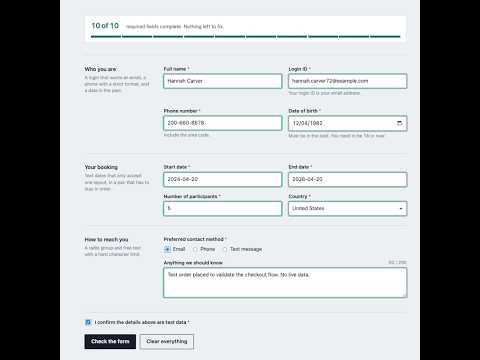
Fills test forms with one coherent, context-aware persona. Reads the form, skips lookups, respects validation.
A tool for developers and QA engineers. Filling the same registration form for the fortieth time is a bad use of an afternoon. This extension reads the form you are on, works out what kind of record it is for, and fills it with placeholder data that actually holds together — one person, consistently, across every field. IT UNDERSTANDS THE FORM BEFORE IT FILLS IT A page headed "Add User Details" gets a user-age person. An onboarding form gets a working-age one. Names, email, phone, city, state and postcode all belong to the same fictional person rather than being drawn at random per field. DATES THAT MAKE SENSE TOGETHER Dates are solved as a set, not one at a time. A date of birth anchors the rest: an issue date lands after the eighteenth birthday and before today, an expiry date lands after its matching start date and in the future, and an application date is today. No more birth years in 1901 sitting next to an issue date in 2029. IT RESPECTS THE FORM'S OWN RULES Character patterns, input masks, length limits and numeric ranges are read from the field before anything is written. If the page rejects a value, the extension reads the validation message it displays and corrects itself rather than leaving the field broken. WHAT IT DELIBERATELY WILL NOT TOUCH - Fields backed by a record search or lookup are always left empty and listed for you, because a junk value in one can dead-end validation or create a record. - Checkboxes whose labels imply a side effect — delete, publish, notify, subscribe, auto-renew — are left alone even when marked required. - It never submits a form. PRIVACY No data is collected, stored remotely, or transmitted. The extension makes no network requests of any kind. All generated data is synthetic and created on your machine. Local storage holds only your own settings — region, dropdown behaviour, seed. It runs only on the tab you are on, and only after you click the toolbar icon. Intended for test and staging environments. The data it produces is fictional and is not suitable for production records.
5 out of 53 ratings
Details
- Version1.3.0
- UpdatedOctober 24, 2026
- Offered byAnshul Sharma
- Size75.22KiB
- LanguagesEnglish
- Developer
Email
a.s.s.s.a.s.v.d.z@gmail.com - Non-traderThis developer has not identified itself as a trader. For consumers in the European Union, please note that consumer rights do not apply to contracts between you and this developer.
Privacy

This developer declares that your data is
- Not being sold to third parties, outside of the approved use cases
- Not being used or transferred for purposes that are unrelated to the item's core functionality
- Not being used or transferred to determine creditworthiness or for lending purposes