

Quick Answer for YouTube

Overview
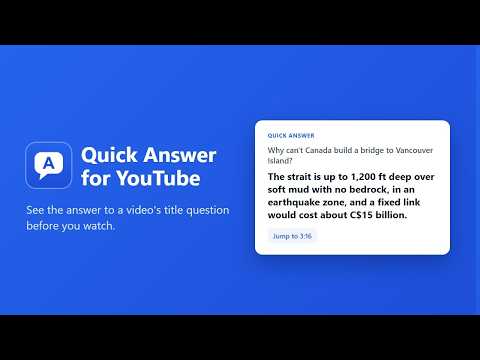
Get the answer to a video's title question from its transcript, so you can decide whether to watch.
Skip the 20-minute wait for a one-sentence answer. Now in 9 languages. Lots of YouTube videos ask a question in the title, like "Why can't Canada build a bridge to Vancouver Island?", and make you watch the whole thing to find out. Quick Answer reads the video's transcript and shows you the answer right under the video, so you can decide whether the rest is worth your time. WHAT YOU GET • The question the video promises to answer • The answer itself, in plain words • A few supporting points from the video • A "Jump to" link to the moment the video gives the answer • One line on what watching adds beyond the answer • A clear warning when a video never actually answers its own title CLICKBAIT METER (optional) Turn it on in settings and video thumbnails get a small badge: "Answers it" or "Never answers", for videos someone has already asked Quick Answer about. It's free and doesn't use your answers. YOUR LANGUAGE Quick Answer works in English, Spanish, Portuguese, French, German, Japanese, Korean, Hindi and Indonesian. Answers are written in your browser's language, whatever language the video is in. GETTING STARTED 1. Install. 2. Open any YouTube video and click "Find the answer" under it. Your first 5 answers are free, with no account and no setup. 3. After that, choose: • Quick Answer Plus: $3.99/month or $29/year for 500 answers a month, no API key needed. Subscribe from the extension's settings (secure checkout by Stripe, cancel any time). • Or your own AI key, free forever: Anthropic Claude, xAI Grok, OpenAI or Google Gemini. Click "Get a key" in settings, paste it, click "Save and test". Where to get your own key: • Anthropic Claude: https://platform.claude.com/dashboard • xAI Grok: https://console.x.ai • OpenAI: https://platform.openai.com/api-keys • Google Gemini (free tier): https://aistudio.google.com/apikey FAQ • How do I open settings again? Click the Quick Answer icon in the toolbar (or the puzzle piece, then Quick Answer). The Settings link in the answer box on YouTube works too. • What does it cost? 5 answers are free. Then either Quick Answer Plus ($3.99/month or $29/year, 500 answers a month), or free with your own AI key, where your provider charges your account directly (usually a cent or a few cents per video; Gemini has a free tier). Asking about the same video again is always free. • How do I cancel Plus? Settings > Quick Answer Plus > Manage billing or cancel, or https://quickanswer.bsvkey.com/account.html. Refunds within 14 days. • Which AI should I pick? Claude gives the most careful answers. Gemini is the easiest way to try it free. • It says "no transcript". Some videos have no YouTube transcript (captions off, music videos, brand-new uploads), so they can't be answered. PRICING • 5 free answers per install • Quick Answer Plus: $3.99/month or $29/year, 500 answers a month, cancel any time (terms and refunds: https://quickanswer.bsvkey.com/terms.html) • Your own AI key: free from us; your AI provider bills you directly PRIVATE • No analytics, no ads, no tracking cookies, no browsing history • A transcript is sent only when you ask for an answer, and it's never stored • With your own key, everything goes straight from your browser to your AI provider Not affiliated with or endorsed by YouTube, Google, Anthropic, xAI or OpenAI.
0 out of 5No ratings
Details
- Version1.4.0
- UpdatedNovember 21, 2026
- FeaturesOffers in-app purchases
- Size69.1KiB
- Languages9 languages
- Developer
Email
embryospace@gmail.com - Non-traderThis developer has not identified itself as a trader. For consumers in the European Union, please note that consumer rights do not apply to contracts between you and this developer.
Privacy

Quick Answer for YouTube has disclosed the following information regarding the collection and usage of your data. More detailed information can be found in the developer's privacy policy.
Quick Answer for YouTube handles the following:
This developer declares that your data is
- Not being sold to third parties, outside of the approved use cases
- Not being used or transferred for purposes that are unrelated to the item's core functionality
- Not being used or transferred to determine creditworthiness or for lending purposes
Support
For help with questions, suggestions, or problems, visit the developer's support site