

Quick accessibility checks

Overview
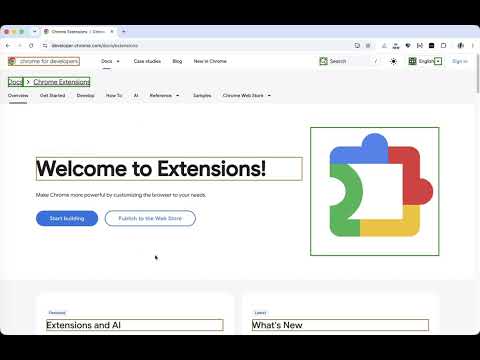
Spot accessibility issues as you browse: highlight headings, image text alternatives, and lists with labels and counts.
Quick accessibility checks helps you spot common accessibility issues while you browse or build a webpage, without leaving the page or digging through its markup. ━━ WHAT YOU CAN CHECK ━━ ▸ Headings: see each heading’s level and text ▸ Images: find text alternatives, decorative images, and images with no alternative ▸ Lists: inspect ordered and unordered list structure ━━ HOW IT HELPS ━━ ✔ Turn on a check to highlight elements directly on the page, with clear labels and counts ✔ Labels reflect Chrome’s computed accessibility tree, so they show what assistive technologies receive, including for custom elements ✔ Highlights follow elements as you scroll, including content in open shadow roots, supported frames, and dialogs ✔ Use hover-only labels to keep the view uncluttered ━━ PRIVACY ━━ 🔒 Checks run locally in Chrome 🔒 Page content is not sent to a server and browsing history is not collected 🔒 Webpages are not permanently modified ━━ GOOD TO KNOW ━━ ⓘ While a check is active, Chrome may show its “debugging this browser” indicator, which the extension uses to read the accessibility tree ⓘ Requires Chrome 125 or later
0 out of 5No ratings
Details
- Version1.1.0
- UpdatedNovember 7, 2026
- Offered byirastrel1788@gmail.com
- Size70.84KiB
- LanguagesEnglish
- Developer
Email
irastrel1788@gmail.com - Non-traderThis developer has not identified itself as a trader. For consumers in the European Union, please note that consumer rights do not apply to contracts between you and this developer.
Privacy

Quick accessibility checks has disclosed the following information regarding the collection and usage of your data. More detailed information can be found in the developer's privacy policy.
Quick accessibility checks handles the following:
This developer declares that your data is
- Not being sold to third parties, outside of the approved use cases
- Not being used or transferred for purposes that are unrelated to the item's core functionality
- Not being used or transferred to determine creditworthiness or for lending purposes