


Overview
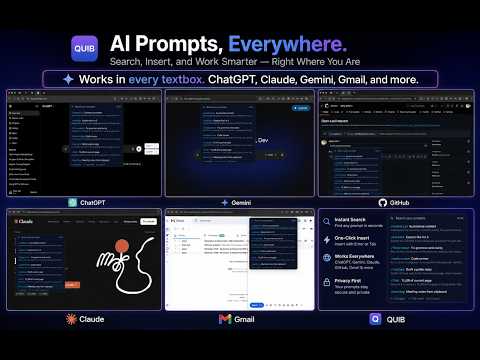
Type / in any textbox to insert your saved AI prompts. Variables, folders, custom trigger key, optional cross-device sync.
Quib turns every textbox in your browser into a launchpad for your favorite AI prompts. Stop bouncing between sidebars and sticky-note docs - just type "/" and pick. WHY POWER USERS LOVE QUIB - One library, every site. The slash listener runs at document_start on every URL and stays inert until you press your trigger key inside an editable element - so the same library follows you from AI chat sites to your email composer, to your code review tool, to your issue tracker, to your docs. See the screenshots for real examples. - Slash + search. Type "/" then start typing to fuzzy-search your library. Arrow keys to navigate, Enter to insert. - Smart variables. {{selection}}, {{url}}, {{title}}, {{clipboard}}, {{date}}, {{time}}, plus custom {{anything}} that prompts you for input at insert time. - Folders, tags, search. Stay organized as your library grows past 100 prompts. - Cross-device sync (Pro). Pro libraries ride Chrome's built-in sync across machines. Free libraries stay local to one browser. - Custom trigger key (Pro). Pick from /, \, ;, :, ~, !, or @ so Quib never collides with the slash menus in Slack, Notion, or Discord. - Import / export. Move your library as a single JSON file. Minimal schema - only "trigger" and "body" are required. - Local-first. Prompts never leave your device unless you upgrade to Pro and opt into sync. No analytics. No telemetry. No remote code. PERFECT FOR - Engineers using ChatGPT, Claude, or Cursor for code review and refactors - Writers and marketers using AI for outlines, edits, and headlines - Recruiters with templated outreach - PMs writing PRDs, summaries, and status updates - Anyone who reuses the same AI prompts more than twice a day PRICING - Free: up to 25 prompts, all editors, all variables, local-only storage - Pro $5/month: unlimited prompts, cross-device sync, custom trigger key, priority email support, 14-day refund on first purchase WHY QUIB INSTEAD OF... - ...AIPRM? AIPRM is locked to ChatGPT. Quib works in every editor where you actually type. - ...Text Blaze / TextExpander? Those are auto-expanding text expanders built for canned responses. Quib uses a picker model so you can scan and choose - the UX prompt engineers actually want. Plus runtime AI variables. - ...other "prompt managers"? Most require opening a popup and clicking "copy". Quib never breaks your flow. PERMISSIONS - "storage" - saves your library locally - "clipboardRead" - reads clipboard only when you use {{clipboard}} - "<all_urls>" (content script) - Quib is a universal text expander; it must be allowed to run wherever you type. The script idles until you press "/" in an editable element. {{url}} and {{title}} are read from the same page at the moment you insert a prompt. Page content is never read, stored, or sent anywhere. - "https://extensionpay.com/*" - the background worker contacts ExtensionPay only to verify your Pro subscription and to open the hosted checkout when you click Upgrade. LINKS - Privacy: https://arkisoul.in/quib/privacy - Support: hello@arkisoul.in - Made by Arkisoul Soft Tech Consultant (https://arkisoul.in)
0 out of 5No ratings
Details
- Version0.1.4
- UpdatedJuly 9, 2026
- FeaturesOffers in-app purchases
- Size225KiB
- LanguagesEnglish
- DeveloperArpit JainWebsite
36 B Brijeshwari Annex West Part Bicholi Hapsi Road Bengali Square Near Jain Indore, Madhya Pradesh 452016 INEmail
hello@arkisoul.in - Non-traderThis developer has not identified itself as a trader. For consumers in the European Union, please note that consumer rights do not apply to contracts between you and this developer.
Privacy

Quib - Universal AI Prompt Library has disclosed the following information regarding the collection and usage of your data. More detailed information can be found in the developer's privacy policy.
Quib - Universal AI Prompt Library handles the following:
This developer declares that your data is
- Not being sold to third parties, outside of the approved use cases
- Not being used or transferred for purposes that are unrelated to the item's core functionality
- Not being used or transferred to determine creditworthiness or for lending purposes
Support
For help with questions, suggestions, or problems, visit the developer's support site