

Qu Student
2 ratings
)
Overview
Help Qassim University students extract courses and build visual timetables and autofill course reviews
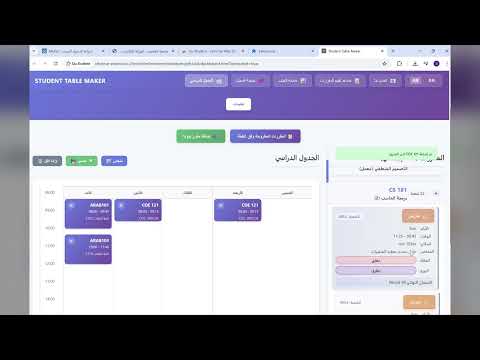
Qu Student is a lightweight Chrome extension built for Qassim University students to make the QU student portal easier and faster to use. It combines three everyday tools in one clean dashboard: a visual timetable builder, a course-review auto-filler, and a GPA calculator—all with a bilingual Arabic/English interface. What it helps you do Build a weekly timetable visually by extracting your available/offered courses from the QU portal and placing them into a clear schedule view. Spot conflicts quickly (e.g., overlapping times and final exam conflicts) while planning your week. Export your timetable when you’re done (PDF / Excel / Calendar export options are included). Finish course evaluations faster using a floating widget that can apply your selected choice (e.g., Agree / Strongly Agree) to all questions at once—with Undo support. Calculate your GPA using either scale, with support for: entering previous GPA + previous hours adding current semester courses (grade + hours) viewing semester results and new cumulative GPA advanced grade mapping (customize grade-to-point values if needed) How it works (simple and practical) You open the extension dashboard. While you’re logged into the QU portal, the extension can extract course rows from the offered-courses page and turn them into structured entries (course code/name/section/time/days/location/instructor when available). You then add/remove courses to build your timetable, filter/search them, and export results. On the course evaluation page, a small floating assistant appears and lets you fill the full evaluation in one click. Qu Student إضافة Chrome مخصّصة لطلاب جامعة القصيم لتسهيل استخدام بوابة الطالب وتسريع الأعمال المتكررة. تجمع الإضافة بين: صانع جدول دراسي مرئي، ومساعد تقييم المقررات (تعبئة تلقائية)، وحاسبة معدل (GPA) — بواجهة عربية/إنجليزية. أبرز المزايا: استخراج المقررات من صفحة المقررات المطروحة وبناء جدول أسبوعي بشكل واضح. إظهار التعارضات بسرعة (ومنها تعارضات الامتحان النهائي). تصدير الجدول بصيغ مثل PDF / Excel / Calendar. في صفحة التقييم: لوحة عائمة تتيح اختيار (موافق/موافق بشدة…) ثم تطبيق الخيار على جميع الأسئلة بضغطة واحدة مع خيار تراجع. حاسبة GPA تدعم النظامين، وإدخال المعدل والساعات السابقة، وإضافة مقررات الفصل الحالي، وإظهار معدل الفصل والمعدل التراكمي الجديد، مع إعدادات متقدمة لتخصيص نقاط الدرجات.
4 out of 52 ratings
Details
- Version3.0.3
- UpdatedDecember 10, 2025
- Offered byqu4611
- Size92.51KiB
- Languagesالعربية
- Developer
Email
qu4611@gmail.com - Non-traderThis developer has not identified itself as a trader. For consumers in the European Union, please note that consumer rights do not apply to contracts between you and this developer.
Privacy

Qu Student has disclosed the following information regarding the collection and usage of your data. More detailed information can be found in the developer's privacy policy.
Qu Student handles the following:
This developer declares that your data is
- Not being sold to third parties, outside of the approved use cases
- Not being used or transferred for purposes that are unrelated to the item's core functionality
- Not being used or transferred to determine creditworthiness or for lending purposes