

QR Code Scanner & Generator

Übersicht
QR Code Scanner & Generator
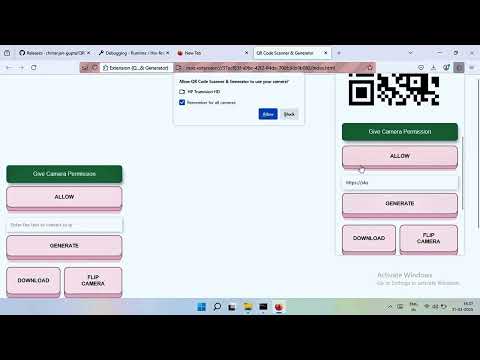
https://youtu.be/8MB_XI2_2Fk QR Code Scanner & Generator QR Code Scanner and Generator Firefox Extension This Firefox extension allows users to easily generate and scan QR codes directly from their browser. It provides a simple, user-friendly interface for quickly scanning QR codes using your camera or from images and generating QR codes from text or selected content like URLs, images, audio, and videos. Features QR Code Scanner: Scan QR codes from images. Scan QR codes using your device's camera. QR Code Generator: Generate QR codes from text, URLs, or any custom content. Generate QR codes from selected text, image, video, or audio URLs via a right-click context menu. Cross-Browser Compatibility: Works seamlessly on both types of browsers. Context Menu Integration: Easily generate QR codes for selected text, image, video, or audio URLs directly from the right-click menu. Easy-to-Use Interface: Simple and intuitive UI for both scanning and generating QR codes. Installation For Mozilla Firefox Go to the Firefox Add-ons website and search for "QR Code Scanner and Generator" or click here to go directly to the extension page. Click the Add to Firefox button. Confirm by clicking Add in the popup. Once installed, the extension icon will appear in the browser toolbar. Usage Scanning QR Codes Click the extension icon in the toolbar to open the scanner. Select an image file from your computer that contains a QR code or click the camera icon to scan a QR code using your device's camera. The extension will automatically decode the QR code and display its content (URL, text, etc.). If the content is a URL, you can directly click on it to open it in a new tab. Generating QR Codes Click the extension icon in the toolbar to open the QR code generator. Enter the content (text, URL, etc.) you want to encode in the text box. Click Generate QR Code. The generated QR code will appear on the screen. You can click to download the QR code image or copy it to the clipboard. Generating QR Codes via Context Menu Text: Select any text on a webpage, right-click, and select Generate QR Code from the context menu to instantly create a QR code for that text. Image: Right-click on an image, select Generate QR Code, and the extension will generate a QR code linking to the image. Video URL: Right-click on a video URL, and select Generate QR Code to create a QR code for that URL. Audio URL: Right-click on an audio URL and select Generate QR Code to create a QR code for that audio file. Features Breakdown Scan QR codes from images: Upload or drag an image with a QR code into the extension to decode it. Scan QR codes from your camera: Use your device's camera to scan QR codes in real time. Generate QR codes from any content: Enter text, URL, or any other data to generate a QR code. Context Menu Integration: Right-click on selected text, image, video, or audio URLs to generate a QR code. Cross-platform support: The extension works on both type of browsers. License This extension is open-source and distributed under the MIT License. This extension is also available for Edge Browser https://microsoftedge.microsoft.com/addons/detail/qr-code-scanner-generat/mfnikgfcadjfkjonhcebmifiohbobjmm Libary Used in this Project: https://github.com/nimiq/qr-scanner https://github.com/davidshimjs/qrcodejs
0 von 5Keine Bewertungen
Details
- Version1.0.2
- Aktualisiert25. Oktober 2025
- Angeboten vonChitranjan Kumar Gupta
- Größe35.92KiB
- SprachenEnglish
- Entwickler
E-Mail
chitranjankumargupta123@gmail.com - Kein HändlerDieser Entwickler hat sich nicht als Händler deklariert. Für Verbraucher in der Europäischen Union gelten die Verbraucherrechte nicht für Verträge, die zwischen dir und diesem Entwickler geschlossen werden.
Datenschutz

Dieser Entwickler erklärt, dass deine Daten
- nicht an Dritte verkauft werden, außer in den genehmigten Anwendungsfällen
- nicht für Zwecke genutzt oder übertragen werden, die nichts mit der Hauptfunktionalität des Artikels zu tun haben
- nicht zur Ermittlung der Kreditwürdigkeit oder für Darlehenszwecke verwendet oder übertragen werden