

QR Code Rabbit — Best QR Code Generator & Scanner

Overview
Generate beautiful styled QR codes and scan QR images via upload or right-click.
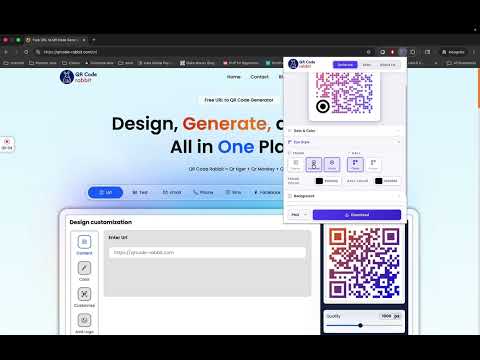
QR Code Rabbit — Free QR Code Generator, QR Maker & QR Code Scanner for Chrome The most powerful and beautifully designed QR Code Generator extension for Chrome. Whether you need a quick QR code for the page you're browsing, a fully styled branded QR code with your logo and custom colors, or a built-in QR code scanner to decode any QR image on the web — QR Code Rabbit does it all, instantly, right from your browser toolbar. No websites to visit. No sign-up required. Just click, customize, and download. ━━━━━━━━━━━━━━━━━━━━━━━━━━━━━━━━━━━━━ ⚡ INSTANT QR CODE GENERATOR — ONE CLICK ━━━━━━━━━━━━━━━━━━━━━━━━━━━━━━━━━━━━━ QR Code Rabbit is the fastest QR Maker for Chrome. The moment you open the extension, it automatically detects the URL of your current tab and generates a QR code instantly — no copy-pasting required. You can also type or paste any custom URL to generate a QR code for any link, product page, social profile, portfolio, event, or campaign landing page. This is the QR Code Generator built for speed: live preview updates as you type, changes apply in real time, and your QR code is always ready to download in seconds. Perfect for: • Sharing web pages from desktop to mobile • Creating QR codes for printed materials — menus, flyers, business cards, posters • Marketers generating QR codes for campaigns and UTM-tracked URLs • Developers and designers testing QR code readability across styles • Content creators linking audiences to videos, pages, or profiles • Anyone who needs a fast, free QR Maker in their browser ━━━━━━━━━━━━━━━━━━━━━━━━━━━━━━━━━━━━━ 🎨 ADVANCED STYLING — THE MOST CUSTOMIZABLE QR MAKER IN CHROME ━━━━━━━━━━━━━━━━━━━━━━━━━━━━━━━━━━━━━ Most QR Code Generators give you a plain black-and-white box. QR Code Rabbit gives you full creative control so your QR codes match your brand and stand out everywhere they're placed. ── DOT STYLES (6 options) ── The dots are the building blocks of your QR code. Choose from six distinct styles to completely change the character of your code: • Square — Classic, traditional QR code dots. Maximum compatibility with all scanners. • Circle — Soft, modern circular dots for a clean, friendly aesthetic. • Rounded — Slightly rounded corners for a balanced, professional look. • Bubble — Extra-rounded dots for a bold, playful, eye-catching style. • Classy — Elegant flowing wave-style pattern for a premium, sophisticated feel. • Classy+ — Rounded variation of the Classy style for refined creative designs. ── COLOR MODES ── Choose how your QR code dots are colored: Solid Color Mode: Pick any color from the full color picker. Match your brand hex code exactly. Your dots will render in a single, clean, consistent color across the entire QR code. Gradient Color Mode: Make your QR code truly stand out with gradient-colored dots. Choose from: • Linear Gradient — A smooth directional color transition across the QR code. Control the exact angle from 0° to 360° with a precise angle slider. • Radial Gradient — A circular gradient that radiates from the center outward, creating a striking focal-point effect. Set your Start Color and End Color independently using the full color picker. The gradient blends naturally across all dot shapes, making your QR codes look like polished design assets rather than raw data squares. ── EYE STYLE (Frame + Ball) ── The three corner "eyes" of a QR code are what scanners lock onto first. QR Code Rabbit lets you customize both layers of each eye independently: Frame Styles (the outer ring of each eye): • Square Frame — Sharp, traditional corner squares • Rounded Frame — Softly rounded corners for a modern look • Circle Frame — Fully circular outer ring for a unique open feel Ball Styles (the inner dot of each eye): • Circle Ball — Smooth circular inner dots • Square Ball — Sharp inner squares for maximum contrast Both the Frame and Ball support independent color selection. This means you can have black dot gradients, a blue frame, and a red ball — total control over every element. ── BACKGROUND ── • Choose any custom background color to complement your design • Enable transparent background to embed your QR code directly over photos, slides, or branded materials without a white box • Built-in smart warning alerts you if your QR code color and background color are the same (e.g., white dots on white background), preventing invisible QR codes before you download ── CENTER LOGO ── Embed your brand logo, icon, or image directly in the center of your QR code for a professional, branded result: • Drag and drop any image file directly onto the logo zone • Browse and upload from your computer • Supports PNG, JPG, SVG, WebP, and all common image formats • Adjust logo size from 10% to 40% of the QR code area with a live slider • Error correction automatically compensates to keep the QR code fully scannable even with a logo overlay This feature is what separates a plain QR Maker from a professional QR Code Generator. Branded QR codes with logos consistently get higher scan rates because they signal trust and identity at a glance. ━━━━━━━━━━━━━━━━━━━━━━━━━━━━━━━━━━━━━ 🛠️ PROFESSIONAL SETTINGS & EXPORT ━━━━━━━━━━━━━━━━━━━━━━━━━━━━━━━━━━━━━ ── ERROR CORRECTION LEVEL ── QR Code Rabbit gives you full control over error correction — a technical property that determines how much damage or obstruction a QR code can handle while still scanning successfully. • L — 7% damage recovery. Smallest QR code, ideal for clean digital use. • M — 15% damage recovery. The balanced default, great for most use cases. • Q — 25% damage recovery. Recommended when adding a logo or using in print environments. • H — 30% damage recovery. Maximum resilience for outdoor, physical, or high-wear placements. Higher error correction levels create slightly larger QR codes but dramatically improve real-world reliability. If your QR code will appear on packaging, signage, or anywhere that might get scratched, smudged, or partially covered — choose Q or H. ── OUTPUT SIZE CONTROL ── Set your download resolution from 200px all the way up to 1000px. Use the slider to dial in the exact size you need: • Small sizes (200–300px) for digital use, email signatures, web embeds • Medium sizes (400–600px) for business cards, flyers, social media posts • Large sizes (700–1000px) for print-ready posters, banners, and large-format materials ── DOWNLOAD FORMATS ── Export your finished QR code in four industry-standard formats: • PNG — Lossless, transparent-background support. Best for most uses. • SVG — Infinitely scalable vector format. Perfect for print, laser cutting, or large-format output. Never pixelated at any size. • JPEG — Compressed format for situations where file size matters. • WEBP — Modern web-optimized format with excellent quality-to-size ratio. No watermarks. No branding added to your download. Your QR code is yours, clean and ready to use. ━━━━━━━━━━━━━━━━━━━━━━━━━━━━━━━━━━━━━ 📷 BUILT-IN QR CODE SCANNER ━━━━━━━━━━━━━━━━━━━━━━━━━━━━━━━━━━━━━ QR Code Rabbit isn't just a QR Code Generator — it's also a full QR code reader and scanner, built directly into the extension. ── UPLOAD TO SCAN ── Switch to the Scan tab, drag and drop any QR code image file, or click to browse and upload. The scanner decodes the QR code instantly and displays the full decoded text or URL. ── RIGHT-CLICK ANY QR CODE ON ANY WEBPAGE ── See a QR code on a website but don't know what it links to? Right-click the QR code image directly on the page and select "Scan QR Code from Image" from the context menu. QR Code Rabbit decodes it immediately without you having to save the image first. This is one of QR Code Rabbit's most powerful and unique features — a true in-browser QR code reader that works on any image, on any website, with a single right-click. ── AFTER SCANNING ── Once decoded, you get: • The full decoded text displayed clearly • A one-click Copy button to copy the result to your clipboard • An Open URL button that opens the decoded link directly in a new tab (shown only when the decoded content is a valid URL) ━━━━━━━━━━━━━━━━━━━━━━━━━━━━━━━━━━━━━ 🔄 DYNAMIC QR CODE GENERATOR — UPGRADE AT QRCODE-RABBIT.COM ━━━━━━━━━━━━━━━━━━━━━━━━━━━━━━━━━━━━━ The extension generates static QR codes — solid, permanent codes that always point to the same destination. For teams, marketers, and businesses that need more, QR Code Rabbit's web platform offers a full Dynamic QR Code Generator with advanced capabilities: What is a Dynamic QR Code Generator? A Dynamic QR Code Generator creates QR codes whose destination can be changed at any time — even after the code has been printed, distributed, or published. The QR code image itself never changes, but the URL it resolves to can be updated in real time through your dashboard. Dynamic QR Code Generator features at qrcode-rabbit.com: • Update the destination URL anytime without reprinting • Real-time scan analytics — track how many times your QR code was scanned, where, and on which device • Campaign performance tracking for marketing and advertising • Bulk QR code creation for products, packaging, or events • Team collaboration and QR code management dashboard • Branded short links for cleaner, more trustworthy QR codes Whether you're running a restaurant updating your digital menu, a brand managing seasonal campaigns, or an event organizer tracking attendance — a Dynamic QR Code Generator is the professional-grade upgrade from static codes. Visit qrcode-rabbit.com to create your first dynamic QR code. ━━━━━━━━━━━━━━━━━━━━━━━━━━━━━━━━━━━━━ 🔒 PRIVACY FIRST — 100% LOCAL PROCESSING ━━━━━━━━━━━━━━━━━━━━━━━━━━━━━━━━━━━━━ QR Code Rabbit processes everything locally in your browser. Your URLs, your images, and your QR codes never leave your device. No data is sent to any server when generating or scanning. No accounts required. No tracking. No analytics on your usage. • All QR code generation happens locally in your browser • All QR scanning is performed locally with no image uploads to external servers • No registration, no sign-in required for any feature in the extension • No ads, no upsells inside the generator interface • Your generated QR codes are completely yours — no watermarks, no usage restrictions ━━━━━━━━━━━━━━━━━━━━━━━━━━━━━━━━━━━━━ ✅ WHY CHOOSE QR CODE RABBIT? ━━━━━━━━━━━━━━━━━━━━━━━━━━━━━━━━━━━━━ There are many QR Code Generators and QR Makers available. Here's why QR Code Rabbit stands apart: ✔ Instant auto-detection of your current tab URL — no copy-pasting ✔ 6 dot styles + gradient + solid color modes — more design options than any comparable extension ✔ Independent eye frame and ball styling — complete creative control over every QR element ✔ Transparent background support — embed QR codes seamlessly into any design ✔ Center logo embedding with adjustable size — branded QR codes in seconds ✔ 4 error correction levels — choose the right balance of size and resilience ✔ Export to PNG, SVG, JPEG, or WEBP at up to 1000px — print-ready quality ✔ Built-in QR scanner with right-click context menu support — decode any QR on the web ✔ 100% local processing — no server, no tracking, no account needed ✔ Connects to a full Dynamic QR Code Generator platform at qrcode-rabbit.com ━━━━━━━━━━━━━━━━━━━━━━━━━━━━━━━━━━━━━ 👥 WHO IS QR CODE RABBIT FOR? ━━━━━━━━━━━━━━━━━━━━━━━━━━━━━━━━━━━━━ • Digital Marketers who need a fast, reliable QR Maker for campaign assets • Small Business Owners creating QR codes for menus, storefronts, and packaging • Designers who need a styled QR Code Generator that produces beautiful, on-brand codes • Developers testing QR code implementations and scanning behavior • Teachers and Educators sharing resources with QR codes in printed handouts • Event Organizers managing registrations, check-ins, or promotional materials • Journalists and Bloggers linking print articles to digital content • Social Media Creators directing audiences from physical to digital • Anyone who needs a free, instant, no-login QR Maker — right in their browser ━━━━━━━━━━━━━━━━━━━━━━━━━━━━━━━━━━━━━ 🚀 GET STARTED IN SECONDS ━━━━━━━━━━━━━━━━━━━━━━━━━━━━━━━━━━━━━ 1. Install QR Code Rabbit from the Chrome Web Store 2. Click the extension icon in your Chrome toolbar 3. Your current page URL is already loaded — your QR code is already generated 4. Customize the style, colors, logo, and size 5. Download your QR code in PNG, SVG, JPEG, or WEBP That's it. The fastest QR Code Generator in Chrome, always one click away. For Dynamic QR Code Generator features, scan analytics, and campaign tracking — visit qrcode-rabbit.com.
5 out of 56 ratings
Details
- Version1.0.0
- UpdatedJune 30, 2026
- Size133KiB
- LanguagesEnglish (United States)
- DeveloperAlphabets DevWebsite
168, sutharo ka was village - loor Bhinmal, Rajasthan 343029 INEmail
jay.aladinn@gmail.com - Non-traderThis developer has not identified itself as a trader. For consumers in the European Union, please note that consumer rights do not apply to contracts between you and this developer.
Privacy

This developer declares that your data is
- Not being sold to third parties, outside of the approved use cases
- Not being used or transferred for purposes that are unrelated to the item's core functionality
- Not being used or transferred to determine creditworthiness or for lending purposes
Support
For help with questions, suggestions, or problems, visit the developer's support site