


Overview
Beautiful styled QR code generator and QR Code Scanner on just right click.
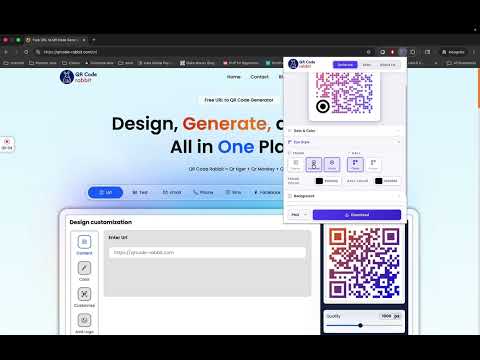
Create beautifully styled QR codes and scan any QR code — all in one click. QR Code Rabbit is a free QR code generator and scanner built into Chrome. Design custom, branded QR codes with your own colors, gradients, dot styles, and logo, or scan any QR code on the web with a right-click. Every code is export-ready in PNG, SVG, JPEG, or WEBP — no sign-up, no watermark. Key Features - Generate a QR code instantly from your current tab, or type any custom URL - 6 dot styles: Square, Circle, Rounded, Bubble, Classy, Classy+ - Solid or gradient colors, with full angle control on linear gradients - Custom eye (corner) styling — independent frame and ball shapes and colors - Add your logo with automatic error correction so it stays scannable - Transparent or custom backgrounds - 4 error correction levels (up to 30% damage recovery for print) - Export from 200px to 1000px in PNG, SVG, JPEG, or WEBP - Built-in scanner — upload an image or right-click any QR code on a webpage - Scan history — revisit, copy, or open anything you've decoded - No special permissions required - Fully local — no sign-up, no accounts, no tracking Rated 5.0 stars. QR Code Rabbit is designed to be fast, private, and free with no catch. All QR code generation and scanning happens locally in your browser — your URLs, images, and scan history never leave your device, and nothing is uploaded unless you choose to visit the web dashboard. Need more than a static code? qrcode-rabbit.com gives you dynamic QR codes you can edit after printing, real-time scan analytics, bulk creation, and campaign tracking — the extension itself stays free and fully local either way. Where can you use QR Code Rabbit? - Add a styled QR code to business cards, menus, flyers, or packaging - Share a webpage to your phone instantly while browsing - Decode any QR code you spot on a website without downloading the image - Create logo-branded codes for marketing campaigns and social posts - Generate print-ready codes with high error correction for outdoor or packaging use - Keep a running history of every code you've scanned for quick reference Updated July 18, 2026 (v1.1.0): - New: History tab automatically saves your recently scanned QR codes - New: Auto-generate for the current tab is now optional - Improved: Bigger, redesigned interface with more room to style and preview Initial release (v1.0.0): - Instant QR code generator with current-tab auto-detection - 6 dot styles, gradients, custom eye styling, transparent backgrounds, logo embedding - 4 error correction levels, export to PNG, SVG, JPEG, WEBP - Built-in scanner with upload and right-click "Scan QR Code from Image" - 100% local — no sign-up, no tracking, no watermarks
5 out of 56 ratings
Details
- Version1.1.0
- UpdatedSeptember 13, 2026
- Size135KiB
- LanguagesEnglish (United States)
- DeveloperAlphabets DevWebsite
168, sutharo ka was village - loor Bhinmal, Rajasthan 343029 INEmail
jay.aladinn@gmail.com - Non-traderThis developer has not identified itself as a trader. For consumers in the European Union, please note that consumer rights do not apply to contracts between you and this developer.
Privacy

This developer declares that your data is
- Not being sold to third parties, outside of the approved use cases
- Not being used or transferred for purposes that are unrelated to the item's core functionality
- Not being used or transferred to determine creditworthiness or for lending purposes
Support
For help with questions, suggestions, or problems, visit the developer's support site