


개요
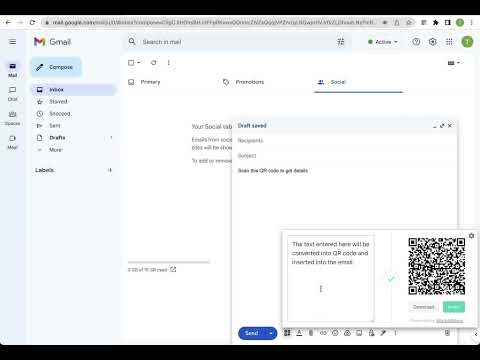
Generate a QR code and insert it into the email when composing or replying
Generate a QR code and insert it into the email when composing or replying. When sending emails to your target, you can attach QR codes to direct them to your marketing campaign. These QR codes can be links, videos, sign-up forms, audio, or a series of images. Why insert QR codes in the emails? Adding QR codes to your emails can significantly increase the strong user experience of your marketing strategy. With QR codes in your emails, your customers can seamlessly access a lot of useful information and provide more help to your customers without consuming more manpower. - Easy to contact customer support: Nowadays, cell phones support scanning QR codes, so customers can easily access the content you provide. - Increase App download rate: You can generate QR codes for your App download addresses, or even merge Apps for multiple platforms into one QR code that automatically redirects to the appropriate download market depending on whether the user's Android or iOS device. - QR code as business card: Nowadays, more and more businesses are using QR codes on their business cards, which can display richer content after scanning. You can also add QR codes to the signatures of your business emails to let your customers know more about you. - Support social marketing: Create QR codes for your business's social media, such as Snapchat, LinkedIn, Facebook, Twitter, etc. to direct customers to your social media profile pages. - Entry pass for events: You can send customers a unique entry pass for an event, they just need to show the email on their phone and verify the QR code. - Use as coupons: Email QR code coupons to your customers, the code can easily be scanned and verified at checkout. this can attract more customers to your store. These are just a few examples, you can use QR codes in your emails to market using a variety of strategies. Data Privacy Your data stays on your device and is not stored or transmitted to our servers. We prioritize keeping your information secure and confidential.
5점 만점에 5점평점 4개
세부정보
개인정보 보호
개발자가 사용자 데이터에 관해 다음과 같이 선언했습니다
- 승인된 사용 사례를 제외하고 서드 파티에 판매하지 않음
- 항목의 핵심 기능과 관련 없는 목적으로 사용하거나 전송하지 않음
- 신용도 판단 또는 대출 목적으로 사용하거나 전송하지 않음
지원
질문, 제안 또는 문제와 관련하여 도움이 필요하면 데스크톱 브라우저에서 이 페이지를 여세요.