

QNavix Odyssey: AI Web Agent – Chat, Automate & Navigate Pages

Overview
QNavix Odyssey — Your Personal AI Web Agent – Chat, Automate & Navigate Pages
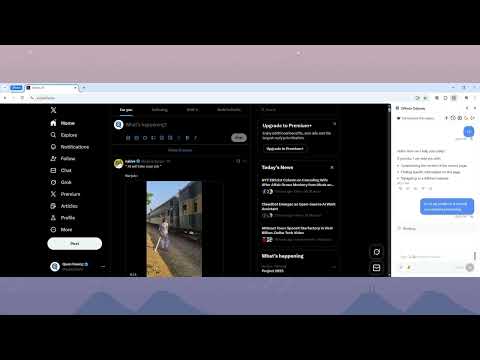
QNavix Odyssey – AI-Powered Browser Extension for Smarter, Faster Web Automation (v1.1.2) QNavix Odyssey is the privacy-first AI browser extension that brings intelligent web automation and AI chat directly into Chrome and Edge—no API keys, no coding, no switching tabs. Designed for everyday users, students, researchers, and professionals, QNavix transforms how you browse, research, and automate repetitive tasks on the web. What's New in v1.1.2: QNavix Life OS The latest update introduces QNavix Life OS — a personal tracking and management system built directly into the extension. Track, manage, and analyze every aspect of your life from fitness and finance to habits and goals, all in one place. Use the new /track command from the chat input to log anything instantly, and manage your schedule with the built-in calendar for events and planning without leaving your browser. Previous highlights: - Text highlighting and "Ask QNavix" right-click shortcuts for instant in-context AI answers (v1.1.1) - /tabs command to organize and group open browser tabs from the chat input (v1.1.1) - Major performance improvements across the entire extension for faster, smoother automation (v1.1.0) - File attachment support — the AI agent reads and uses uploaded documents during tasks (v1.0.9) - Cross-browser chat session sync so your conversations follow you everywhere (v1.0.8) How QNavix Odyssey Works 1) Describe your task in plain English — no commands or special syntax required 2) QNavix proposes a clear, step-by-step plan before doing anything 3) You review and approve (or edit) the plan 4) The AI agent executes the steps accurately, so you don't have to Two Powerful Modes — One Seamless Experience AI Chat Assistant (instant answers, no browsing required) - Summarize any web page or PDF in seconds - Compare multiple open tabs side by side - Research topics, draft emails, and simplify complex content - Reference any open tab using @mention for targeted, in-context answers - Safe by default — the AI never touches your browser without your explicit approval AI Browser Agent (automation with your approval) - Automate multi-step tasks: price comparisons, form filling, data gathering, and more - Navigate, click, scroll, and interact with web pages on your behalf - Review every plan before execution — you stay in full control - Attach files and let the agent use their contents as part of the task Key Features & Benefits - Works in Chrome and Edge — no additional software required - No technical setup — install and start immediately, no API keys needed - Privacy-first design — your data stays yours - Markdown-first page extraction for accurate, structured content capture - Visual screenshot support for tables, charts, and figures - Session history synced across browsers - Intelligent query suggestions when you're not sure what to ask Who Is QNavix Odyssey For? - Everyday users who want AI help without the complexity - Students and researchers who need fast, accurate web summaries - Professionals who spend time on repetitive browsing tasks - Anyone who wants a smarter, faster way to use the web QNavix Odyssey — browse smarter, automate faster, and take back your time.
5 out of 58 ratings
Details
- Version1.1.2
- UpdatedMarch 11, 2026
- FeaturesOffers in-app purchases
- Size865KiB
- LanguagesEnglish
- DeveloperWebsite
Email
support@qnavix.net - Non-traderThis developer has not identified itself as a trader. For consumers in the European Union, please note that consumer rights do not apply to contracts between you and this developer.
Privacy

QNavix Odyssey: AI Web Agent – Chat, Automate & Navigate Pages has disclosed the following information regarding the collection and usage of your data. More detailed information can be found in the developer's privacy policy.
QNavix Odyssey: AI Web Agent – Chat, Automate & Navigate Pages handles the following:
This developer declares that your data is
- Not being sold to third parties, outside of the approved use cases
- Not being used or transferred for purposes that are unrelated to the item's core functionality
- Not being used or transferred to determine creditworthiness or for lending purposes
Support
For help with questions, suggestions, or problems, please open this page on your desktop browser