


Overview
Click to check the current website or search a selected keyword across multiple domain suffixes.
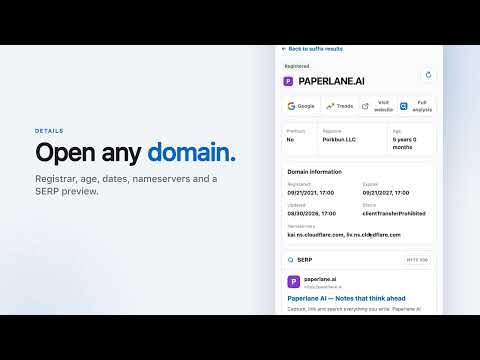
QName.AI helps you check one keyword across multiple domain suffixes without leaving the page you are viewing. • Click the extension to extract the current website’s keyword and check 13 default suffixes. Nothing runs automatically when a page opens. • Select a domain-friendly word on any page, right-click, and start a multi-suffix WHOIS check. • Customize the suffixes you want to search. • See availability, registration, pending-delete, Dropzone, and review states as results arrive. • Open a registered domain to view its registrar, registration and expiry dates, nameservers, favicon, and SERP preview when available. • Jump to Google, Google Trends, the website, or the full QName.AI analysis. Authentication uses your existing QName.AI web session—no API key is required. The extension does not read or store cookie values and does not inject content scripts into every website.
5 out of 55 ratings
Details
- Version2.0.6
- UpdatedOctober 7, 2026
- Size81.73KiB
- Languages11 languages
- DeveloperWebsite
Email
vibecodi@gmail.com - Non-traderThis developer has not identified itself as a trader. For consumers in the European Union, please note that consumer rights do not apply to contracts between you and this developer.
Privacy

QName.AI — Multi-Suffix WHOIS has disclosed the following information regarding the collection and usage of your data. More detailed information can be found in the developer's privacy policy.
QName.AI — Multi-Suffix WHOIS handles the following:
This developer declares that your data is
- Not being sold to third parties, outside of the approved use cases
- Not being used or transferred for purposes that are unrelated to the item's core functionality
- Not being used or transferred to determine creditworthiness or for lending purposes
Support
For help with questions, suggestions, or problems, visit the developer's support site