

QAgentExt - QA Testing Agent

Overview
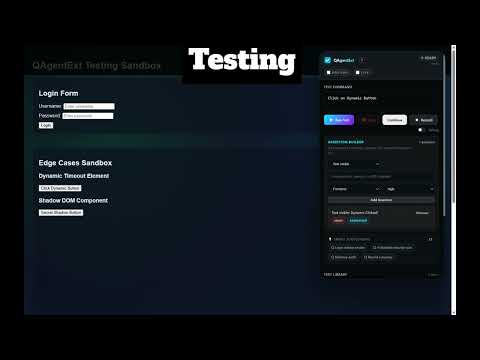
Run guided QA checks, failure triage, and bug replay packs on live web pages from the Chrome side panel.
QAgentExt: Test, Audit, and Fix Your Web App — Right From the Side Panel Open the side panel, type "test login with wrong password", and watch the agent find the elements, run the flow, and report what broke. No scripts, no setup, no cloud. QAgentExt is a pre-automation layer for developers and QA testers: the fastest way to validate a feature before (or instead of) writing full automation code. WHAT IT DOES - Run tests in plain English "Test login", "Search for shoes then check results", "Click checkout". The parser turns commands into steps; the self-healing finder survives selector changes and explains every heal with a confidence score and rationale. - Validate and drive real backends (new in v1.6) Assert a response's shape ("assert response for /api/user matches schema {...}"), call an API mid-flow ("call api POST /api/seed with {...}") carrying the page's session, and chain values forward ("extract name as {{who}} then Search for {{who}}"). One click freezes a run's captured responses into armed mocks so it replays with the backend down. - Cover devices, locales, and components (new in v1.6) "run on iPhone 14, Pixel 7 then Test login" runs your flow across device presets into a per-device pass/fail grid. "check rtl" audits internationalization and right-to-left layout. "visual match #selector" compares a single component instead of the whole page. - Monitor in the background, safely (new in v1.6) A scheduled monitor can optionally run itself in an inactive background tab it opens and closes — off by default, opt-in per monitor, and fully disclosed. Runs are crash-safe: a service-worker eviction never leaves a stuck "running" state. - Mock the backend for deterministic error testing (new in v1.5) "mock api GET /api/stock returns 500 then click Buy then check error appears" — the mock intercepts the page's own request, so failure paths test the same way whether the backend is up or down. Mocked calls still show in the network log, flagged. - See your suite's health at a glance (new in v1.5) A Dashboard tab shows pass rate, estimated time saved, slowest and flakiest tests, a recent-runs trend, and per-category storage usage — computed on the fly, exportable as an exec summary. - Hand off bugs with the failing moment attached (new in v1.5) Filed GitHub/Jira issues and JUnit exports lead with the step that broke, its console errors, and the failing requests — feed CI dashboards or paste into any tracker. - Generate a regression suite for the page you're on (new in v1.4) One click proposes prioritized happy-path, negative-path, and audit tests, each with a plain-language rationale. You review and pick — nothing runs or saves without your selection. - Monitor your suites on a schedule (new in v1.4) Schedule any test folder to run on an interval. Optionally POST pass/fail summaries to your own Slack/Discord webhook — opt-in, user-configured, and the only network call the extension ever makes. - Debug with time travel (new in v1.4) Scrub through any run step-by-step with the DOM, console errors, and network requests shown as-of each step. One click jumps to the failing moment; bug packs pinpoint it too. - Share tests and baselines through Git (new in v1.4) Download a commit-ready test library (secrets masked) and review test changes in pull requests — imports merge with a full report and your local edits always win. Visual baselines export as team packs so everyone reviews against the same goldens. - Audit accessibility like you mean it (new in v1.3) "Test accessibility" runs three engines in one pass: axe-core, a built-in 19-rule WCAG 2.2 AA scanner, and a keyboard-navigability audit that computes your real tab order and catches mouse-only controls, focus-trap dialogs, and hidden tab stops. Every finding includes its WCAG reference and a concrete fix. - Export compliance evidence (new in v1.3) One click produces a dated, local evidence bundle — findings JSON, Markdown report, conformance score, screenshot — ready for audit trails. Nothing is uploaded anywhere. - Assert your API contracts (new in v1.3) "assert api /login returns 200 < 800ms" validates real captured traffic during the flow, with pass/fail rows in the report. - Hunt flaky tests (new in v1.3) Run 5× re-runs a flow, scores its flakiness, pinpoints the unstable step, and tells you whether to quarantine it. - Hand off to CI (new in v1.3) Turn any saved test into a commit-ready GitHub Actions workflow or GitLab CI job. Secret-like values are detected and scrubbed to CI placeholders — never inlined. - Full audit lab Performance budgets (Core Web Vitals), security scan, memory-leak tracking, JS error capture, network analysis, visual regression with baselines, and multi-tab flows. - Record, save, reuse Record manual actions, save flows to a searchable library with folders, tags, favorites, and environment profiles, then export to Playwright, Cypress, Selenium, and more. Share libraries as portable JSON bundles. PRIVACY Everything runs locally in your browser. No accounts, no external APIs, no telemetry. The single optional outbound call is the scheduled-monitor webhook, sent only to a URL you configure. Works offline, on VPNs, and on internal dev environments. GOOD FOR - Developers who want instant feedback on the feature they just built - QA testers replacing daily manual regression with reusable flows - QA teams sharing one test library and one set of visual baselines through their repo - Teams that need WCAG evidence without buying an enterprise a11y platform - Anyone converting validated manual flows into CI automation Open a page, open the side panel, and type your first command.
0 out of 5No ratings
Details
- Version1.6.0
- UpdatedAugust 15, 2026
- Offered byShubham Singh
- Size340KiB
- LanguagesEnglish
- Developer
Email
shubix.connect@gmail.com - Non-traderThis developer has not identified itself as a trader. For consumers in the European Union, please note that consumer rights do not apply to contracts between you and this developer.
Privacy

This developer declares that your data is
- Not being sold to third parties, outside of the approved use cases
- Not being used or transferred for purposes that are unrelated to the item's core functionality
- Not being used or transferred to determine creditworthiness or for lending purposes
Support
For help with questions, suggestions, or problems, please open this page on your desktop browser