

Overview
Record browser clicks, grab screen coordinates/selectors, and export ready-to-run PyAutoGUI, Playwright, or Selenium scripts.
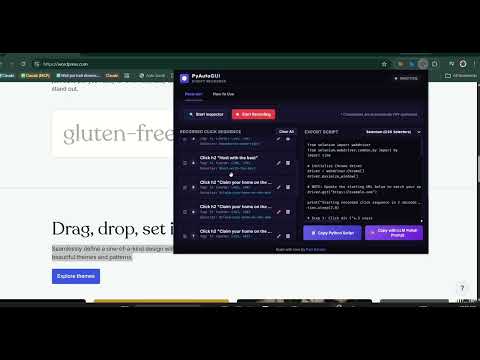
PyAutoGUI Script Recorder turns your manual browser interactions into clean, structured, and ready-to-run Python automation scripts. Stop guessing pixel coordinates and writing element selectors by hand! Designed specifically for Python developers building RPA, browser automation, or web scraping scripts, this utility helps you capture coordinates, selectors, and record multi-step click sequences instantly. 🌟 Key Features: 🎯 HUD Overlay & Selector Inspector Click "Start Inspector" and hover over any webpage element. Instantly view logical screen coordinates (PyAutoGUI-ready), computed CSS selectors, and relative XPath queries. Ctrl-Lock Feature: Hold the [Ctrl] key to freeze the HUD overlay in place, letting you easily move your mouse and copy selectors or XPaths straight to your clipboard! Visual warnings highlight nested iframe boundaries and non-unique selectors (multiple elements matched). 🔴 Multi-Page Click Recorder Click "Start Recording" to auto-close the popup and focus on page clicks. A small, floating widget appears in the bottom-right of your page to count steps in real-time. The background service worker preserves all actions across redirects, reloads, and form submissions. Click "STOP" on the widget to finish recording. ⚙️ Step Sequence Manager Open the popup tab to see your recorded sequence. Drag and drop cards vertically to re-arrange step execution. Double-click labels to rename steps (automatically becomes human-readable comments in the generated script). Delete accidental clicks. ⏱️ Intelligent Sleep Thresholds Automatically calculates actual time gaps between clicks to write precise time.sleep() statements. Smart capping: Minimum sleep is 0.3s for DOM loading, and pauses over 3.0s are capped at 2.0s to eliminate developer idle/thinking time. ✨ One-Click LLM Polish Prompt Export in PyAutoGUI (coordinate-based), Playwright (selector-based), or Selenium (selector-based) formats. Click "Copy with LLM Polish Prompt" to copy a pre-baked prompt wrapping your code. Paste it directly into ChatGPT or Claude to get a polished version with advanced error handling, structured logging, and dynamic wait loops! 🔒 Privacy by Design: 100% Offline & Private: No accounts, no sign-ups, no tracking SDKs, and no remote calls. All data is saved inside your browser's local sandbox storage (chrome.storage.local). Minimal Permissions: Only requests the storage permission to preserve recorded steps.
0 out of 5No ratings
Details
- Version1.0
- UpdatedJune 11, 2026
- Size32.69KiB
- LanguagesEnglish
- DeveloperWebsite
Email
faizazizanxyz@gmail.com - Non-traderThis developer has not identified itself as a trader. For consumers in the European Union, please note that consumer rights do not apply to contracts between you and this developer.
Privacy

This developer declares that your data is
- Not being sold to third parties, outside of the approved use cases
- Not being used or transferred for purposes that are unrelated to the item's core functionality
- Not being used or transferred to determine creditworthiness or for lending purposes