

PurposeTab
79 ratings
)
Overview
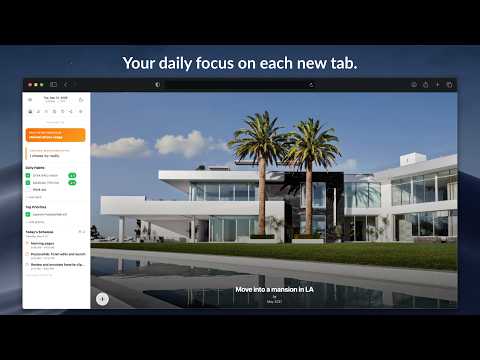
New tab dashboard with goals, habits, calendar, and daily focus.
PurposeTab is a minimalist extension that helps you stay centered on your priorities. Every time you open a new tab in Chrome, you see exactly what you need to focus on. On the left side, you can see your daily intention, habits, and priorities. On the right side, you can upload images of the goals you're working towards. Other exciting features include the ability to submit a journal entry reflection for the day (and you can review all saved journal entries) and to export a graphic of your daily updates to post to social media. It’s built for focus and privacy. All your data stays on your computer, it works offline, and there is no need to create an account. Main features included: • Daily focus and mantras: Set an intention that resets at midnight to keep you present. • Habit tracking: Add your daily habits with optional links to the tools you use. • Priority list: A simple to-do list for your most important tasks. • Vision board: Upload personal images that inspire you and add custom titles or dates. • Journaling: Use the built-in prompts for daily reflection and look back at your entries later. • Social sharing: Generate custom graphics of your progress to share on Instagram. • Scratchpad: Quick notepads for whenever you have a random idea or need to jot something down. • Customization: Toggle sections on or off, use dark mode, or use privacy mode when you’re sharing your screen in a meeting. • Data sync: Your settings and data sync automatically across any computer where you’re logged into Chrome. Getting started is easy. Just install the extension and open a new tab. If you want to see how it works first, you can watch the guide here: https://www.jaredgold.com/purposetab If PurposeTab helps you stay on track, please leave us a 5-star review. It really helps others find the tool. For help or questions, you can reach us at: purposetabhelp@gmail.com Privacy is a top priority, and PurposeTab is built with minimal permission requests, and I don't use any servers of my own to read or edit any of your data.
4.9 out of 579 ratings
Details
- Version0.1.0.2
- UpdatedSeptember 8, 2026
- Offered byPurposeTab
- Size178KiB
- Languages4 languages
- Developer
Email
purposetabhelp@gmail.com - Non-traderThis developer has not identified itself as a trader. For consumers in the European Union, please note that consumer rights do not apply to contracts between you and this developer.
Privacy

PurposeTab has disclosed the following information regarding the collection and usage of your data. More detailed information can be found in the developer's privacy policy.
PurposeTab handles the following:
This developer declares that your data is
- Not being sold to third parties, outside of the approved use cases
- Not being used or transferred for purposes that are unrelated to the item's core functionality
- Not being used or transferred to determine creditworthiness or for lending purposes
Support
For help with questions, suggestions, or problems, please open this page on your desktop browser