

PurposeTab
79 个评分
)
概述
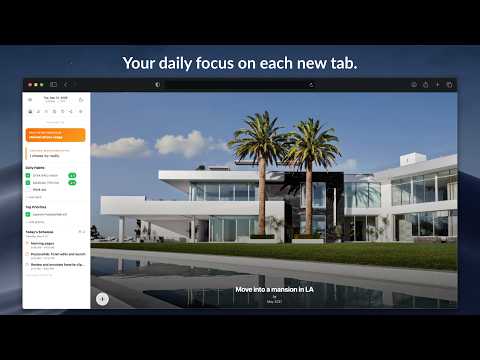
New tab dashboard with goals, habits, calendar, and daily focus.
PurposeTab is a minimalist extension that helps you stay centered on your priorities. Every time you open a new tab in Chrome, you see exactly what you need to focus on. On the left side, you can see your daily intention, habits, and priorities. On the right side, you can upload images of the goals you're working towards. Other exciting features include the ability to submit a journal entry reflection for the day (and you can review all saved journal entries) and to export a graphic of your daily updates to post to social media. It’s built for focus and privacy. All your data stays on your computer, it works offline, and there is no need to create an account. Main features included: • Daily focus and mantras: Set an intention that resets at midnight to keep you present. • Habit tracking: Add your daily habits with optional links to the tools you use. • Priority list: A simple to-do list for your most important tasks. • Vision board: Upload personal images that inspire you and add custom titles or dates. • Journaling: Use the built-in prompts for daily reflection and look back at your entries later. • Social sharing: Generate custom graphics of your progress to share on Instagram. • Scratchpad: Quick notepads for whenever you have a random idea or need to jot something down. • Customization: Toggle sections on or off, use dark mode, or use privacy mode when you’re sharing your screen in a meeting. • Data sync: Your settings and data sync automatically across any computer where you’re logged into Chrome. Getting started is easy. Just install the extension and open a new tab. If you want to see how it works first, you can watch the guide here: https://www.jaredgold.com/purposetab If PurposeTab helps you stay on track, please leave us a 5-star review. It really helps others find the tool. For help or questions, you can reach us at: purposetabhelp@gmail.com Privacy is a top priority, and PurposeTab is built with minimal permission requests, and I don't use any servers of my own to read or edit any of your data.
4.9 星(5 星制)79 个评分
详情
- 版本0.1.0.2
- 上次更新日期2026年9月8日
- 提供方PurposeTab
- 大小178KiB
- 语言4 种语言
- 开发者
邮箱
purposetabhelp@gmail.com - 非交易者该开发者尚未将自己标识为交易者。欧盟地区消费者须知:消费者权利可能不适用于您与该开发者达成的合约。
隐私权

该开发者已声明,您的数据:
- 不会因未获批准的用途出售给第三方
- 不会为实现与产品核心功能无关的目的而使用或转移
- 不会为确定信用度或放贷目的而使用或转移
支持
若有任何疑问、建议或问题,请在桌面浏览器中打开此页面