

Pure Side Tabs

Overview
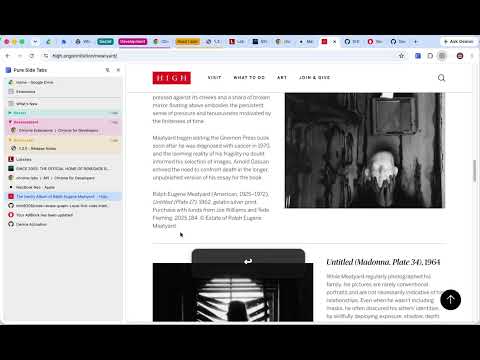
Safely view and manage your open tabs and tab groups in a sidebar. Fully open-source, with zero dependencies and no data collection.
🪩 Features • Show tabs and tab groups in a sidebar • No data harvesting, ever (source is available for verification) • Pop-up menu with most-recently visited tabs • Allows easily switching between most-recently used tabs with the keyboard • Recent tab view allows for a Ctrl-Tab-like experience. • Press / in the popup to search all open and recently closed tabs • Drag-and-drop tabs and tab groups for arrangement ⌨️ Usage 1. Install from the Chrome Web Store 2. Ctrl-B (Command-B on Mac) to show sidebar 3. Ctrl-E (Command-E on Mac) to show popup menu, arrow keys or j/k to navigate, enter to switch, esc to dismiss 4. Configure shortcuts to change keyboard mappings (Window > Extensions > Keyboard shortcuts) 5. Configure settings in extension options 📣 Tips • You can pin the extension (from the sidebar's title, the Extensions toolbar, or from the extension's details) to make the recent tab popup show faster. • You can use the popup menu to easily switch back and forth between two tabs (Ctrl-Tab replacement): show the popup menu (Ctrl/Command-E by default), then press Enter. This will switch back and forth between the two most recently-viewed tabs. • Holding Ctrl/Command while collapsing or expanding tab groups will apply the command to all tab groups in the window. • Enable "Always keep tab groups at top" in settings to pin tab groups directly after pinned tabs, with automatic enforcement on new tabs and drag-and-drop. 📋 Changelog • 1.2.0 - "tab groups always at top" setting, added search to MRU popup, audio icon sidebar, bug where tabs were removed from tab groups • 1.1.0 - cmd+click to open/close all tab groups, scroll to newly opened tabs in list • 1.0.0 - initial release
0 out of 5No ratings
Details
- Version1.2.0
- UpdatedJuly 2, 2026
- Offered byDoo Productions
- Size29.92KiB
- LanguagesEnglish (United States)
- Developer
Email
chrome@doo.productions - Non-traderThis developer has not identified itself as a trader. For consumers in the European Union, please note that consumer rights do not apply to contracts between you and this developer.
Privacy

This developer declares that your data is
- Not being sold to third parties, outside of the approved use cases
- Not being used or transferred for purposes that are unrelated to the item's core functionality
- Not being used or transferred to determine creditworthiness or for lending purposes
Support
For help with questions, suggestions, or problems, visit the developer's support site