


Overview
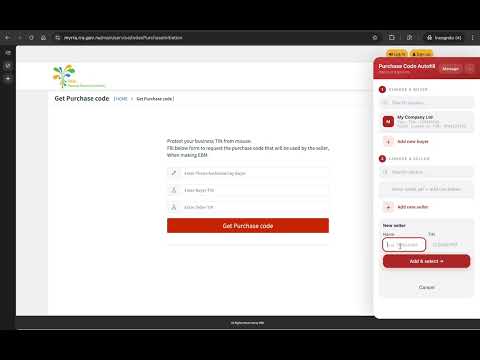
Auto-fills the Get Purchase Code form on myrra.rra.gov.rw. No data collected — everything stays on your device.
Tired of typing your TIN, phone number, and seller details every time you request a purchase code on myrra.rra.gov.rw? This extension injects a small sidebar on the Get Purchase Code page. Save your buyer profile (name, TIN, phone) and your frequent sellers (name + TIN) once — then pick them from a list and the form fills itself instantly. FEATURES • Save multiple buyer profiles and sellers • Search and pick from saved profiles in one click • Form fields fill automatically — phone, buyer TIN, seller TIN • Collapsible sidebar — stays out of your way when not needed • All data stored locally on your device. Nothing is sent anywhere. PRIVACY No accounts. No servers. No tracking. Your TIN and phone number never leave your browser. Not affiliated with Rwanda Revenue Authority. A personal project to save you the copy-paste.
0 out of 5No ratings
Details
- Version1.2.0
- UpdatedMay 1, 2026
- Size17.65KiB
- LanguagesEnglish
- DeveloperWebsite
Email
jean@jean.rw - Non-traderThis developer has not identified itself as a trader. For consumers in the European Union, please note that consumer rights do not apply to contracts between you and this developer.
Privacy

This developer declares that your data is
- Not being sold to third parties, outside of the approved use cases
- Not being used or transferred for purposes that are unrelated to the item's core functionality
- Not being used or transferred to determine creditworthiness or for lending purposes