

Puncto Timer
1 rating
)
Overview
Measure elapsed time between any two interactions — down to the millisecond.
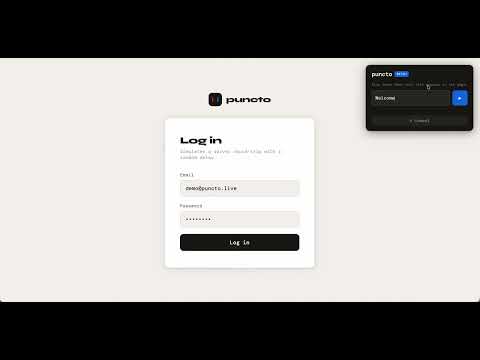
Puncto Timer measures elapsed time between any two events on a web page — down to the millisecond. ▶ Right-click any element → timer starts instantly ⏹ Auto-stops the moment your expected text appears in the DOM ⌨ Or stop manually with the overlay button or Space key HOW IT WORKS 1. Right-click any element on the page 2. Choose "Start Puncto Timer" (instant start) or "Start Puncto Timer — Watch for Text" (auto-stop) 3. For Watch mode: type the text you expect to appear (e.g. "Order confirmed"), press ▶ 4. The timer runs as a floating overlay. It stops automatically when the text appears. USE CASES • Measure login / checkout / API response times • UX and performance testing • QA form submission timing • Reaction time benchmarking • Any workflow where you need precise elapsed time PRIVACY No data is collected. The extension only uses the contextMenus and storage permissions. It does not access your browsing history, passwords, or any personal data.
5 out of 51 rating
Details
- Version1.0.1
- UpdatedMarch 26, 2026
- Size14.44KiB
- LanguagesEnglish
- Developer
Email
kulcsarrudolf@gmail.com - Non-traderThis developer has not identified itself as a trader. For consumers in the European Union, please note that consumer rights do not apply to contracts between you and this developer.
Privacy

This developer declares that your data is
- Not being sold to third parties, outside of the approved use cases
- Not being used or transferred for purposes that are unrelated to the item's core functionality
- Not being used or transferred to determine creditworthiness or for lending purposes