

Pull Up
13 lượt xếp hạng
)
Tổng quan
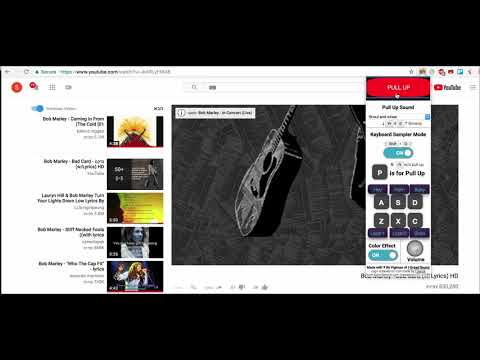
Loving the tune ya? now you can pull it up easily with style. works on youtube. might add more sites later, keep the link and enjoy.
2020 Updates and Instructions: Fixed Color Effect👌 🔥 Removed the notifications (as asked by users ) and the sample selection by keyboard, better solution is cooking If you are a Jamaican music lover you probably have noticed the tradition to start over a song from the beginning when the crowd get excited. This old tradition started from spinning vinyls at the 60's when the music was so fresh that the people wanted to hear it over and over again. From the action of pulling the song to the start came the name "pull up". after came along "rewind", "forward" ,"wheel", "haul and pull", "come again" and more, all comes to describe this amazing energy that only a real Reggae and Dancehall lover will understand. Now you can feel this vibe anywhere and do it while listening to music on Youtube™ in this free and easy extension. Use the extension button or a keyboard shortcut, choose a sound between different samples, or let the app surprise you with a random sample, enable / disable visual effect and enjoy your own style of Pull Up. Past Updates and Instructions: fixed known bug - when pressing Shift+O outside of youtube a message is now no longer showing ***Keyboard Sampler Mode has been added. ***You can switch in between Sampler mode on/off - trough pressing Shift+O or by using the extension menu. ***You can now Pull Up anytime by pressing Alt+P keyboard shortcut or by using the extension button. ***While in the Sampler mode there are many keyboard shortcuts explained. *** Volume knob has been added. ** Better design
4,7/513 lượt xếp hạng
Chi tiết
- Phiên bản2.5
- Đã cập nhật11 tháng 7, 2020
- Nhà cung cấpShoham Vigiser
- Kích thước1.6MiB
- Ngôn ngữEnglish
- Nhà phát triển
Email
svigiser@gmail.com - Người bán phi thương mạiNhà phát triển này không tự nhận mình là người bán. Đối với người tiêu dùng ở Liên minh Châu Âu, xin lưu ý rằng các quyền của người tiêu dùng không được áp dụng trong hợp đồng giữa bạn và nhà phát triển này.
Quyền riêng tư

Hỗ trợ
Nếu bạn có câu hỏi, ý kiến đề xuất hoặc gặp vấn đề, vui lòng mở trang này bằng trình duyệt dành cho máy tính để được trợ giúp