

PubMed2EndNote
Overview
Copy PubMed citations to clipboard as EndNote-compatible Word citations with one click
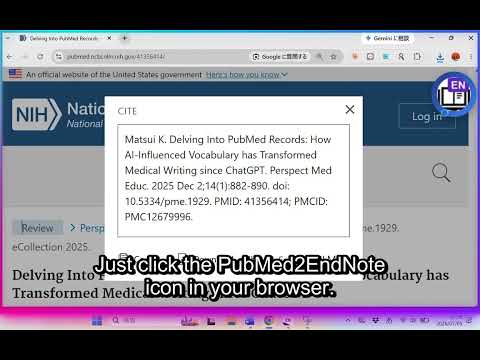
PubMed2EndNote converts PubMed article metadata into an EndNote-compatible citation with one click. [How to use] 1. Open any article page on PubMed (pubmed.ncbi.nlm.nih.gov) 2. Click the blue button that appears at the top-right of the page 3. Paste into Microsoft Word with Ctrl+V 4. In the EndNote tab, click "Update Citations and Bibliography" — the citation and reference list are formatted automatically [Features] • Automatically retrieves bibliographic data: authors, journal, volume/issue/pages, DOI, Abstract, MeSH terms • Pastes as an EndNote (Cite While You Write) citation field — recognized immediately by EndNote • Pasted citations are highlighted in yellow for easy identification • Supports special characters (e.g. umlauts) • All bibliographic data is fetched from the official NCBI (National Library of Medicine) API [Requirements] • Microsoft Word + EndNote (Cite While You Write) • An email address must be set on first use (sent as a contact parameter with NCBI API requests, per NCBI usage policy) --- PubMed2EndNote 可一键将PubMed文献元数据转换为EndNote兼容的引用格式。 【使用方法】 1. 在 PubMed(pubmed.ncbi.nlm.nih.gov)打开任意文献页面 2. 点击页面右上角出现的蓝色按钮 3. 在 Microsoft Word 中按 Ctrl+V 粘贴 4. 在 EndNote 选项卡中点击"Update Citations and Bibliography",引用和参考文献列表将自动格式化 【功能特点】 ・自动获取作者、期刊名、卷期页码、DOI、摘要、MeSH词等书目信息 ・以 EndNote(Cite While You Write)可识别的引用字段格式粘贴 ・粘贴处以黄色高亮显示,便于识别 ・支持变音符号等特殊字符 ・书目信息通过美国国立医学图书馆(NCBI)官方API获取 【系统要求】 ・Microsoft Word + EndNote(Cite While You Write) ・首次使用时需设置电子邮箱(按照NCBI API使用规范,作为联系方式随API请求发送) --- PubMed2EndNoteは、PubMedの論文情報をワンクリックでEndNote対応の引用に変換するChrome拡張機能です。 【使い方】 1. PubMed(pubmed.ncbi.nlm.nih.gov)で論文ページを開く 2. ページ右上に表示される青いボタンをクリック 3. Microsoft Wordに Ctrl+V で貼り付け 4. EndNoteタブの「Update Citations and Bibliography」で引用と文献リストが自動整形されます 【特徴】 ・著者名・雑誌名・巻号ページ・DOI・Abstract・MeSHタームなどの書誌情報を自動取得 ・EndNote(Cite While You Write)がそのまま認識できる引用フィールドとして貼り付け可能 ・貼り付け箇所は黄色ハイライトで目立つように表示 ・ウムラウトなどの特殊文字にも対応 ・書誌情報は米国国立医学図書館(NCBI)の公式APIから取得 【必要な環境】 ・Microsoft Word + EndNote(Cite While You Write) ・初回利用時にメールアドレスの設定が必要です(NCBI APIの利用ガイドラインに従い、APIリクエストの連絡先として送信されるものです)citations as EndNote-ready Word citations with one click.
0 out of 5No ratings
Details
- Version3.0
- UpdatedJuly 6, 2026
- Offered byKentaro Matsui
- Size20.86KiB
- LanguagesEnglish
- Developer
Email
matsui.kentaro@ncnp.go.jp - Non-traderThis developer has not identified itself as a trader. For consumers in the European Union, please note that consumer rights do not apply to contracts between you and this developer.
Privacy

PubMed2EndNote has disclosed the following information regarding the collection and usage of your data. More detailed information can be found in the developer's privacy policy.
PubMed2EndNote handles the following:
This developer declares that your data is
- Not being sold to third parties, outside of the approved use cases
- Not being used or transferred for purposes that are unrelated to the item's core functionality
- Not being used or transferred to determine creditworthiness or for lending purposes