


Overview
Quickly switch and manage proxy settings from your browser toolbar.
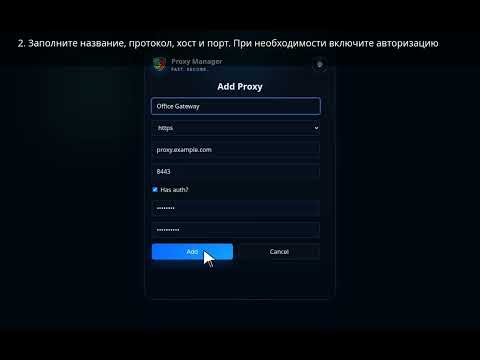
Proxy Manager makes it easy to manage browser proxy settings without digging through system or browser configuration pages. The extension opens in a compact popup and lets you quickly choose a saved proxy profile, turn proxy usage on or off, and keep your proxy list organized. Key features: - save multiple proxy profiles; - switch the active proxy with one click; - turn proxy usage on or off from the popup; - support for HTTP, HTTPS, SOCKS4, and SOCKS5; - support for proxies with username and password authentication; - import proxy lists from JSON or lines in the protocol://user:pass@host:port format; - export saved profiles for backup or transfer; - search by label, host, or protocol; - sort the profile list; - edit, copy, and delete saved proxies. How to use: 1. Click the Proxy Manager icon in your browser toolbar. 2. Add a new proxy with “Add new proxy”. 3. Enter a label, protocol, host, port, and authentication details if needed. 4. Select a saved profile from the list. 5. Turn proxy usage on or off with a single switch. For larger proxy lists, use Import proxies: paste a JSON array or lines such as http://user:pass@1.2.3.4:8080. Saved profiles can also be exported for backup or moved to another browser. Privacy: Proxy profiles are stored locally in your browser storage. The extension does not require registration and does not send your proxy settings to external servers. Additional capabilities: - Add Proxy: Create a proxy profile with label, protocol, host, port, and optional authentication. - Export proxies: Export saved profiles for backup or migration. - Search by label, host or protocol: Search saved profiles by label, host, or protocol. - Copy proxy: Copy a saved proxy as a connection URL. - Bypass: Keep a per-profile bypass list for hosts that should use a direct connection. - Reset all proxies: Remove every saved proxy profile and disable proxy use when a clean reset is needed. - Theme: Switch the popup between dark and light themes. - Diagnostics: Review proxy control, authentication, and diagnostics state. - Check proxy: Check the current external IP through the active proxy. - Proxy authentication: Handle proxy authentication challenges for the active profile. - Choose backup file in a tab: Open JSON backup import in a browser tab when Firefox would close the popup for file selection.
5 out of 55 ratings
Details
- Version1.0.28
- UpdatedMay 4, 2026
- Size431KiB
- Languages57 languages
- DeveloperWebsite
Email
veselov.anton@gmail.com - Non-traderThis developer has not identified itself as a trader. For consumers in the European Union, please note that consumer rights do not apply to contracts between you and this developer.
Privacy

This developer declares that your data is
- Not being sold to third parties, outside of the approved use cases
- Not being used or transferred for purposes that are unrelated to the item's core functionality
- Not being used or transferred to determine creditworthiness or for lending purposes
Support
For help with questions, suggestions, or problems, please open this page on your desktop browser