

Provyn – Reverse Image Search, Fake Photo & Misinformation Fact-Checks
3 ratings
)
Overview
Don't be fooled by misinformation. Hover any picture to see who took it, when, and any fact-checks, even of photos in screenshots.
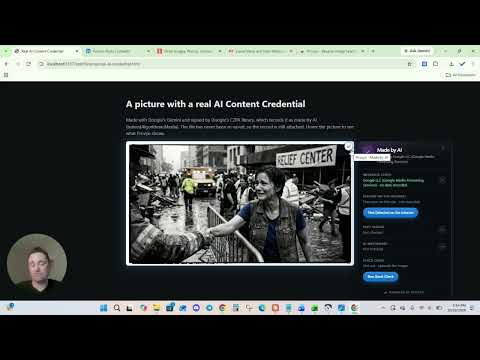
Provyn is the premier image provenance tool. Every picture you see online came from somewhere. Provyn shows you what can actually be known about where, without leaving the page. Hover any image and a small badge appears in the corner. Hover the badge and a panel opens. No right-click, no copying addresses into a reverse image search on another site. WHO TOOK THIS PHOTO? Most news photos come from a photographer and an agency, but the credit is easy to miss and is often lost when a picture is shared. Provyn finds it for you, from the photo info inside the picture (its EXIF and IPTC labels) and the credit beside it, and shows the photographer and agency at a glance, with a link to the agency's own record where there is one. HAS IT BEEN FACT-CHECKED? When a picture has been fact-checked, Provyn shows whose verdict it is and what they said, for example "Lead Stories rated it False", with a link to the article. New fact-checks from Snopes, Lead Stories, FactCheck.org and others show up within about half an hour. Older ones come from Google's Fact Check search, which covers fact-checkers around the world. A fact-check in another language is translated into yours. It works on screenshots too. When someone screenshots a post and shares it, Provyn finds the photo inside the screenshot and checks that. HISTORY ON THE INTERNET Provyn asks the Internet Archive how long that image address has been on the web and shows the earliest copy it holds. A picture shared as breaking news that the archive has held since 2019 tells you something. It dates that address on that site, not the picture itself. A button opens a tab to show where it was first detected on the internet. IS IT A KNOWN PHOTOGRAPH? Provyn checks every picture you hover against stored public photo archives: over 250,000 photographs from Wikimedia Commons and a Library of Congress collection. It also asks Wikimedia Commons whether it holds the exact same file. When it finds one, you get the photographer, the licence, when the photo was taken, and a link to the original. A news photo presented as today's that turns out to be a 1943 Library of Congress photograph has answered its own question. When it finds nothing, it says so. IS IT A STOCK PHOTO? Press Run Stock Check and Provyn searches multiple stock photo agencies: Flickr, Pexels, Pixabay and Shutterstock. Between them those libraries hold over 500 million pictures. Provyn compares every result with the picture and reports only one that is the same photograph, giving the photographer or contributor, the date and a link. DOES IT CARRY A SIGNED RECORD? Some images carry a signed record inside the file, an open standard called C2PA (Content Credentials), used by Google, Adobe, OpenAI, some camera makers and some news agencies. Provyn reads it in your browser and tells you who signed it, whether the signature holds up, and whether the record says AI made or edited the image. What the panel can say: Made by AI. The record says AI generated the image, and names the tool where it can. AI was used to edit this. A photograph with generative editing on top. Image taken by camera. The record says a camera captured it. This describes the capture, not what was in front of the lens: someone can photograph an AI image on a screen. The wording never says "not AI". Created by [name]. A valid record that names a signer but not how the image was made. Common and usually innocent. Unreliable metadata. The signature doesn't hold up, or the picture no longer matches its record. The second usually means a website re-saved the image. No signed record. The file names a photographer or other details, but nobody signed them. The credit is shown below, marked unverified. No metadata. No record at all. This is what most images show while C2PA is progressively adopted. WHAT IT WILL NOT DO It will not tell you an image is real or fake. It is not a deepfake detector and it never guesses from what a picture looks like. A fact-check verdict is the fact-checker's, not Provyn's, and it may be about a claim made with the picture rather than the picture itself. Open the article to see which. Most pictures have never been fact-checked, so "None found" is the normal answer. Most images have no signed record: social networks and news sites strip it when they re-save uploads. "No metadata" is the normal case, not a warning. A signature that checks out proves the record hasn't been altered since it was signed. It does not prove the name on it is genuine, because the certificate isn't checked against the official C2PA trust list. The panel says this in words rather than showing a green check. A credit is what the picture's file or the page says, not a signed record. Provyn marks it as unverified, and where it disagrees with a signed record, the signed record wins. An archive, stock or fact-check match is a strong lead, not proof of who made a picture. Cropped, mirrored or heavily edited copies can be missed, and not every photo inside a screenshot can be found. PRIVACY No account, no sign-in, no tracking, no analytics, no advertising. Provyn works out who took a photo inside your browser. Nothing about that is sent anywhere. When you hover a picture, Provyn sends a fingerprint of it, never the picture, to the Provyn server to check the archives and fact-checks, and a different fingerprint to Wikimedia Commons. It sends the image's address to the Internet Archive; you can switch that off. To look for fact-checks, Provyn sends the image's address through the Provyn server to Google's Fact Check search, so Google sees the Provyn server asking, not you. Private addresses are never sent. You can switch this off, or have it ask only when you press a button. Only when you press Run Stock Check does Provyn send a few words from beside the picture and a small copy of the picture, with its hidden information removed, to the Provyn server, which searches Wikimedia Commons, Flickr, Pexels, Pixabay and Shutterstock. The copy is not kept. The full privacy policy explains exactly what is sent and kept. WHY IT ASKS TO RUN ON ALL SITES Chrome asks for this after you install, on Provyn's welcome page, so you know what it's for before you say yes. Provyn can't know in advance which page you'll want to check. It reads an image, and the credit beside it, only when you hover it. You can say no and turn it on later from the toolbar button, or take it back at any time. SETTINGS Choose where Provyn runs: everywhere except sites you block, only on sites you choose, or nowhere. Set the minimum image size, the badge corner, whether a key must be held before badges appear, whether content credentials are read on hover, whether the Internet Archive lookup runs, and when fact-checks are looked up. WHO THIS IS FOR Journalists and editors checking a picture before using it. Fact-checkers, researchers, moderators and OSINT investigators. Teachers showing students how to check a source. Anyone who has been sent an image and wondered where it really came from, and would rather have a straight answer, including "nobody knows", than a confident guess.
5 out of 53 ratings
Details
- Version0.1.25
- UpdatedOctober 22, 2026
- Offered byProvyn
- Size79.19KiB
- LanguagesEnglish
- Developer
Email
provynofficial@gmail.com - Non-traderThis developer has not identified itself as a trader. For consumers in the European Union, please note that consumer rights do not apply to contracts between you and this developer.
Privacy

Provyn – Reverse Image Search, Fake Photo & Misinformation Fact-Checks has disclosed the following information regarding the collection and usage of your data. More detailed information can be found in the developer's privacy policy.
Provyn – Reverse Image Search, Fake Photo & Misinformation Fact-Checks handles the following:
This developer declares that your data is
- Not being sold to third parties, outside of the approved use cases
- Not being used or transferred for purposes that are unrelated to the item's core functionality
- Not being used or transferred to determine creditworthiness or for lending purposes