Item logo image for ProtonMail Font Enhancer

ProtonMail Font Enhancer

pontools.net
Item media 2 (screenshot) for ProtonMail Font Enhancer
Item video thumbnail
Item media 2 (screenshot) for ProtonMail Font Enhancer
Item video thumbnail
Item media 2 (screenshot) for ProtonMail Font Enhancer

Overview

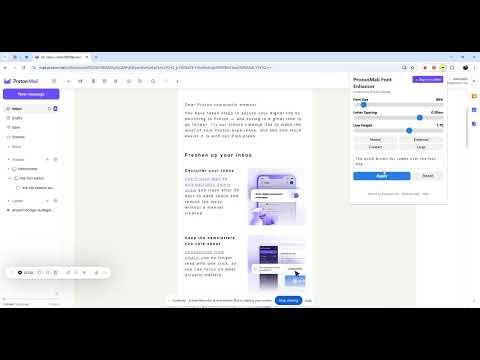
Enhance ProtonMail fonts with customizable size, spacing and line height

🔍 Tired of straining your eyes reading ProtonMail? Meet ProtonMail Font Enhancer! Transform your ProtonMail reading experience with this powerful Chrome extension that puts you in control of how your emails look. No more squinting at tiny text or dealing with cramped letter spacing! ✨ KEY FEATURES: • Customize font size from 80% to 200% • Fine-tune letter spacing for better readability • Adjust line height for comfortable reading • Real-time preview of all changes • Settings persist across sessions 🎯 PERFECT FOR: • Users who find ProtonMail's default font too small • Professionals reading long emails all day • People switching between mobile and desktop • Teams with different reading preferences • Anyone who values eye comfort and productivity ⚡ QUICK PRESETS: • Normal: Standard ProtonMail look • Enhanced: Optimized for long reading sessions • Compact: Fit more content on screen • Large: Maximum visibility for easier reading 🔒 PRIVACY FIRST: • No data collection • Works locally in your browser • Respects your ProtonMail privacy 🌐 MORE RESOURCES: Website: https://pontools.net Help Center: https://pontools.net/extensions/protonmail-font-enhancer More Extensions: https://pontools.net/extensions

Details

  • Version
    1.3
  • Updated
    April 2, 2025
  • Size
    18.31KiB
  • Languages
    English (United States)
  • Developer
    Website
    Email
    ahxh2000@gmail.com
  • Non-trader
    This developer has not identified itself as a trader. For consumers in the European Union, please note that consumer rights do not apply to contracts between you and this developer.

Privacy

The developer has disclosed that it will not collect or use your data. To learn more, see the developer’s privacy policy.

This developer declares that your data is

  • Not being sold to third parties, outside of the approved use cases
  • Not being used or transferred for purposes that are unrelated to the item's core functionality
  • Not being used or transferred to determine creditworthiness or for lending purposes

Support

Related

Email Signature Rescue - Browser Extension

4.1

Install HTML email signatures with no character limit. Office 365, Outlook.com, Gmail, Yahoo Mail, AOL Mail.

Email Polisher for Gmail

5.0

A Chrome extension that polishes the content of Gmail emails using GPT

Note Keeper

5.0

Create and manage notes with rich text editing and custom icons

Inbox Zero Tabs for Gmail

5.0

Add custom tabs to Gmail for better email organization

Email reader view

5.0

Display emails in a more readable format

Reader View

4.7

Removes clutter like buttons, backgrounds, adjusts text size, contrast, and layout for better readability

Email Signature Maker

5.0

Use Email Signature Maker to generate your own signature design and set it up for Gmail, Outlook, and Yahoo.

Gmail Templates

5.0

Use Gmail Templates for creating messages in one second and boost your productivity with auto text expander and browser template

HTMaiL: Insert HTML into Gmail, Outlook and Yahoo Mail

4.3

Edit and easily insert HTML code into the body of your email message in Gmail, Outlook, and Yahoo Mail.

Make Text Readable for Google Chrome™

4.3

Free! Adjust font, height, and font size to make web pages easier to read.

ProtonMailCounter

4.1

Unofficial Proton Mail counter extension for chrome

Font Finder

3.9

Font finder for images, texts and websites to check Font Family, size, height

Email Signature Rescue - Browser Extension

4.1

Install HTML email signatures with no character limit. Office 365, Outlook.com, Gmail, Yahoo Mail, AOL Mail.

Email Polisher for Gmail

5.0

A Chrome extension that polishes the content of Gmail emails using GPT

Note Keeper

5.0

Create and manage notes with rich text editing and custom icons

Inbox Zero Tabs for Gmail

5.0

Add custom tabs to Gmail for better email organization

Email reader view

5.0

Display emails in a more readable format

Reader View

4.7

Removes clutter like buttons, backgrounds, adjusts text size, contrast, and layout for better readability

Email Signature Maker

5.0

Use Email Signature Maker to generate your own signature design and set it up for Gmail, Outlook, and Yahoo.

Gmail Templates

5.0

Use Gmail Templates for creating messages in one second and boost your productivity with auto text expander and browser template

Google apps