

Proto to Video: Figma Prototype to Video, MP4 & GIF

Overview
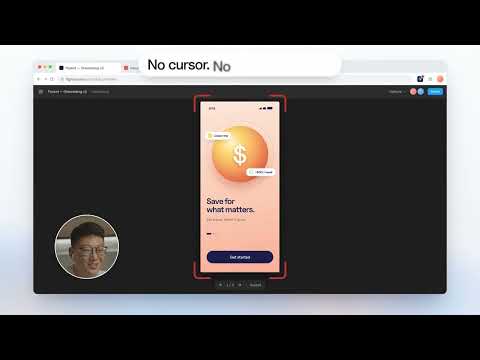
Record a Figma prototype and export it as MP4, GIF or WebM. No cursor, no Figma interface, with a device frame.
Proto to Video records your Figma prototype and turns it into a clean video: MP4, GIF or WebM, with no cursor and no Figma interface, in a device frame. Made for designers who show prototypes in a portfolio, a Dribbble shot, a case study or a client update. Use it to export a Figma prototype to video or GIF, screen record a Figma prototype without the cursor, or share a Figma prototype as a video link. ▸ RECORD • Open any Figma prototype (Present ▶) and click Record, or press Alt+Shift+R • Only the prototype is filmed: no cursor, no Figma toolbar, no hotspot hints • Soft tap circles show where you clicked • Add your voice or your face in a round bubble (Pro) ▸ FRAME AND EXPORT • iPhone, Android, iPad, MacBook or browser frame • Plain colours or soft gradient scenes as background • Trim the start and the end, set the margin • Export MP4, WebM or a sharp GIF up to 800 px wide ▸ SHARE A LINK • One click turns an export into a link that plays on any phone or computer • No account needed to watch it • Re-export a take and the link shows the new version • Studio plan: your name and logo, a password and a view count per link ▸ PRIVATE BY DEFAULT • Your takes stay in your browser, sorted by project and client • A video only leaves your computer when you create a link • No tracking, no ads ▸ PLANS • Free: 5 exports a month with a small watermark, up to 10 links • Pro: unlimited exports, no watermark, device frames, tap circles, scenes, camera bubble • Studio: everything in Pro, plus branded and password-protected links Questions: hi@proto-to-video.com · https://proto-to-video.com Figma is a trademark of Figma, Inc. Proto to Video is an independent product and is not affiliated with or endorsed by Figma.
0 out of 5No ratings
Details
- Version1.0.2
- UpdatedOctober 12, 2026
- FeaturesOffers in-app purchases
- Offered byDeDieu
- Size2.91MiB
- Languages52 languages
- DeveloperDeDieu Lembow Ilanga
1955 Rue du Chanoine Chamberland 101 Trois-rivières, QC G8Z 2S6 CAEmail
dedieuilanga01@gmail.comPhone
+1 819-244-2801 - TraderThis developer has identified itself as a trader per the definition from the European Union and committed to only offer products or services that comply with EU laws.
Privacy

Proto to Video: Figma Prototype to Video, MP4 & GIF has disclosed the following information regarding the collection and usage of your data. More detailed information can be found in the developer's privacy policy.
Proto to Video: Figma Prototype to Video, MP4 & GIF handles the following:
This developer declares that your data is
- Not being sold to third parties, outside of the approved use cases
- Not being used or transferred for purposes that are unrelated to the item's core functionality
- Not being used or transferred to determine creditworthiness or for lending purposes
Support
For help with questions, suggestions, or problems, visit the developer's support site