

ProTab Suspender - Memory Saver

Overview
Auto-suspend tabs to save memory. Features: Screenshot Preview, Sessions Manager, Analytics. Best alternative to OneTab.
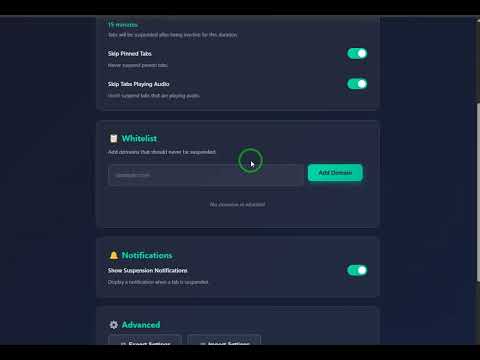
ProTab Suspender - The Ultimate Tab Management & Memory Optimization SolutionTransform your browsing experience with ProTab Suspender, the most advanced tab suspension extension for Google Chrome. Save memory, boost performance, and never lose track of your tabs again. Perfect for power users, developers, researchers, and anyone who works with multiple browser tabs daily.🌟 Why Choose ProTab Suspender?Are you tired of Chrome consuming gigabytes of RAM? Do you have dozens or hundreds of tabs open simultaneously? ProTab Suspender is your solution. It solves the problem of high memory consumption by intelligently suspending inactive tabs, freeing up memory while preserving your browsing session.✨ Key Features - What Makes Us Different1. 📸 Screenshot Preview - UNIQUE FEATUREThe ONLY tab suspender with visual screenshot previews! Instantly identify suspended tabs by their appearance on a professional dashboard.Visual recognition - Identify tabs by screenshot.Quick restoration - Click on any screenshot to restore.Memory efficient - Compressed JPEG format.2. ↩️ Undo System - EXCLUSIVE SAFETY NETIndustry-first undo functionality for tab operations! Made a mistake? Quickly reverse your last 5 actions, including Suspend All and Restore All.Undo Suspend All - Restore all tabs you just suspended.Persistent storage - History survives browser restarts.3. ⌨️ Keyboard Shortcuts - POWER USER FRIENDLYControl everything without touching your mouse! Use simple shortcuts for maximum productivity:Ctrl+Shift+S - Suspend all inactive tabs instantly.Ctrl+Shift+R - Restore all suspended tabs.Ctrl+Shift+Z - Undo last action.4. 📊 Advanced Analytics DashboardTrack your browsing habits and memory savings! Get data-driven insights with professional charts.Total suspensions - See how many tabs you've suspended.Memory saved - Calculate total RAM freed (in GB).Top domains - Identify which websites you suspend most.5. 💾 Sessions ManagerSave and restore entire browsing sessions! Perfect for research or project workflow.Named sessions - Save current tabs with custom names.One-click restore - Open entire session in a new window.Export/Import - Share sessions between devices.6. 🎯 Smart Auto-SuspensionIntelligent, configurable automatic tab suspension! Set it and forget it.Customizable timeout - 1 to 60 minutes of inactivity.Skip pinned tabs - Keep important tabs always active.Whitelist domains - Exclude specific websites (Gmail, Slack, etc.).7. 🎨 Modern, Beautiful UIStunning glassmorphism design that's a pleasure to use! Includes a Dark Theme for easy viewing.🏆 Comparison with CompetitorsFeatureOneTabProTab SuspenderScreenshot Preview❌✅ UNIQUEUndo System❌✅ EXCLUSIVEAnalytics Dashboard❌✅ ADVANCEDAuto-Suspend❌✅ SmartProTab is the superior, feature-rich, and modern alternative.🎯 Key BenefitsMemory Optimization: Save 50-100MB per tab, freeing up 2-4GB RAM easily.Performance Boost: Faster browser startup, smoother scrolling, and better multitasking.Productivity Enhancement: Organized workflow, quick restoration, and safety with the Undo system.Privacy & Security: 100% local storage. No external servers, no tracking, and Manifest V3 compliant.📖 How to Use - Quick Start GuideInstallation: Click "Add to Chrome."Manual Suspend: Click the icon and "Suspend All Inactive Tabs."Automatic: Enable "Auto-Suspend" in Settings and set the timeout.Restore: Click "Restore All Tabs" or the individual screenshot in the Dashboard.🎯 Call to ActionInstall ProTab Suspender today and experience:✅ 60-80% reduction in memory usage✅ Faster, more responsive browsing✅ Beautiful, modern interface
0 out of 5No ratings
Details
- Version2.1.0
- UpdatedDecember 13, 2025
- Size69.04KiB
- Languages8 languages
- Developer
Email
onemiccar@gmail.com - Non-traderThis developer has not identified itself as a trader. For consumers in the European Union, please note that consumer rights do not apply to contracts between you and this developer.
Privacy
This developer declares that your data is
- Not being sold to third parties, outside of the approved use cases
- Not being used or transferred for purposes that are unrelated to the item's core functionality
- Not being used or transferred to determine creditworthiness or for lending purposes