

Pronuncia: Read-aloud practice
3 ratings
)
Overview
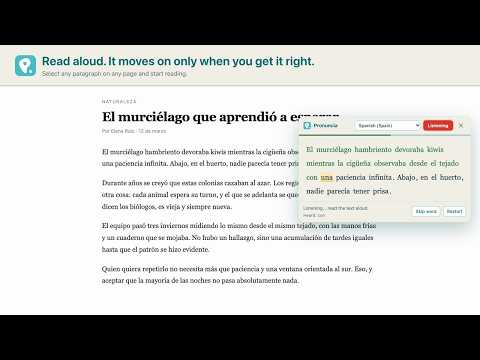
Read any text on the web aloud. It will not move on until you pronounce each word clearly.
Pronuncia turns any text on the web into reading-aloud practice. Select a paragraph on any page, open Pronuncia, and read it out loud. The current word is highlighted, and the text only moves on when the recogniser hears the word it was waiting for. Get one wrong and it stops there: the word turns black and a speaker button appears so you can hear how it should sound. HOW IT WORKS 1. Select any text on any web page. 2. Open it from the right-click menu, or with Ctrl+Shift+L (Cmd+Shift+L on a Mac). 3. Read aloud. The current word is highlighted and will not move on until you say it clearly. 4. Stuck on a word? Click it and you'll hear it pronounced. YOUR OWN PDFs Click the Pronuncia icon and choose "Read a PDF". Drop a file on the page and the whole document loads, ready to read: no selecting, no copying, no page-by-page. The file is opened inside your browser and is never uploaded anywhere, not even to us. It has to be a PDF with real text in it — a scan is a picture of a page and there is nothing in it to read. WHAT YOU GET • Six languages: Spanish, English, Portuguese, French, Italian and German, with their regional variants • Automatic language detection from the text you select • A reference voice: click any word to hear how it should sound • Adjustable strictness, so you can give yourself more or less room • Adjustable speed for the reference voice • Works on any web page, with nothing to copy and paste anywhere • The extension itself in six languages, not just the texts you practise • Your own PDFs, on a page of their own, with the file never leaving your browser WHAT IT IS NOT Pronuncia uses Chrome's built-in speech recognition, which reports which words it understood — not a per-phoneme pronunciation score. It is forgiving with strong accents and it gets proper nouns and technical terms wrong. It is built for practising fluency and confidence while reading aloud; it is not a substitute for a phonetic assessment. Only one tab can listen at a time: Chrome's recogniser cannot be shared. Open a second reader and it tells you which tab has the microphone; one click brings it over. PRIVACY Chrome's speech recognition sends your microphone audio to Google's servers, exactly as it does on any website that uses Chrome's dictation. We never receive, hear or store your audio, and we use no analytics and no trackers. Full details: https://pronuncia.dev/privacy/ Requires Google Chrome, a microphone and an internet connection.
5 out of 53 ratings
Details
- Version0.2.0
- UpdatedNovember 7, 2026
- Offered bymasdemanu
- Size589KiB
- Languages6 languages
- Developer
Email
masdemanu@gmail.com - Non-traderThis developer has not identified itself as a trader. For consumers in the European Union, please note that consumer rights do not apply to contracts between you and this developer.
Privacy

Pronuncia: Read-aloud practice has disclosed the following information regarding the collection and usage of your data. More detailed information can be found in the developer's privacy policy.
Pronuncia: Read-aloud practice handles the following:
This developer declares that your data is
- Not being sold to third parties, outside of the approved use cases
- Not being used or transferred for purposes that are unrelated to the item's core functionality
- Not being used or transferred to determine creditworthiness or for lending purposes
Support
For help with questions, suggestions, or problems, please open this page on your desktop browser