

PromptVault — AI Prompt Manager for ChatGPT, Claude & Gemini
7 ratings
)
Overview
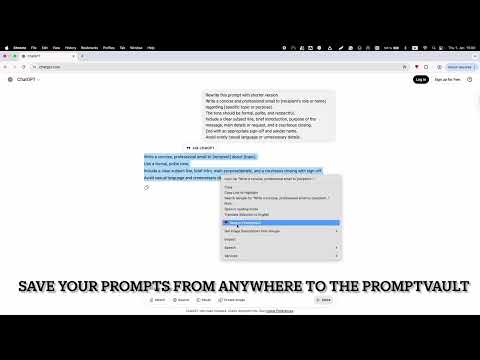
Save prompts in folders and paste them into the focused field with one click.
PromptVault — AI Prompt Manager for ChatGPT, Claude & Gemini Tired of rewriting the same prompts over and over? PromptVault keeps your best AI prompts organized, tagged, and ready to paste — so you never lose your best AI workflows again. Whether you're crafting content, writing code, or managing business communications, PromptVault keeps your best prompts organized and instantly accessible. 🚀 WHY PROMPTVAULT? ✅ Save prompts from anywhere with a right-click ✅ One-click paste into any text field ✅ Auto-tagging and smart organization ✅ Version history — restore any previous version instantly ✅ 100% local storage — your data never leaves your browser ⚡ KEY FEATURES 📁 Smart Organization Create unlimited folders to categorize your prompts by project, topic, or workflow. Drag-and-drop to rearrange. Auto-color coding based on tags keeps everything visually organized. ✨ Intelligent Tagging Auto-suggested tags help you tag prompts as you save them. Filter and search by tags, name, or full content to find exactly what you need. ⚡ Quick Access One-click paste into any text field. Right-click any selected text to save it as a new prompt. Quick Save modal for capturing prompts on the go. 📊 Smart Views Track your most-used prompts and recently used items. Usage statistics and timestamps help you optimize your AI workflow. 🔄 Version Control Every edit is automatically saved. Restore any of the last 5 versions with one click. Never lose an important prompt variation. 🎨 Customization Light and dark theme support. Resizable sidebar for your preferred workflow. Open in a dedicated window for extended sessions. 📚 Template Library Jump-start your prompting with pre-built templates for Content Creation, Business, AI Development, and Productivity. 💾 Import/Export Backup your entire library or share collections with your team. Portable JSON format for easy migration. 🎯 PERFECT FOR • AI enthusiasts working with ChatGPT, Claude, or other LLMs • Content creators managing writing templates • Developers storing code snippets and debugging prompts • Professionals organizing business communications • Anyone who wants to boost productivity with reusable prompts 🔒 Privacy First All data is stored locally in your browser. No cloud sync, no tracking, complete privacy. 💬 SUPPORT Need help? Visit https://thebuildvibe.com for support and documentation.
4.1 out of 57 ratings
Details
- Version0.7.4
- UpdatedJuly 16, 2026
- Offered byTheBuildVibe
- Size67.12KiB
- LanguagesEnglish
- DeveloperMd Aftab
255, opposite new telephone exchange rasulpur, Rampur, Uttar Pradesh Suar, Uttar Pradesh 244927 INEmail
alam156@gmail.comPhone
+91 97183 87037 - TraderThis developer has identified itself as a trader per the definition from the European Union and committed to only offer products or services that comply with EU laws.
Privacy

This developer declares that your data is
- Not being sold to third parties, outside of the approved use cases
- Not being used or transferred for purposes that are unrelated to the item's core functionality
- Not being used or transferred to determine creditworthiness or for lending purposes
Support
For help with questions, suggestions, or problems, please open this page on your desktop browser