

PromptShot – 스크린샷 AI 프롬프트 캡처 (Cursor·ChatGPT·Claude)
Overview
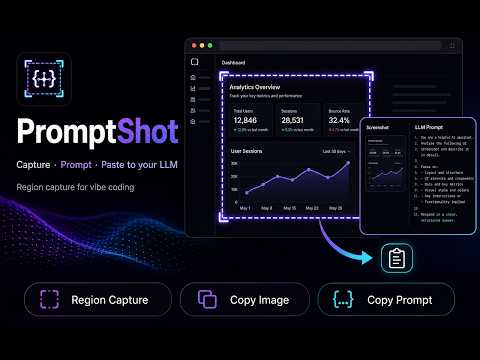
스크린샷을 AI 프롬프트로. 영역을 캡처해 Cursor·ChatGPT·Claude용 프롬프트와 이미지를 한 번에 복사하는 바이브 코딩 도구.
PromptShot — Cursor·ChatGPT·Claude용 스크린샷 AI 프롬프트 Chrome 확장 프로그램 PromptShot은 Chrome에서 웹 페이지 일부만 드래그해 영역 스크린샷을 찍고, LLM에 바로 붙여 넣을 AI 프롬프트와 이미지를 클립보드에 한 번에 복사하는 바이브 코딩·AI 코딩 전용 확장 프로그램입니다. UI 수정, 버그 화면 공유, 디자인 핸드오프, 컴포넌트 추출처럼 스크린샷 → 프롬프트가 반복되는 작업에서, 긴 설명을 타이핑하는 대신 캡처 → Ctrl+V 붙여넣기 → 다음 작업으로 흐름을 이어갈 수 있습니다. 이런 분께 추천합니다 Cursor·Claude·ChatGPT·Copilot 등 AI 코딩 도구와 함께 개발하는 분 전체 화면이 아닌 영역 캡처로 UI·레이아웃·버그 화면만 정확히 공유하고 싶은 분 캡처 후 펜·형광펜·화살표로 표시하고 AI에게 전달하는 분 기능 무료: 영역 캡처, 이미지·프롬프트 클립보드 복사, 기본 프리셋(UI 구현·컴포넌트 추출·디버그·디자인 핸드오프 등) Pro: 커스텀 프리셋, 캡처 단축키, 캡처 후 표시 펜(펜·형광펜·화살표·지우개) 등 캡처와 설정은 브라우저 안에서만 처리되며, 페이지 내용을 서버로 보내지 않습니다.
0 out of 5No ratings
Details
- Version1.0.15
- UpdatedJuly 19, 2026
- FeaturesOffers in-app purchases
- Offered by이종현
- Size909KiB
- Languages2 languages
- Developer
Email
belhyun@gmail.com - Non-traderThis developer has not identified itself as a trader. For consumers in the European Union, please note that consumer rights do not apply to contracts between you and this developer.
Privacy

This developer declares that your data is
- Not being sold to third parties, outside of the approved use cases
- Not being used or transferred for purposes that are unrelated to the item's core functionality
- Not being used or transferred to determine creditworthiness or for lending purposes
Support
For help with questions, suggestions, or problems, please open this page on your desktop browser