

PromptShield — AI Prompt Privacy Redactor

Overview
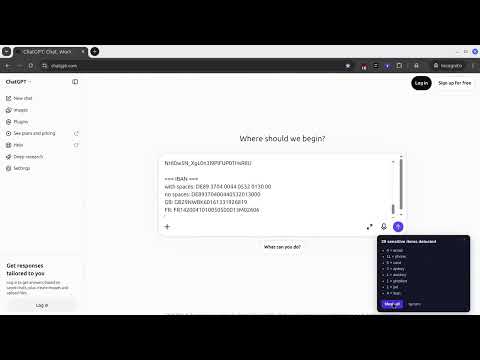
Masks sensitive data (emails, API keys, cards, IBANs, phones, JWT) in AI chat prompts locally before sending.
PromptShield — AI Data Masking & Privacy Guard Protect your personal and sensitive data while using ChatGPT, Claude, and Gemini. PromptShield automatically detects and masks sensitive information in your AI prompts before they leave your browser. Prevent accidental leaks of emails, passwords, phone numbers, API keys, and corporate data into AI model histories — with zero setup required. KEY FEATURES 🔒 100% Local & Private All processing happens entirely on your device. Your prompts and sensitive data never touch third-party servers. ⚡ Automatic Sensitivity Detection Instantly detects emails, phone numbers, credit cards, API keys, access tokens, and custom pattern types in real-time as you type. 🎯 Smart Placeholder Masking Replaces confidential details with clear, safe placeholders (e.g., [EMAIL_1]) right before your prompt is sent. 🔄 One-Click Value Reveal Easily toggle or view original values inside AI responses with a simple click. 🚀 Native Support for Top AI Platforms Seamlessly integrates with ChatGPT, Claude, Gemini, and other major AI chat interfaces. ⚙️ Fully Customizable Rules Enable/disable detection categories to match your workflow, and easily manage whitelist exceptions. HOW IT WORKS Type your prompt normally into your favorite AI tool. PromptShield highlights sensitive data and automatically masks it. Your protected prompt is sent safely to the AI model. Placeholders in AI responses are highlighted so you can effortlessly view the original context. PRIVACY & SECURITY COMMITMENT No account or sign-in required Zero data collection or tracking No external server connections Minimum browser permissions requested Take control of your privacy when using AI tools. Install PromptShield today!
0 out of 5No ratings
Details
- Version1.0.0
- UpdatedNovember 4, 2026
- Offered bysvx.ai.llm@gmail.com
- Size161KiB
- LanguagesEnglish (United States)
- Developer
Email
svx.ai.llm@gmail.com - Non-traderThis developer has not identified itself as a trader. For consumers in the European Union, please note that consumer rights do not apply to contracts between you and this developer.
Privacy

This developer declares that your data is
- Not being sold to third parties, outside of the approved use cases
- Not being used or transferred for purposes that are unrelated to the item's core functionality
- Not being used or transferred to determine creditworthiness or for lending purposes
Support
For help with questions, suggestions, or problems, please open this page on your desktop browser