


Overview
Save, organize, and optimize AI prompts. Sync via Google Drive. Local AI with Gemini Nano. Side Panel for easy paste-to-page.
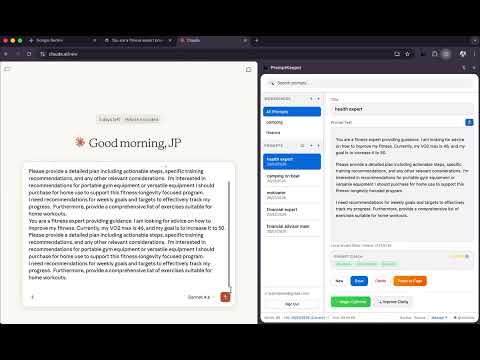
PromptKeeper is the ultimate keeper for your AI Workflows & Prompts —a private, local-first prompt engineering workspace that lives right in your browser. Offline storage or Synced to your Google Drive. Stop losing your best prompts in scattered chat logs, stale text files, or messy Notion pages. PromptKeeper gives you a professional environment to organize, version, evaluate, and refine your prompts locally. Then, securely inject them into ChatGPT, Claude, Gemini, or any corporate AI platform with a single click. 🌟 THE PROMPTKEEPER ADVANTAGE • True Portability: A floating side-panel lets you browse, manage, and "Paste-to-Page" your polished prompts without ever leaving your active tab. • Absolute Privacy: Your prompts belong to you. Everything is stored locally. We never see, harvest, or transmit your data. • Next-Gen Local AI: Leverage Chrome's built-in Gemini Nano model to refine, summarize, and evaluate your prompts securely on-device, for free, with zero API keys required. 🚀 WHAT'S NEW IN v2.2.0 PromptKeeper just got smarter and more customizable: • Prompt Coach: An on-device AI evaluator that scores your prompts on Context, Clarity, Constraints, and Tone, offering actionable advice to improve output quality. • Theme Engine: Switch between System, Light, and a sleek Dark Mode for late-night prompt crafting. • Custom Keyboard Shortcuts: Configure Hotkeys to suit your personal workflow. • Workflow Enhancements: Instant drag-and-drop sorting, smarter custom modals, and advanced placeholder UX. CORE FEATURES 💻 FULL-SCREEN PROMPT IDE A distraction-free environment for deep prompt engineering. • Spacious rich-text markdown editor with live word counts. • Built-in AI tools and real-time prompt evaluation. • Rapid iteration environment with a split pane for previewing your final output. 🤖 ON-DEVICE AI OPTIMIZATION (Gemini Nano) Utilize Chrome's edge AI capabilities to optimize your prompts instantly, without sending data to the cloud. • Prompt Coach: Get instant feedback loops on how to improve your prompt's structure. • Magic Enhance: Let local AI turn your rough bullet points into a highly structured prompt. • Formalize, Clarify, Shorten: One-click style refinement. • Streaming AI: Watch on-device generations in real-time and cancel them instantly. 📂 WORKSPACES & VERSIONS Organize the chaos. • Group your prompts into dedicated Workspaces (Coding, Marketing, Creative, HR). • Every save creates a new version iteration. Time-travel to any past revision with one click. • Seamlessly drag and drop prompts between projects to stay neatly organized. ☁️ SECURE GOOGLE DRIVE SYNC Your prompts, everywhere you go. • Opt-in automatic backup to a secure, dedicated file in your personal Google Drive. • Sync your prompt library seamlessly across multiple computers. • We only request scoped access strictly limited to the PromptKeeper backup file. PromptKeeper is built for prompt engineers, developers, marketers, and power users who demand structure, efficiency, and privacy while utilizing AI daily. Step up your AI game and treat your prompts with the respect they deserve.
4.5 out of 52 ratings
Details
- Version2.2.0
- UpdatedFebruary 23, 2026
- Offered byJaroslav Pantsjoha
- Size20.78MiB
- LanguagesEnglish (United Kingdom)
- Developer
Email
jpantsjoha@gmail.com - Non-traderThis developer has not identified itself as a trader. For consumers in the European Union, please note that consumer rights do not apply to contracts between you and this developer.
Privacy

This developer declares that your data is
- Not being sold to third parties, outside of the approved use cases
- Not being used or transferred for purposes that are unrelated to the item's core functionality
- Not being used or transferred to determine creditworthiness or for lending purposes
Support
For help with questions, suggestions, or problems, please open this page on your desktop browser