


Overview
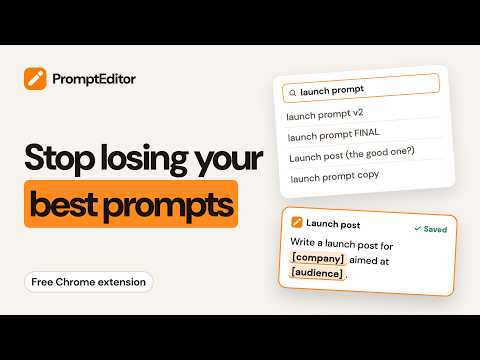
The notebook for everything you ask AI. Save prompts as notes, reuse them with variables, send them to ChatGPT, Claude or Gemini.
The notebook for everything you ask AI. Write a prompt once, reuse it everywhere. PromptEditor is a notebook in Chrome's side panel, right next to ChatGPT, Claude, Gemini, Perplexity and Copilot. Keep your prompts and the best AI replies as notes, mark the parts that change with [placeholders], and let your variables fill them in. When it's ready, send it to any AI in one click. Free, every feature. No account. Everything stays on your device. --- ✦ VARIABLES: SET IT ONCE, EVERY PROMPT KNOWS Define the things you type over and over (your name, your company, your audience, your tone) as variables. Whenever you open a prompt, every matching [placeholder] is filled in automatically. Change a variable and every prompt follows. Auto-fill can be switched off at any time. ✦ PLACEHOLDERS Wrap anything that changes in [square] or [curly] brackets and it becomes a clickable field. Variables fill the ones they know; click the rest to type the real value. ✦ NOTES THAT SAVE THEMSELVES No Save button. Start typing and your note is saved. Reopen it and keep editing; changes update the same note instead of making copies. "New" (⌘⌥N / Ctrl+Alt+N) starts a blank page, "Save as new" forks a version. ✦ TEXT STYLES Give longer notes structure with Title, Heading, Subheading and Body (⌘⌥1/2/3/0 or Ctrl+Alt+1/2/3/0), plus bold, italic, lists and tables. ✦ RICH TEXT OR MARKDOWN Switch views anytime. Headings, lists and formatting carry over as #, -, 1. and back. Paste Markdown and it renders; copy and you get clean Markdown. ✦ YOUR LIBRARY: SAVED + HISTORY "Saved" holds your notes. "History" is an automatic log of every prompt you copied or sent. Full-text search, tags added automatically by AI, and your own tags. ✦ SAVE ANY AI REPLY An "Edit in PromptEditor" button appears under every reply on the supported sites, and a small button floats over any text you select. One click and it's in your notebook. ✦ SEND TO ANY AI Click "Send to…" and pick a chat. PromptEditor opens it and drops your prompt into the box, ready to send. ✦ EXPORT, IMPORT AND FILES Export your whole library as one Markdown file (readable in Obsidian or any editor) and import it back. Open .md and .txt files straight into the editor, or download any note as .md. ✦ FIND & REPLACE Swap a word or phrase across the whole prompt, one at a time or all at once (⌘H / Ctrl+H). ✦ SHARE Turn any saved prompt into a short link anyone can open, open that link in a new tab to preview it, or copy the prompt as clean Markdown. No account needed on either side. ✦ LIGHT AND DARK Follows your system theme, or pick Light or Dark in Settings. Editor text size is adjustable there too. ✦ FREE, FOREVER Every feature, for everyone. No plans, no paywalls, no license keys. ✦ PRIVATE BY DESIGN No accounts, no tracking, no analytics. Your notes, history and variables are stored locally in your browser and never leave your device. The only exception: if you choose to create a share link, that prompt is sent to our link shortener. ✦ WORKS ON Claude (claude.ai) ChatGPT (chatgpt.com) Gemini (gemini.google.com) Perplexity (perplexity.ai) Microsoft Copilot (copilot.microsoft.com) --- HOW IT WORKS Write or save. Start a note in the side panel, or click "Edit in PromptEditor" under any AI reply to keep it. Mark what changes. Wrap the parts that vary in [brackets]. Your variables fill the ones they know; click the rest. Send it anywhere. "Send to…" opens any supported AI with your prompt in the box. Or copy it as Markdown, or share a link. --- PERMISSIONS EXPLAINED Side Panel: to show your notebook alongside the page Clipboard: to paste content in and copy or send your finished prompt Storage: to save your notes, history, variables and settings locally Active Tab: to add the "Edit in PromptEditor" button on AI chat pages --- Made with care by Tiziano @ TIES (T-is-enough Studio). Enjoying PromptEditor? Buy TIES an espresso: https://ko-fi.com/tiesdigital Have feedback or want to vote on what we build next? Open the Feedback tab in the extension. --- Privacy Policy URL https://prompteditor.ties.digital/privacy Homepage URL https://prompteditor.ties.digital Support URL https://prompteditor.ties.digital --- What's New — v1.6.0 Everything is free, forever — full-text search, custom tags, and library export/import are now unlocked for everyone. No plans, no license keys Text styles — format notes with Title, Heading, Subheading and Body text (⌘/Ctrl+Alt+1/2/3/0). Styles carry over to Markdown mode as #, ##, ### Fresh new look — refined layout and typography across the side panel and popup Dark mode — follows your system theme, or choose Light or Dark in Settings Pick up where you left off — the side panel reopens your last prompt, or starts on a blank page if you prefer (set it in the toolbar popup) Open share links instantly — new Share option opens the prompt's link in a new tab Fewer permissions — the extension no longer contacts a license server
4.3 out of 53 ratings
Details
- Version1.6.0
- UpdatedNovember 24, 2026
- Offered bytisenoughstudio
- Size86.65KiB
- LanguagesEnglish
- Developer
Email
tisenoughstudio@gmail.com - Non-traderThis developer has not identified itself as a trader. For consumers in the European Union, please note that consumer rights do not apply to contracts between you and this developer.
Privacy

PromptEditor: Prompt Notebook for ChatGPT, Claude & Gemini has disclosed the following information regarding the collection and usage of your data. More detailed information can be found in the developer's privacy policy.
PromptEditor: Prompt Notebook for ChatGPT, Claude & Gemini handles the following:
This developer declares that your data is
- Not being sold to third parties, outside of the approved use cases
- Not being used or transferred for purposes that are unrelated to the item's core functionality
- Not being used or transferred to determine creditworthiness or for lending purposes
Support
For help with questions, suggestions, or problems, visit the developer's support site