

Prompt Saves
1 rating
)
Overview
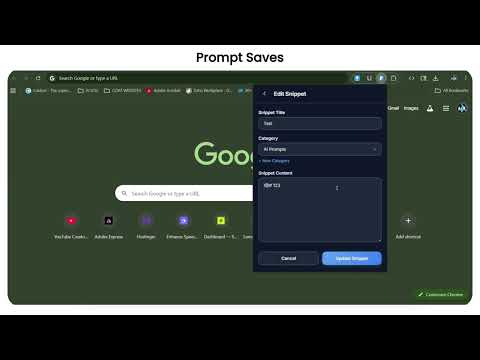
Save any text, code, or AI prompt with one click. Organize, pin, and copy instantly — your snippet vault in the toolbar.
Prompt Saves — Your Personal Snippet Vault, Always One Click Away Stop losing your best prompts, code snippets, and templates across random notes apps. Prompt Saves lives in your Chrome toolbar — ready to save or retrieve anything in one click, without leaving your current tab. ━━━━━━━━━━━━━━━━━━━━━━━━━━━━━━ WHAT PROMPT SAVES DOES Save any reusable text - AI prompts, code templates, email replies, SQL queries, meeting agendas - and copy it back instantly whenever you need it. No sign-in. No cloud. Fully private. ━━━━━━━━━━━━━━━━━━━━━━━━━━━━━━ KEY FEATURES One-Click Save & Copy Save any selected text from any webpage instantly. Copy snippets to clipboard in one click - the most common action takes exactly one click. Smart Categories Organize snippets into color-coded categories: "AI Prompts", "Code", "Email Templates", or anything you define. Visual badges make finding things effortless. Pin Your Favorites Pin your most-used snippets to the top. Drag-and-drop to reorder pinned items exactly how you want. Instant Fuzzy Search Search across all snippet titles and content simultaneously. Results update as you type - find anything in under a second. Auto-Fill from Selection Highlight text on any webpage, open Prompt Saves, and it auto-fills into the save form. Saving is one click away. Share as Text or Markdown Share snippets as plain text or formatted Markdown - perfect for Slack, email, Discord, or documentation. Import & Export (JSON) Export all snippets as JSON for backup. Import from another device with automatic duplicate detection. Dark Mode Only Sleek, eye-friendly dark interface designed for power users. 100% Private - No Account Needed All data is stored locally using the Chrome Storage API. Nothing leaves your browser. No accounts, no cloud uploads, no tracking of any kind. ━━━━━━━━━━━━━━━━━━━━━━━━━━━━━━ PERFECT FOR • AI Power Users - Save and organize ChatGPT, Claude, Gemini prompts • Developers - Store code snippets, Git commands, regex, config templates • Writers & Creators - Keep email templates, social copy, brand guidelines • Support & Sales - Store canned replies, scripts, FAQs for instant access • Anyone - Addresses, signatures, meeting agendas, frequently typed text ━━━━━━━━━━━━━━━━━━━━━━━━━━━━━━ FREE vs PRO Free Tier (Forever Free): ✓ Up to 30 snippets ✓ 5 custom categories ✓ All core features ✓ Full import / export Pro — One-Time Purchase ($3.99): ✓ Unlimited snippets ✓ Unlimited categories ✓ Ad-free experience ✓ Priority support ✓ Pay once, use forever — no subscriptions ━━━━━━━━━━━━━━━━━━━━━━━━━━━━━━ 🛡️ PRIVACY FIRST Prompt Saves stores everything locally on your device. We collect no personal data, require no sign-up, and do not track browsing. The only network request is an optional call to our licensing provider (LemonSqueezy) when you activate a Pro license key. ━━━━━━━━━━━━━━━━━━━━━━━━━━━━━━ 📧 SUPPORT & FEEDBACK Found a bug or have a feature request? Email: nexaurastudios@gmail.com ⭐⭐⭐⭐⭐ If Prompt Saves saves you time, please leave a 5-star rating — it helps others discover the extension and keeps development going!
4 out of 51 rating
Details
- Version1.0.1
- UpdatedJune 10, 2026
- FeaturesOffers in-app purchases
- Offered byNexaura Dev
- Size34.54KiB
- LanguagesEnglish
- Developer
Email
nexaurastudios@gmail.com - Non-traderThis developer has not identified itself as a trader. For consumers in the European Union, please note that consumer rights do not apply to contracts between you and this developer.
Privacy

This developer declares that your data is
- Not being sold to third parties, outside of the approved use cases
- Not being used or transferred for purposes that are unrelated to the item's core functionality
- Not being used or transferred to determine creditworthiness or for lending purposes
Support
For help with questions, suggestions, or problems, please open this page on your desktop browser