

Prompt Navigator
2 ratings
)
Overview
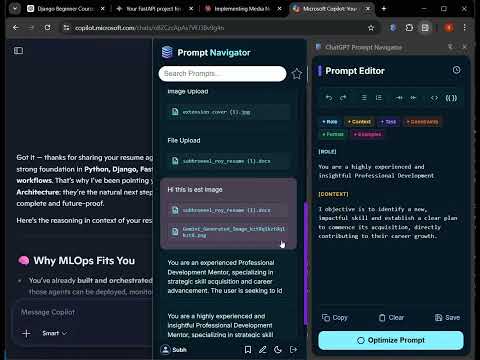
Navigate to prompts in ChatGPT, Claude, Gemini and Copilot via a slide-out sidebar.
Tired of Lost Prompts and Endless Scrolling? Take Control of Your AI Workflow. If you use ChatGPT, Claude, Gemini and Copilot AI tools daily, you know the pain: an incredible response gets buried in a mountain of text, or a perfect prompt is lost forever. Stop wasting time scrolling through endless chat histories. Prompt Navigator & Editor is the ultimate AI companion that transforms how you interact with LLMs. Organize, optimize, navigate, and perfect your AI prompts directly within your browser. Key Features to Supercharge Your AI Experience ⚡ Instant Prompt Navigation: Click on any past user prompt from our clean sidebar menu to instantly navigate to that exact section of the chat. 🔍 Smart Search & Bookmarks: Easily locate historical conversations with keyword search. Bookmark critical turning points in your chats for one-click access later. 📁 Cloud-Synced Prompt Library: Save your high-performing prompts into organized, custom folders. Access your personal prompt library from any device, anytime. ✍️ Advanced AI Prompt Editor: Craft flawless prompts with a dedicated workspace. Features include advanced editing tools, rich formatting, and a Drafts section to save works-in-progress before hitting send. 🤖 AI Prompt Optimizer & Enhancer: Turn basic ideas into expert-level prompts. Our built-in AI automatically refines, adds context, and optimizes your prompts using proven engineering frameworks to guarantee superior AI responses every single time. 🪄 AI-Powered Variables & Templates: Create dynamic prompt templates. Insert placeholders (e.g., [TASK], [ROLE]) and let the extension help you fill them out rapidly. Why AI Power Users Choose Prompt Navigator Boost Productivity: Cut down your AI management time by 50%. Eliminate Prompt Loss: Your best ideas and setups are securely stored and organized. Better AI Outputs: Stop settling for generic AI answers. Write better inputs, get flawless outputs. Stop fighting the chat interface. Install Prompt Navigator & Editor today and unlock a truly frictionless AI workflow!
5 out of 52 ratings
Details
- Version1.5.2
- UpdatedJune 22, 2026
- Offered bySubhroneel Roy
- Size367KiB
- LanguagesEnglish
- Developer
Email
roysubhroneel@gmail.com - Non-traderThis developer has not identified itself as a trader. For consumers in the European Union, please note that consumer rights do not apply to contracts between you and this developer.
Privacy

Prompt Navigator has disclosed the following information regarding the collection and usage of your data. More detailed information can be found in the developer's privacy policy.
Prompt Navigator handles the following:
This developer declares that your data is
- Not being sold to third parties, outside of the approved use cases
- Not being used or transferred for purposes that are unrelated to the item's core functionality
- Not being used or transferred to determine creditworthiness or for lending purposes
Support
For help with questions, suggestions, or problems, please open this page on your desktop browser