


Overview
Batch, sequence, and schedule prompt runs on ChatGPT. Build prompt runlists and set delays. Free tier and Pro Versions.
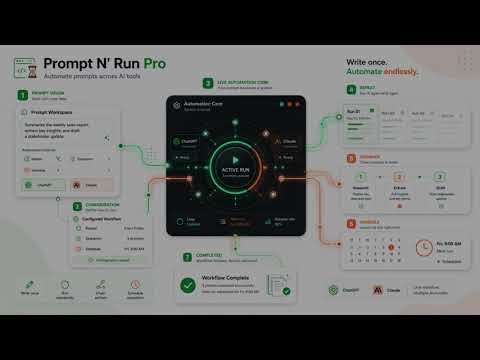
Overview Prompt automation for ChatGPT in your own browser. Prompt N' Run Pro for ChatGPT helps you repeat prompts, chain different prompts in order, and schedule prompt runs for later. It works directly inside your logged-in ChatGPT.com browser tab, so you can build automated ChatGPT workflows without an API key or a separate prompt-processing service. Want to run research, drafting, summaries, QA checks, content workflows, or daily prompt routines without manually sending every prompt yourself? Here are 🔟 reasons to choose Prompt N' Run Pro for ChatGPT. 1️⃣ Runs directly on ChatGPT.com Use Prompt N' Run in your logged-in ChatGPT browser tab. 2️⃣ No API key required Automate browser-based ChatGPT workflows without setting up API access. 3️⃣ Repeat, Sequence, and Schedule in one extension Use one tool for batch runs, ordered prompt chains, and scheduled automation. 4️⃣ Repeat prompts for batch work Send the same prompt multiple times with your chosen repeat count and delay. 5️⃣ Queue different prompts in order Use Sequence to run multi-step workflows where each prompt can be different. 6️⃣ Schedule prompt runs for later Send prompts at selected times or create daily scheduled prompt routines. 7️⃣ Smart completion detection Prompt N' Run waits until ChatGPT is finished before sending the next prompt. 8️⃣ Built for longer ChatGPT responses Completion detection can wait through extended-thinking responses and slower outputs. 9️⃣ Adjustable workflow controls Set delays, wait limits, quiet thresholds, loops, and other automation behavior. 🔟 Pro controls for serious workflows Pro unlocks sequences, schedules, unlimited repeats, long delays, unlimited wait time, higher quiet thresholds, logs, and diagnostics. 🔁🔁🔁 Repeat Mode 🔁🔁🔁 Use Repeat when you want to send the same prompt more than once. ▸ Choose how many times the prompt should run ▸ Set delays between runs ▸ Use short or long delays depending on the task ▸ Let Prompt N' Run wait for ChatGPT to finish before continuing ▸ Useful for batch drafting, repeated analysis, testing prompts, or recurring prompt patterns 🧩🧩🧩 Sequence Mode 🧩🧩🧩 Use Sequence when each prompt needs to be different. ▸ Queue multiple prompts in the exact order you choose ▸ Build multi-step ChatGPT workflows ▸ Run research, summarize, rewrite, compare, extract, or transform content in stages ▸ Create prompt chains for writing, analysis, review, QA, and structured work ▸ Loop sequences when you need the same workflow to run again 🕒🕒🕒 Schedule Mode 🕒🕒🕒 Use Schedule when a prompt should run later. ▸ Schedule a prompt for a specific time ▸ Create daily scheduled prompt routines ▸ Prepare prompts in advance ▸ Use scheduled runs for reminders, recurring checks, daily workflows, or time-based tasks ▸ Let Prompt N' Run wait until the scheduled time and then send the prompt 🧠🧠🧠 Smart Completion Detection 🧠🧠🧠 Prompt N' Run is designed to wait before sending the next prompt. ▸ Detects when ChatGPT has finished responding ▸ Helps avoid sending the next prompt too early ▸ Supports longer outputs and extended-thinking responses ▸ Quiet threshold controls help handle complex tasks that need more time ▸ Higher Pro thresholds give longer workflows more room to complete cleanly 🧭🧭🧭 Popup and Side Panel Controls 🧭🧭🧭 Use the extension in the view that fits your workflow. ▸ Use the popup for quick access ▸ Use the side panel for a larger workspace ▸ Resize the panel to fit your browser layout ▸ Switch views while keeping your workflow organized ▸ Manage repeat, sequence, and schedule controls from the extension interface 🚀🚀🚀 Pro Features 🚀🚀🚀 Prompt N' Run Pro unlocks advanced automation controls for heavier ChatGPT workflows. ▸ Sequences ▸ Schedules ▸ Unlimited repeats ▸ Long delays ▸ Unlimited wait time ▸ Higher quiet thresholds ▸ Logs ▸ Diagnostics Prompt N' Run is useful for: ▸ Researchers running repeated analysis ▸ Writers building multi-step drafting workflows ▸ Students organizing study or summary routines ▸ Operators running structured ChatGPT tasks ▸ Teams testing prompt behavior ▸ Creators batching content workflows ▸ Anyone who wants ChatGPT workflows to run with less manual babysitting 📧 Contact 📧 Questions, suggestions, or feature requests? Contact us here: https://promptnrun.com/contact/ Thank you for using Prompt N' Run.
0 out of 5No ratings
Details
- Version1.2.0
- UpdatedJuly 2, 2026
- FeaturesOffers in-app purchases
- Size85.83KiB
- LanguagesEnglish
- DeveloperWebsite
Email
contact@bensimonlabs.com - Non-traderThis developer has not identified itself as a trader. For consumers in the European Union, please note that consumer rights do not apply to contracts between you and this developer.
Privacy

Prompt N' Run - ChatGPT has disclosed the following information regarding the collection and usage of your data. More detailed information can be found in the developer's privacy policy.
Prompt N' Run - ChatGPT handles the following:
This developer declares that your data is
- Not being sold to third parties, outside of the approved use cases
- Not being used or transferred for purposes that are unrelated to the item's core functionality
- Not being used or transferred to determine creditworthiness or for lending purposes
Support
For help with questions, suggestions, or problems, visit the developer's support site