Item logo image for Prompt Kit

Prompt Kit

5.0(

1 rating

)
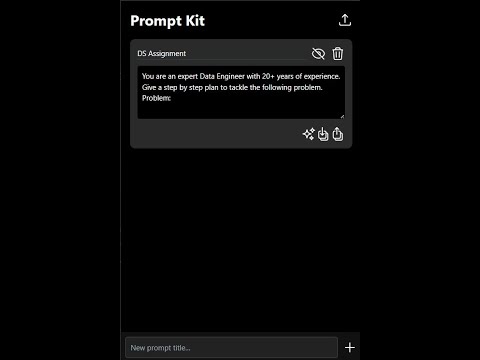
Item media 2 (screenshot) for Prompt Kit
Item video thumbnail
Item media 2 (screenshot) for Prompt Kit
Item video thumbnail
Item media 2 (screenshot) for Prompt Kit

Overview

A simple inventory for your prompts - saved in your own Google Drive.

Imagine this. You constructed a great personalized prompt to do a certain task, for example summarizing research articles or writing a cover letter for a job opening. Now every time you want to use it, you have to find the prompt, copy the text you want to use like the article or the job description, paste it into your prompt, and then copy the entire thing to finally use it. To get rid of these extra few steps, I built this really simple chrome extension. Its main feature, Merge and Copy, directly solves this problem. You just copy the text you want to work on, like an article or some notes, then with a single click you can merge it with a saved prompt like '<Some thoughtfully engineered context> Summarize the following text for me:'. The full, combined prompt is copied to your clipboard, ready to go. Of course, it also works as a simple inventory for all your prompts. The saved prompts remain completely private and secure since they are saved on your own google drive. This also means you can get your prompts back if you reinstall the extension or use it on a new computer. None of your data ever passes through my servers or is stored by me.

Details

  • Version
    1.1.0
  • Updated
    September 1, 2025
  • Offered by
    shaheerahmad57575
  • Size
    90.93KiB
  • Languages
    English
  • Developer
    Email
    shaheerahmad57575@gmail.com
  • Non-trader
    This developer has not identified itself as a trader. For consumers in the European Union, please note that consumer rights do not apply to contracts between you and this developer.

Privacy

Manage extensions and learn how they're being used in your organization
The developer has disclosed that it will not collect or use your data.

This developer declares that your data is

  • Not being sold to third parties, outside of the approved use cases
  • Not being used or transferred for purposes that are unrelated to the item's core functionality
  • Not being used or transferred to determine creditworthiness or for lending purposes

Support

For help with questions, suggestions, or problems, visit the developer's support site

Related

CloudPrompt

4.5

Save, organize, and access your AI prompts instantly. Stored privately in your Google Drive.

PromptKeeper

4.5

Save, organize, and optimize AI prompts. Sync via Google Drive. Local AI with Gemini Nano. Side Panel for easy paste-to-page.

Multiple Copy & Clipboard History

5.0

Make multiple copies and save to your clipborad history

Bloco de Notas

0.0

Um bloco de notas minimalista que salva automaticamente suas notas no armazenamento sincronizado do Chrome.

Google Docs New

4.4

Try Google Docs New: easily create Docs, Forms, Spreadsheets, and access Drive from your browser.

Documents App

5.0

Use Documents App extension to open google docs quickly via the google drive app for easy access.

To do list - Keep it simple

4.6

A simple but powerful Chrome to-do list to organize tasks your way.

Desktop app for Google Tasks

4.7

Standalone Desktop app for Google Tasks. Export and share your Google Tasks lists in one click.

Prompt Saver

4.9

Save and manage your prompts

G-Note AI: Simple & Modern Notes App

4.8

Simple & Modern Notes App. Sync with Google Drive. Real-time collaboration.

Copy History +: The Best Clipboard History Manager Tool

4.6

Secure Clipboard History Manager to auto save copy paste text & snippets. Free easy tool to manage clipboard and boost productivity.

Easy Copy Paste Text

5.0

Easily copy and manage text snippets from web pages with rich text support and Google Drive sync.

CloudPrompt

4.5

Save, organize, and access your AI prompts instantly. Stored privately in your Google Drive.

PromptKeeper

4.5

Save, organize, and optimize AI prompts. Sync via Google Drive. Local AI with Gemini Nano. Side Panel for easy paste-to-page.

Multiple Copy & Clipboard History

5.0

Make multiple copies and save to your clipborad history

Bloco de Notas

0.0

Um bloco de notas minimalista que salva automaticamente suas notas no armazenamento sincronizado do Chrome.

Google Docs New

4.4

Try Google Docs New: easily create Docs, Forms, Spreadsheets, and access Drive from your browser.

Documents App

5.0

Use Documents App extension to open google docs quickly via the google drive app for easy access.

To do list - Keep it simple

4.6

A simple but powerful Chrome to-do list to organize tasks your way.

Desktop app for Google Tasks

4.7

Standalone Desktop app for Google Tasks. Export and share your Google Tasks lists in one click.

Google apps