

AI Productivity Toolbox - RightClik
7 ratings
)
Overview
Prompt library, bookmarks, timestamps, navigation, badges, and toolbox for ChatGPT, Claude, and Gemini. Saved data stays local.
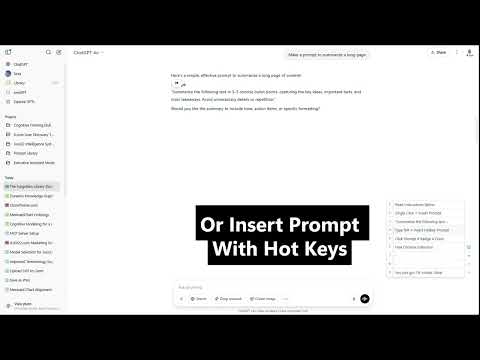
Formerly Prompt Counter and Jumper, RightClik is now an AI productivity toolbox for ChatGPT, Claude, and Gemini. ✅ Prompt Counter — See how many prompts you've sent per conversation, right in the sidebar. 🎨 Color Badges — Tag conversations with 5 cycling colors. Filter and sort in the Conversations tab. 📋 Prompt Library — Save your best prompts in 3 folders. Click to insert at cursor, or type %1 to hotkey-insert. 🔖 Bookmarks — Save any AI response with one click. Organize in folders, preview, copy, or download as markdown. ⏱️ Timestamps — See when each prompt was sent. 🖱️ Right-Click Toolbox — Open the floating toolbox from plain chat text or empty space while native menus stay available on selections, links, code, media, and the chat input. 🧭 Navigator — Up/down arrows to jump between prompts. Double-tap arrow keys for shortcuts. 📐 Wide Mode — Expand the chat width with one toggle. Works on: chatgpt.com · claude.ai · gemini.google.com
5 out of 57 ratings
Details
- Version6.0.3
- UpdatedJune 20, 2026
- Size144KiB
- LanguagesEnglish
- Developer
Email
tjmills111@gmail.com - Non-traderThis developer has not identified itself as a trader. For consumers in the European Union, please note that consumer rights do not apply to contracts between you and this developer.
Privacy

This developer declares that your data is
- Not being sold to third parties, outside of the approved use cases
- Not being used or transferred for purposes that are unrelated to the item's core functionality
- Not being used or transferred to determine creditworthiness or for lending purposes