Item logo image for ProfitDekho Lens

ProfitDekho Lens

profitdekho.in
4.4(

28 ratings

)
ExtensionTools1,000 users
Item media 4 (screenshot) for ProfitDekho Lens
Item media 5 (screenshot) for ProfitDekho Lens
Item media 1 (screenshot) for ProfitDekho Lens
Item media 2 (screenshot) for ProfitDekho Lens
Item media 3 (screenshot) for ProfitDekho Lens
Item media 4 (screenshot) for ProfitDekho Lens
Item media 5 (screenshot) for ProfitDekho Lens
Item media 1 (screenshot) for ProfitDekho Lens
Item media 2 (screenshot) for ProfitDekho Lens
Item media 1 (screenshot) for ProfitDekho Lens
Item media 2 (screenshot) for ProfitDekho Lens
Item media 3 (screenshot) for ProfitDekho Lens
Item media 4 (screenshot) for ProfitDekho Lens
Item media 5 (screenshot) for ProfitDekho Lens

Overview

All-in-one Meesho seller toolkit — Profit & Loss, order analytics, smart label crop, Manojit AI, listing SEO & photo download.

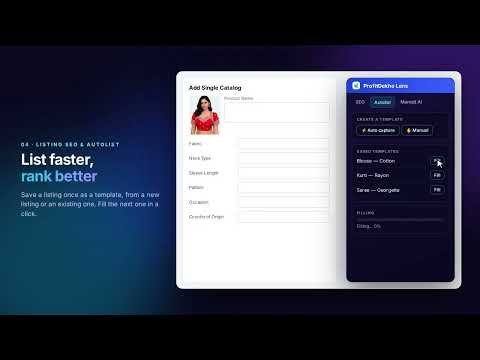
ProfitDekho Lens is a complete toolkit for Indian e-commerce sellers on Meesho and Flipkart. It brings profit tracking, order analytics, packing and label work, listing SEO and an AI seller assistant together in one clean panel — right inside the pages you already work on. No spreadsheets, no switching tabs. WHAT YOU GET PROFIT & LOSS (Meesho) Upload your Meesho "Payments to date" report and instantly see a settlement- based, SKU-wise profit breakdown. It separates your real numbers — settlement amount, ad cost, product cost, packing cost and wrong/damage return loss — so you finally know your true net profit per product. Add your own packing and return-loss figures and they are saved per file, so your P&L stays accurate every time you reopen it. Export the full breakdown to Excel in one click, and compare the last three months side by side. ANALYTICS (Meesho) Upload your Meesho Order Report and get a clear performance dashboard — total orders, delivered, cancelled, RTO, exchange and returns — plus per-SKU numbers and state-wise demand, so you can spot your winners and your loss-makers at a glance. ORDERS, MANIFEST AND PICK LIST (Meesho) Your Hold, Pending and Ready to Ship piles in one place, with search and filters. Take a snapshot and it becomes a manifest: one line per item with the sizes added up, ready to carry to the racks. Your last five snapshots are kept on your ProfitDekho account, so they are there on every computer you sign in from. Copy a list as text, print it, download it as a PDF, email it or send it on WhatsApp. Merge several snapshots — even from different shops and different days — into one sheet that carries its own record of what went into it, and nothing is ever picked twice. LIVE PROFIT METER (Meesho) See what the pile in front of you is actually worth once it has played out. Give your margin, packing cost, RTO rate, return rate and return cost, and the estimate follows your Ready to Ship pile as orders arrive — RTO earns nothing, only the net delivered pieces pay, and packing comes off every piece. If you have been uploading payment files, one tap fills those rates in from your own last three months instead of you typing them from memory. SKU MAPPING (Meesho) One blouse listed five times is five lines on every sheet. Give those spellings a single name once, and your Manifest, your Live Profit Meter and your label printing all use it — you never type it twice. Pull your SKU list straight from your Meesho inventory file, or upload it yourself. SMART LABEL MANAGER Drop your Meesho, Flipkart or Amazon shipping label PDFs and print them the way you want. Crop for thermal or A4 printers, sort by SKU or by courier, generate a pick list, keep or trim the tax-invoice portion, circle multi-quantity orders, stamp your shop name or logo on every label, and merge several PDFs into one. Draw your own crop box once and it stays until you remove it. On Meesho you can print your own SKU names on the label with the catalog SKU beside them, and the whole pile comes out one name at a time, in size order — 30, 32, 34, then S, M, L, XL. A label history keeps your last 30 days of prints on your own computer, date-wise, so you can re-download any file with a single click. MANOJIT AI — YOUR SELLER ASSISTANT An AI assistant trained for Indian marketplace sellers, available exactly where you need it: On the Meesho supplier dashboard: ask any Meesho selling question and get deep, practical answers on pricing, returns, RTO, settlements, claims and ad strategy. On a Meesho product page: instant insight on price, demand and rating, plus a suggested selling price and keywords. On the Meesho listing page: help writing titles, descriptions and keywords, and fixing QC or upload errors. On Flipkart: the same listing help tuned for the Flipkart Seller Hub. LISTING SEO AND AUTOLIST (Meesho & Flipkart) Generate high-converting titles, descriptions and search keywords so more buyers find your products. On Meesho, save your own listing templates and fill a new listing from one of them instead of retyping the same fields. ONE-CLICK PRODUCT PHOTO DOWNLOAD Download product images from marketplace listing pages in one click — handy for research, catalogs and re-listing across platforms. MORE TOOLS Best shipping cost check, straight from the Meesho product page. Meesho bulk price increase, across your whole catalogue at once instead of listing by listing. Amazon and Flipkart profit/loss calculator from your settlement file. Amazon and Flipkart label crop, with your SKU stamped on the label. A short tutorial video in every section, so nothing needs a manual. EXTENSION LOCK Protect sensitive sections with a PIN. It stays on your own device. RUNS ON A SLOW COMPUTER TOO The panel checks your machine and turns its background motion off by itself on a low-end PC, and you can force Low or High yourself in Other Features. Heavy chart and spreadsheet libraries now load only when a chart or a file actually needs them, so ordinary pages stay light. WHY SELLERS USE PROFITDEKHO LENS See your real profit, not just your sales. Cut returns and RTO with data, not guesswork. Pack and print faster, with one name per item instead of five. Get expert selling answers instantly, in Hinglish or English. PRICING Free trial included. Upgrade any time at profitdekho.in/subscription for unlimited access. SUPPORT Email: manojit@profitdekho.in Phone: 011-69296459 Hours: Monday to Friday, 11:00 AM - 7:00 PM WhatsApp support is available inside the extension (Other Features tab). PRIVACY ProfitDekho Lens works only on Meesho, Flipkart and Amazon seller pages. Buyer details never leave your browser. When a shipping label is read, the customer name, address and phone number on it are used to cut the label and are then discarded — they are never sent anywhere or saved. Label PDFs are processed in memory and never written to disk. Some of your own working data is saved to your ProfitDekho account, because that is what makes it available on every computer you sign in from: your uploaded Meesho reports, your manifest snapshots (SKU, size, quantity and order number only), your SKU names and your saved cost figures. You can delete any snapshot from the panel. Nothing is sold or shared with anyone. Built for Indian sellers by ProfitDekho.in.

Details

  • Version
    5.24.21
  • Updated
    September 29, 2026
  • Size
    1.77MiB
  • Languages
    English
  • Developer
    Manojit Goldar
    Chandpara Bazar Chandpara,North 24 Pgs Chandpara, West Bengal 743245 IN
    Website
    Email
    Manojit@profitdekho.in
    Phone
    +91 96791 44569
  • Trader
    This developer has identified itself as a trader per the definition from the European Union and committed to only offer products or services that comply with EU laws.

Privacy

Manage extensions and learn how they're being used in your organization

ProfitDekho Lens has disclosed the following information regarding the collection and usage of your data. More detailed information can be found in the developer's privacy policy.

ProfitDekho Lens handles the following:

Personally identifiable information
Financial and payment information
Authentication information
Website content

This developer declares that your data is

  • Not being sold to third parties, outside of the approved use cases
  • Not being used or transferred for purposes that are unrelated to the item's core functionality
  • Not being used or transferred to determine creditworthiness or for lending purposes

Support

For help with questions, suggestions, or problems, visit the developer's support site

Google apps