

Productivity Clock

Overview
Track your work & focus sessions. Pomodoro timer, daily goals, monthly reports — all in one clean interface.
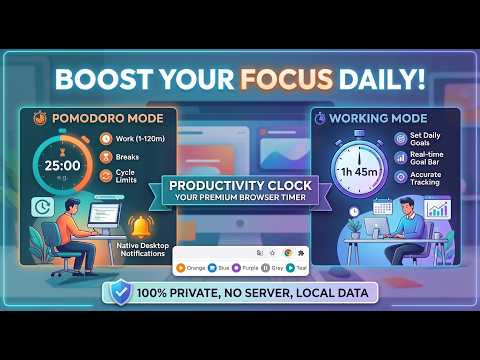
Productivity Clock is a lightweight, privacy-first focus timer that lives in your browser toolbar. All data is saved locally in Chrome — nothing is ever sent to any server, and no account is required. ── WORKING MODE ── Start a named working or study session and watch your elapsed time count up in real time. Set a daily focus goal in hours and minutes, then track progress with a live goal bar inside the popup. Pause and resume anytime without losing a single second — every moment is accurately banked, even if the popup is closed. When your daily goal is reached, the extension marks it as complete. ── POMODORO MODE ── Classic focus-break cycling with full control over every setting: • Work time — any duration from 1 to 120 minutes • Break time — a short rest between each focus block (set to 0 to skip breaks entirely) • Loop break — an extra rest gap inserted between complete cycles, separate from the per-cycle break. Useful for longer study marathons. • Cycle limit — choose exactly how many cycles to run, or set to 0 for infinite. The maximum allowed is automatically calculated from your chosen times so the total never exceeds 24 hours. At the end of each phase, Chrome sends a native desktop notification — even when the popup is closed — so you always know when to switch. ── POMODORO INSIDE WORKING ── Already running a working session? Start a Pomodoro directly from the working panel without interrupting your session. Configure work time, break, loop break, and cycle count inline, then tap Start. The working timer keeps accumulating in the background, and both modes contribute to the same daily total. ── LIVE ICON BADGE ── The extension icon shows your current state at a glance, even when the popup is closed: ▶ Orange — Pomodoro focus phase running ☕ Blue — Pomodoro break phase ⏺ Purple — Loop break phase ⏸ Grey — Pomodoro paused ▶ Teal — Working session running ⏸ Teal — Working session paused (blank) — Idle ── DAILY STATS ── View today's total focus time and goal progress right in the popup. Open the full stats page for a detailed day-by-day history. Use "Clear Today" to reset the current day's data with a single tap. ── COMPANION WEBSITE ── Productivity Clock also exists as a full-featured web app at https://productive-clock.netlify.app/ — with a live analog clock, multiple colour themes, a productivity calendar, monthly visual reports, streak tracking, and more. The extension and the website share the same local storage keys, so data recorded in the extension appears on the website automatically when opened in the same browser. ── PRIVACY ── No accounts. No servers. No analytics. No trackers. Everything is stored exclusively in your browser using Chrome's local storage. Your data never leaves your device.
0 out of 5No ratings
Details
- Version1.0.1
- UpdatedMay 26, 2026
- Offered bybright_day_digital
- Size91.93KiB
- LanguagesEnglish (United States)
- Developer
Email
ap1484480@gmail.com - Non-traderThis developer has not identified itself as a trader. For consumers in the European Union, please note that consumer rights do not apply to contracts between you and this developer.
Privacy

This developer declares that your data is
- Not being sold to third parties, outside of the approved use cases
- Not being used or transferred for purposes that are unrelated to the item's core functionality
- Not being used or transferred to determine creditworthiness or for lending purposes
Support
For help with questions, suggestions, or problems, visit the developer's support site