


Overview
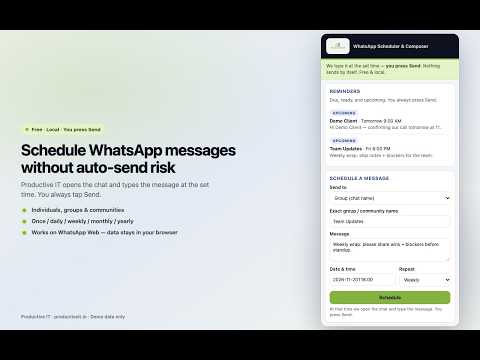
Schedule WhatsApp messages to people, groups & communities. Format faster; you always press Send. By Productive IT.
Productive IT — WhatsApp Scheduler & Composer helps you schedule and write WhatsApp Web messages without auto-sending anything. WHAT IT DOES • Schedule messages to individuals, groups, and communities • At the set time, Chrome opens the chat and types your message • YOU press Send — nothing is sent automatically (safer for personal WhatsApp) • In-chat toolbar: Schedule, Bold / Italic / Strike / Code, Lists, Templates • Quick time chips: In 1 hour · Tonight 8pm · Tomorrow 9am • Manager page: schedules calendar, address book, templates, backup/CSV, health check • Free forever · works fully offline · no account · no servers · your data stays in Chrome WHY INSTALL IT Stop forgetting follow-ups. Prepare birthday, festival, and business reminders in advance. Write faster with formatting and templates — then send only when you’re happy with the message. HOW TO USE 1. Open web.whatsapp.com and sign in 2. Open a chat, type your message, tap Schedule (or use a quick chip) 3. When it’s time, review the typed message and press Send By Productive IT · productiveit.in
0 out of 5No ratings
Details
- Version1.4.7
- UpdatedNovember 20, 2026
- Size49.88KiB
- LanguagesEnglish
- DeveloperVirender DhimanWebsite
House No 231/6, Gandhi Nagar Karnal, Haryana 132001 INEmail
info@productiveit.inPhone
+91 74047 54700 - TraderThis developer has identified itself as a trader per the definition from the European Union and committed to only offer products or services that comply with EU laws.
Privacy

This developer declares that your data is
- Not being sold to third parties, outside of the approved use cases
- Not being used or transferred for purposes that are unrelated to the item's core functionality
- Not being used or transferred to determine creditworthiness or for lending purposes
Support
For help with questions, suggestions, or problems, visit the developer's support site