“Prodegic Quick Launcher”的产品徽标图片

Prodegic Quick Launcher

Prodegic Quick Launcher的项目媒体 5(屏幕截图)
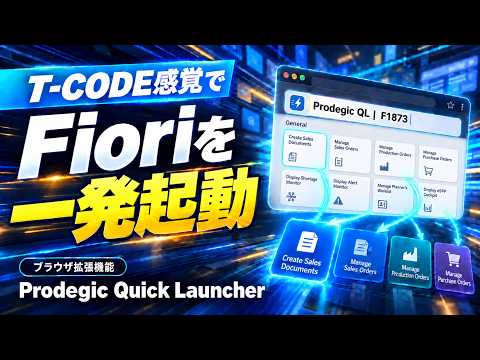
产品视频缩略图
Prodegic Quick Launcher的项目媒体 2(屏幕截图)
Prodegic Quick Launcher的项目媒体 3(屏幕截图)
Prodegic Quick Launcher的项目媒体 4(屏幕截图)
Prodegic Quick Launcher的项目媒体 5(屏幕截图)
产品视频缩略图
产品视频缩略图
Prodegic Quick Launcher的项目媒体 2(屏幕截图)
Prodegic Quick Launcher的项目媒体 3(屏幕截图)
Prodegic Quick Launcher的项目媒体 4(屏幕截图)
Prodegic Quick Launcher的项目媒体 5(屏幕截图)

概述

快速启动 SAP® Fiori® 应用和事务代码

Skip searching through the SAP® Fiori® launchpad. Launch apps instantly by Fiori ID, transaction code, or app name, just like the command field in SAP GUI. ■ Launch instantly - Type a Fiori ID (e.g. F1873), a transaction code (e.g. VA01), or part of an app name, and open it in one step - Launch any transaction code, even one without a launchpad tile (such as SE16H), just like the SAP GUI command field - Enter “ql, space, ID” in the address bar to launch from any tab - When the input field is empty, recently used apps are displayed and can be reopened with a single click - No prior configuration is required, such as SAP server settings ■ Get and share launch URLs - Generate a direct launch URL for the app you are viewing - Create URLs that open a specific record, such as a sales order - Copy as a named link like "[F1873] Manage Sales Orders" and paste it straight into Outlook or Teams ■ Work across systems - Register your development, quality, and production systems - Build a URL to open the same app on another system or client in one step ■ Check technical details - See the Fiori ID, UI type (Fiori elements, freestyle, Web Dynpro, SAP GUI), and app version - See the OData services an app uses and open $metadata with one click ■ How it differs from the launchpad's built-in transaction code search The SAP Fiori launchpad can only open apps that have a tile assigned. Prodegic Quick Launcher also opens transaction codes without tiles, works from any tab, and adds URL sharing, system switching, and technical details. It works with existing SAP S/4HANA releases. ■ Built for trust - No communication with any external server - All data stays in your browser - Page information is read only when you click the icon or launch from the address bar ■ Languages English, Japanese, Simplified Chinese ■ License Free for personal learning, research, and evaluation. Continued business use requires an annual corporate license. Organizations may use it at work for up to 30 days to evaluate it. Contact: [your contact email] SAP, SAP Fiori, and SAP S/4HANA are trademarks or registered trademarks of SAP SE in Germany and other countries. This extension is not an SAP SE product and is not endorsed or supported by SAP SE. Developed by Prodegic Consulting Co., Ltd.

0 星(5 星制)无评分

详细了解结果和评价。

详情

  • 版本
    2.3.0
  • 上次更新日期
    2026年10月21日
  • 大小
    77.04KiB
  • 语言
    3 种语言
  • 开发者
    プロデジックコンサルティング株式会社
    西区北幸1丁目11−5 相鉄KSビル 6F 横浜市, 神奈川県 220-0004 JP
    网站
    邮箱
    support@prodegic.co.jp
    电话
    +81 70-8382-8034
  • 交易者
    此开发者已根据欧盟的定义将自己标识为交易者,并承诺仅提供符合欧盟法律要求的产品或服务。
  • D-U-N-S
    699593489

隐私权

管理扩展程序并了解它们在组织中的使用情况
该开发者已披露,此产品不会收集或使用您的数据。 如需了解详情,请参阅开发者的privacy policy。

该开发者已声明,您的数据:

  • 不会因未获批准的用途出售给第三方
  • 不会为实现与产品核心功能无关的目的而使用或转移
  • 不会为确定信用度或放贷目的而使用或转移

支持

若有任何疑问、建议或问题,请访问开发者的支持网站

相关

SAP Cloud ERP Launchpad

5.0

SAP Cloud ERP Launchpad,适用于 SAP S/4HANA 公共和私有云的浏览器扩展

SAP Knowledge Agent

5.0

Real-time SAP documentation assistant using On-the-Fly RAG

SAP B1 Table Finder

5.0

Instantly search and explore SAP Business One table definitions, primary keys, and object types.

Zap Office

0.0

CRM e Respostas Rápidas para o WhatsApp Web

FioriFlow — SAP Fiori shortcuts & safety

0.0

Command palette, OData tester, T-code lookup, and a Dev/QA/Prod safety banner with production-action confirmations for SAP Fiori.

Stock Trading Bot(한투)

5.0

Apps Script 기반 자동 주식 시스템 매매 Bot(한투 REST API)

CPI Copilot Tools

5.0

Step map, compare and trace analysis for SAP CPI iFlows, read directly in your Integration Suite tab.

SAP Fiori System Info

0.0

Displays SAP system and client details on Fiori Launchpad Shell Bar

B1 Copilot — AI Assistant for SAP Business One

0.0

AI side panel for SAP Business One: ask questions, generate SQL, decode errors, build spreadsheets. Unofficial, not SAP-affiliated.

Get SAP Fiori Client

0.0

Retrieve the session SAP Fiori Client

Fiori Launchpad Helper

4.7

Speed up SAP Fiori work with launchpad shortcuts, bookmarks, OData testing, app lookup, and debug tools.

Flora: AI assistant for SAP Fiori Launchpad

0.0

AI assistant for SAP Fiori Launchpad, on-premise or BTP. Finds apps, fills filters, reads tables, explains screens. No SAP setup.

SAP Cloud ERP Launchpad

5.0

SAP Cloud ERP Launchpad,适用于 SAP S/4HANA 公共和私有云的浏览器扩展

SAP Knowledge Agent

5.0

Real-time SAP documentation assistant using On-the-Fly RAG

SAP B1 Table Finder

5.0

Instantly search and explore SAP Business One table definitions, primary keys, and object types.

Zap Office

0.0

CRM e Respostas Rápidas para o WhatsApp Web

FioriFlow — SAP Fiori shortcuts & safety

0.0

Command palette, OData tester, T-code lookup, and a Dev/QA/Prod safety banner with production-action confirmations for SAP Fiori.

Stock Trading Bot(한투)

5.0

Apps Script 기반 자동 주식 시스템 매매 Bot(한투 REST API)

CPI Copilot Tools

5.0

Step map, compare and trace analysis for SAP CPI iFlows, read directly in your Integration Suite tab.

SAP Fiori System Info

0.0

Displays SAP system and client details on Fiori Launchpad Shell Bar

搜索
清除搜索内容
关闭搜索框
Google 应用
主菜单
