

PrivyTranslate

Overview
Privately translate web pages and text with Chrome's built-in Translator or your local AI provider.
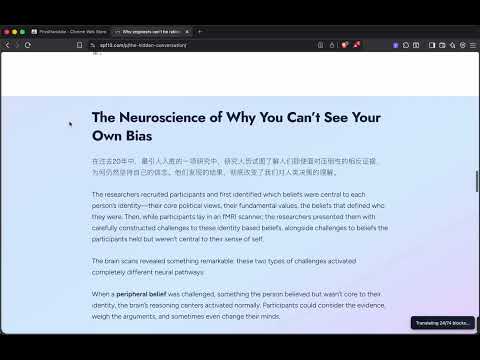
PrivyTranslate helps you read the web in another language while keeping you in control of where page text is processed. Choose the workflow that fits the page: - Overlay translations beside the original text. - Replace text in place, with a one-click restore option. - Compare original and translated text side by side. - Translate pasted text from a dedicated page. PrivyTranslate uses Chrome's built-in Translator by default when available. You can also connect it to a local provider such as Ollama, LM Studio, an OpenAI-compatible local endpoint, or the PrivyTranslate Local API. Page text is sent only to the provider you select. The extension has no analytics or tracking.
0 out of 5No ratings
Details
- Version0.7.6
- UpdatedAugust 28, 2026
- Offered byGuoyu Wang
- Size1.16MiB
- Languages10 languages
- Developer
Email
support@kenelite.com - Non-traderThis developer has not identified itself as a trader. For consumers in the European Union, please note that consumer rights do not apply to contracts between you and this developer.
Privacy

This developer declares that your data is
- Not being sold to third parties, outside of the approved use cases
- Not being used or transferred for purposes that are unrelated to the item's core functionality
- Not being used or transferred to determine creditworthiness or for lending purposes
Support
For help with questions, suggestions, or problems, please open this page on your desktop browser