

Private Screenshot, Blur & Annotate, Encrypted Sharing, Full Page Capture

Overview
Private screenshot tool: capture, blur & annotate on your device. Share by end-to-end encrypted link, only to people you choose.
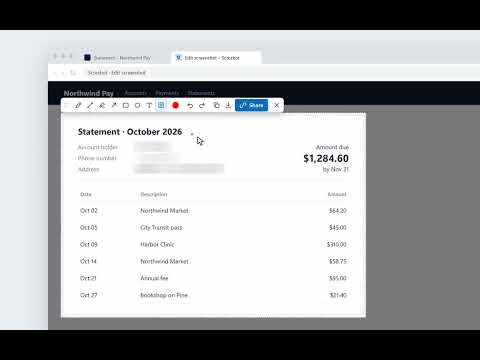
Screshot: Private Screenshot, Blur & Annotate, End-to-End Encrypted Sharing Your screenshots stay on your device until you decide otherwise. Capture any page in Chrome, blur emails, names and customer details, and point at what matters, all inside your browser. When you need a link, click Share: the screenshot is encrypted on your computer before it uploads, and the key goes only to the people you choose. Not even Screshot can see it. WHY SCRESHOT • Private by default: capturing, blurring, annotating, copying and downloading happen in your browser, with no account. Nothing leaves your computer until you click Share. • Blur & annotate in one editor: hide customer details in one drag, then add arrows, boxes or text. The blur is written into the pixels, not added as a layer. • Encrypted on your device: each shared screenshot gets its own AES-256 key, made in your browser. Screshot stores the encrypted file and never has the key. The name you give it, its size and dimensions are not encrypted. • You choose who can view: Only me (the default), Invited people (they sign in with their Screshot account), your team's Workspace, or Anyone with the link (the key travels in the link after the #, a part browsers never send to a server). • Change your mind any time: switch who can view without uploading again. Remove someone and the link stops working for them the next time it's opened. • Talk about it in private: comments on a shared screenshot are end-to-end encrypted too, with replies and @mentions for the people who can open it. HOW IT WORKS 1. Click the Screshot icon or press Ctrl+Shift+S (Mac: Cmd+Shift+S). For a whole scrolling page, right-click the icon and choose Capture full page, or press Alt+Shift+S (Mac: Option+Shift+S). 2. Drag to select the area you need, or double-click to keep the whole capture. 3. Blur anything sensitive, then add arrows, boxes or text. 4. Copy to the clipboard, download a PNG, or click Share for an end-to-end encrypted link. FEATURES • Capture the visible area in one click, or a full scrolling page (press Esc to cancel at any time) • Blur emails, names and other details by hand; the blur is written into the pixels • Blur works on visible-area captures; full-page captures can be copied, downloaded or shared as they are. • Arrows, lines, rectangles, ellipses, pencil, highlighter and text, in any color • Unlimited undo and redo • Sharp at full resolution on any display and zoom level • Copy to the clipboard and paste into your team chat, email or issue tracker, or download a PNG • Share by end-to-end encrypted link, including full-page captures, with 1 GB of encrypted storage free per account • Workspaces: share with your whole team in one click, still end-to-end encrypted • Encrypted comments with replies and @mentions on every shared screenshot • One dashboard on screshot.com for everything you've shared: rename, change who can view, restore from the trash or delete forever • Unlock with a passkey (fingerprint, face or device PIN) or your personal recovery code. No passwords to remember. PRIVATE BY DESIGN • No account needed to capture, blur, annotate, copy or download. Sign in with Google only when you want to share; signing in on the extension or the website signs you in on both. • Nothing leaves your computer unless you click Share. • No tracking or analytics inside the extension. No selling data, no ads, no training AI on your screenshots. • Five permissions, none with an install warning: – activeTab: captures only the tab you choose, when you ask – scripting: scrolls that tab during a full-page capture, then restores it – contextMenus: adds the capture options to the icon's right-click menu – storage: keeps your Screshot sign-in on this device – identity: opens Google sign-in when you choose to share How the encryption works: https://www.screshot.com/security#encryption KEYBOARD SHORTCUTS Capture • Visible area: Ctrl+Shift+S (Mac: Cmd+Shift+S) • Full page: Alt+Shift+S (Mac: Option+Shift+S) • Cancel a full-page capture: Esc Change these at chrome://extensions/shortcuts Editor (Mac: Control+Option instead of Ctrl+Alt) • Ctrl+Alt+B blur · Ctrl+Alt+A arrow · Ctrl+Alt+R rectangle · Ctrl+Alt+E ellipse • Ctrl+Alt+L line · Ctrl+Alt+P pencil · Ctrl+Alt+H highlighter · Ctrl+Alt+T text · Ctrl+Alt+K color • Ctrl+Z / Ctrl+Y undo and redo · Ctrl+C copy · Ctrl+S download · Esc close FOR TEAMS AND IT Deploy Screshot to every Chrome browser in your organization with the device management tools you already use. Capture and blur need no accounts or licenses, and sharing is opt-in for each person. Teams share through Workspaces, managed by their owners and admins. Deployment guide and security review pack: https://www.screshot.com/enterprise Questions or ideas: https://www.screshot.com/contact
4.0 out of 571 ratings
Details
- Version3.0.2
- UpdatedNovember 10, 2026
- Size102KiB
- LanguagesEnglish (United States)
- DeveloperWebsite
Email
screenshoteasy@gmail.com - Non-traderThis developer has not identified itself as a trader. For consumers in the European Union, please note that consumer rights do not apply to contracts between you and this developer.
Privacy

Private Screenshot, Blur & Annotate, Encrypted Sharing, Full Page Capture has disclosed the following information regarding the collection and usage of your data. More detailed information can be found in the developer's privacy policy.
Private Screenshot, Blur & Annotate, Encrypted Sharing, Full Page Capture handles the following:
This developer declares that your data is
- Not being sold to third parties, outside of the approved use cases
- Not being used or transferred for purposes that are unrelated to the item's core functionality
- Not being used or transferred to determine creditworthiness or for lending purposes
Support
For help with questions, suggestions, or problems, please open this page on your desktop browser