

PrivacyVeil — Silent AI Privacy Filter

Overview
Automatically masks your private info when pasting into AI chats, restores originals when copying back. Set it once, forget it.
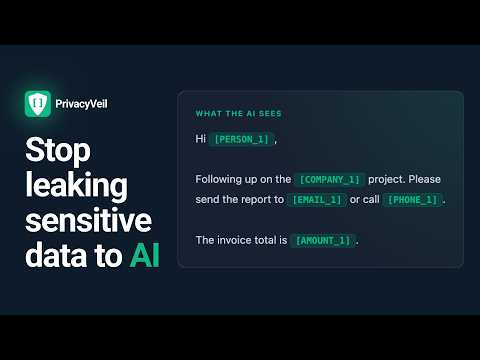
Your private data is leaking into AI every time you paste. Every time you copy text from an email, document, or chat and paste it into an AI assistant, you're sending names, email addresses, phone numbers, client details, and financial data to AI companies. PrivacyVeil stops that — silently, automatically, without changing how you work. HOW IT WORKS Set up your protected words once — your name, company, client names, project codes Use AI normally — just paste as you always do PrivacyVeil intercepts the paste and replaces protected words with safe placeholders like [PERSON_1], [COMPANY_1] The AI sees only the placeholders — never your real data When you copy the AI's response, originals are silently restored to your clipboard Paste anywhere — your real data is back, as if nothing happened Zero clicks during daily use. Set it once, forget it's there. WHAT'S DETECTED AUTOMATICALLY Beyond your custom words, PrivacyVeil catches sensitive patterns without any setup: Email addresses Phone numbers Credit card numbers IBANs Social Security Numbers Currency amounts FEATURES ✓ Silent clipboard filter — auto-shields on paste, auto-restores on copy ✓ Custom protected words with categories (Person, Company, Project, Address) ✓ Inline "Protect" pill — select any word in AI chat, click to protect it forever ✓ Side Panel — paste from desktop apps, shield, and send to AI in one click ✓ Right-click context menu — "Protect this text" on any selection ✓ Works on all major AI chat platforms PRIVACY FIRST 100% local processing — everything runs in your browser No data sent to any server No analytics, no tracking, no cookies No account required Your protected words never leave your machine Only activates on specific AI chat sites — no access to other websites FREE PLAN 5 custom protected words, all auto-detection patterns, all supported AI platforms, side panel, inline protect pill. PRO PLAN ($4/month) Unlimited protected words, placeholder instructions for better restore accuracy, import/export filter lists. Coming soon: custom AI site support, session history & audit log. WHO IT'S FOR Professionals who paste client emails, contracts, or reports into AI Lawyers, consultants, and compliance managers handling confidential data Freelancers working under NDAs Anyone who uses AI daily and cares about not leaking personal information PERMISSIONS EXPLAINED Storage — saves your protected words and settings locally Clipboard Read/Write — reads clipboard on copy to restore originals, writes restored text back Context Menus — adds "Protect this text" to right-click menu Side Panel — enables the desktop-app paste workflow Active Tab — allows side panel to send shielded text to the AI chat Questions? Email support@ties.digital Privacy Policy: https://privacyveil.ties.digital/privacy.html
0 out of 5No ratings
Details
- Version1.0.0
- UpdatedMay 12, 2026
- Offered bytisenoughstudio
- Size51.56KiB
- LanguagesEnglish
- Developer
Email
tisenoughstudio@gmail.com - Non-traderThis developer has not identified itself as a trader. For consumers in the European Union, please note that consumer rights do not apply to contracts between you and this developer.
Privacy

This developer declares that your data is
- Not being sold to third parties, outside of the approved use cases
- Not being used or transferred for purposes that are unrelated to the item's core functionality
- Not being used or transferred to determine creditworthiness or for lending purposes
Support
For help with questions, suggestions, or problems, visit the developer's support site