

Privacy Blur for WhatsApp
6 ratings
)
Overview
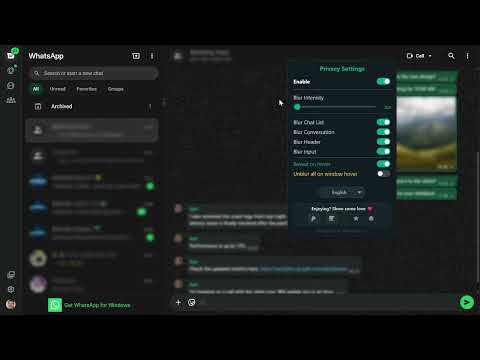
Smart privacy for WhatsApp Web. Blur messages, images & contacts. Hover to reveal. Secure your screen from prying eyes.
Someone nearby could be reading your chats right now. Privacy Blur for WhatsApp Web instantly hides your messages, contacts, and media from prying eyes — without interrupting your flow. Whether you're in an open office, a café, or anywhere people pass behind you, your conversations stay yours alone. How it works: Hover over any message to read it. Hold F2 for a full-screen peek. Everything else stays blurred — always. 🔒 What gets protected: • Chat list & contact names • Active conversation & message content • Images, videos, and media • Header info and typing area ✦ Features built for real privacy: • Protection modes — choose Balanced for everyday use or Strict for maximum coverage • Blackout mode — replace blur with solid black blocks for total visual lockdown • Adjustable blur intensity — dial it in from subtle to solid • Reveal & Pause — temporarily show everything for 10 seconds, or pause protection for 5 minutes • Idle auto-lock — screen blurs the moment you step away • Custom shortcut — toggle privacy on/off instantly with Alt+X (rebindable) • Right-click master switch — one click to enable or disable everything • Peek Mode (F2) — hold to reveal, release to hide again • Hover to read — reveal individual messages without turning privacy off • In-page badge — see your protection status at a glance, right inside WhatsApp 🌍 Available in 19 languages — including English, Spanish, French, Arabic, Hebrew, and more. Zero data. Zero tracking. Zero compromise. Privacy Blur works entirely inside your browser. It never reads, stores, transmits, or analyzes your messages or contacts. There are no servers, no accounts, and no data collection of any kind — ever. Install free. Your chats stay on your screen, and nowhere else. Privacy Blur for WhatsApp is an independent project. It is not affiliated with, endorsed by, or connected to WhatsApp Inc. or Meta Platforms, Inc.
4.8 out of 56 ratings
Details
- Version2.1.3
- UpdatedAugust 17, 2026
- Offered byorbitcode
- Size141KiB
- Languages19 languages
- Developer
Email
orbitcode0@gmail.com - Non-traderThis developer has not identified itself as a trader. For consumers in the European Union, please note that consumer rights do not apply to contracts between you and this developer.
Privacy

This developer declares that your data is
- Not being sold to third parties, outside of the approved use cases
- Not being used or transferred for purposes that are unrelated to the item's core functionality
- Not being used or transferred to determine creditworthiness or for lending purposes
Support
For help with questions, suggestions, or problems, please open this page on your desktop browser