

Prism Live Transcriber
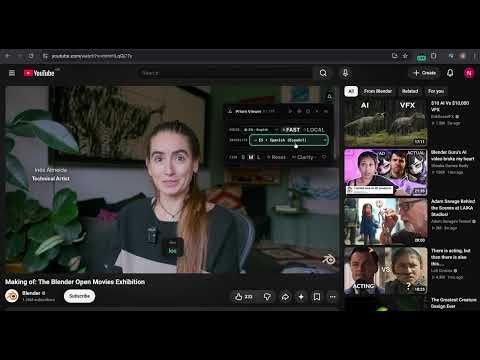
Overview
Real-time caption overlay for web video and audio tabs, powered by instant browser speech and on-device Whisper AI.
Follow live streams, videos, and spoken web audio in your preferred language with clean, unobtrusive captions overlaid directly on screen. Prism Live Transcriber displays a compact, draggable rolling caption capsule (up to five words at a time) so you can follow conversations naturally without blocking the video you are watching. Move it anywhere on screen, adjust text size, or re-center it with one click. Key features: - 12-Language Audio & Live Translation: Choose automatic language detection or lock source speech across English, Spanish, French, Russian, Japanese, German, Portuguese, Korean, Chinese, Italian, Turkish, and Arabic—with optional live translation to any of the 12 languages directly over YouTube, Twitch, and web video tabs. - Fast or Private Local Transcription: Switch anytime between FAST mode (instant browser speech recognition) and LOCAL mode (private on-device speech recognition with offline-cached model support after initial download). - Kinetic Five-Word Caption Capsule: Displays rolling spoken phrases with Hover-to-Freeze so you can pause and read back, automatic fade-out during brief silences, concise ambient sound indicators, and Click-to-Copy on any phrase. - Capsule Scale, Clarity Boost & Fullscreen Support: Resize captions anytime (S | M | L), toggle Clarity vocal enhancement for clearer dialogue over music or game audio, and keep captions visible inside fullscreen players. - Creator Studio Mode & Game Radar SFX: Open the panel menu to switch between Viewer Mode and Creator Studio Mode—overlaying live captions from local microphone(s) and optional game audio for broadcasts, with custom streamer themes (Glass, Cyber, Esports, VTuber) and optional Game Radar SFX alerts. - Quick Shortcuts & Bilingual UI: Open controls from the page button or press Alt+P (Option+P on macOS), test sample captions before capturing audio, and use the interface in English or Spanish. How to use: 1. Open a tab playing video or audio in Chrome (135 or newer). 2. Click the Prism toolbar icon to start live captioning, or press Alt+P to open the controls panel. 3. Keep AUTO detection or pick any of the 12 source languages, select an optional translation target, switch between FAST and LOCAL mode, or open the panel menu to launch Creator Studio Mode. Privacy & support: Tab, microphone, and game audio are processed transiently in your browser while active and are never collected, recorded, stored on remote servers, or sold by the developer. An optional Ko-fi creator support link is available in the control panel footer.
0 out of 5No ratings
Details
- Version1.0.3
- UpdatedNovember 18, 2026
- Offered byneocriollo.support@gmail.com
- Size3.55MiB
- Languages2 languages
- Developerjoan andre cordero urena
A052 curridabat, San José 11801 CREmail
neocriollo.support@gmail.comPhone
+506 8443 2005 - TraderThis developer has identified itself as a trader per the definition from the European Union and committed to only offer products or services that comply with EU laws.
Privacy

Prism Live Transcriber has disclosed the following information regarding the collection and usage of your data. More detailed information can be found in the developer's privacy policy.
Prism Live Transcriber handles the following:
This developer declares that your data is
- Not being sold to third parties, outside of the approved use cases
- Not being used or transferred for purposes that are unrelated to the item's core functionality
- Not being used or transferred to determine creditworthiness or for lending purposes
Support
For help with questions, suggestions, or problems, visit the developer's support site