

Printer for Google Chrome 2.0
20 arvostelua
)
Yleiskatsaus
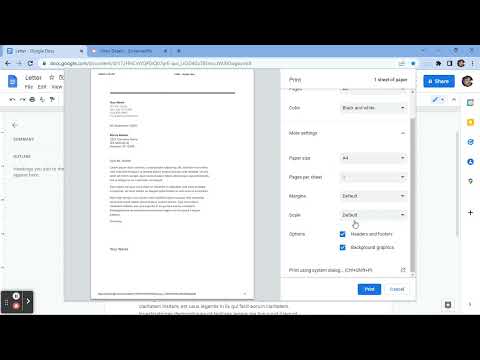
Prints the current page opened in Chrome with a single click.
⬇️Easy to set up ⬇️: 1. 🆓 and very easy to operate. 2. Place a print 🖨 button inside your web browser. So you can easily print a page with one click. 3. Choose the style and the Print button design. 🖨(color, black and white) 4. Double-click on the print icon 🖨 to save the file in HTML or PDF, or to open the Options page. ✨Features ✨: 1. Choose between the regular Print button or the Material Design Print button. 2. Or customize your own design Print button. 3. Supports both the TOUCH screen 🖥and DESKTOP screens with the mouse.🖱 4. Print button works for Windows, Mac, Linux, and Google Chromebooks. Our extension lets you print faster the opened tab on your current browser with one single click.
4,2/520 arvostelua
Tiedot
- Versio1.0.1
- Päivitetty9. lokakuuta 2022
- Tekijä:A & C
- Koko15.38KiB
- KieletEnglish
- Kehittäjä
Sähköposti
bonbatheco@gmail.com - Muu kuin elinkeinonharjoittajaKehittäjä ei ole tunnistautunut elinkeinonharjoittajaksi. Huomioitavaa kuluttajille Euroopan Unionin alueella: Kuluttajan oikeudet eivät päde sinun ja kehittäjän välisiin sopimuksiin.
Tietosuoja

Kehittäjän mukaan datasi on
- ei myydä kolmansille osapuolille muissa kuin hyväksytyissä käyttötapauksissa
- ei käytetä tai siirretä syystä, joka ei liity tuotteen ydintoimintoihin
- ei käytetä tai siirretä luottokelpoisuuden toteamiseksi tai lainoja varten.
Tuki
Jos sinulla on kysymyksiä, ehdotuksia tai ongelmia, avaa tämä sivu tietokoneen selaimella