

PrimeVocab: Dual Subtitles & Spaced Repetition

Overview
Dual subtitles for YouTube, Netflix & Prime Video. Click a word to translate and save it; learn English and more with flashcards.
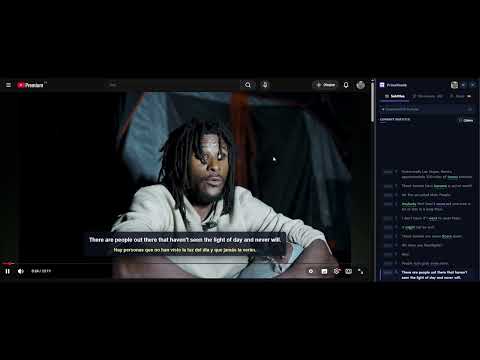
🎬 Dual subtitles for YouTube, Netflix, Prime Video & more – learn languages while you watch! PrimeVocab is a language-learning extension and vocabulary builder. It shows bilingual subtitles (two subtitles at once), works as a click-to-translate subtitle translator and turns the words you save into spaced-repetition flashcards and games. Learn English – or any of 22 languages – from the series, movies and videos you already love. ✨ Why PrimeVocab? • Two subtitles at once – even YouTube's auto-generated subtitles, shown as complete sentences. • Click any word to translate it and save it together with the scene. • Flashcards, games and shadowing turn saved words into vocabulary you keep. • 22 languages, free to start. 📺 Supported platforms YouTube · Netflix · Prime Video · & all web videos! 👥 Who is it for? • Anyone preparing for IELTS or TOEFL, or improving everyday English. • Learners of any of 22 languages, from Spanish and German to Japanese and Korean. • Anyone who wants real-life words, idioms and phrasal verbs from the shows they watch. 🌐 Dual subtitles & subtitle translator • Uses official translated subtitles when available, otherwise Google Translate – also for auto-generated subtitles. • Click any word: translation, pronunciation and, for English words, the A1–C2 level and synonyms. • Highlights idioms, phrasal verbs and collocations in English subtitles; multi-word phrases you save are highlighted as one unit. • Cinema mode on Netflix and Prime Video hides the player's buttons and can also hide Prime's X-Ray (IMDb) panel. 🧠 Smart playback (Premium) • Shadowing: the video pauses after each sentence so you can repeat it out loud. • Smart shadowing: pauses only on sentences with C1/C2 words, words you marked hard, idioms or phrasal verbs. • Auto rewind: goes back 2–8 seconds when you save a word, so you hear it again in context. • Auto slow motion: plays at 0.5×–0.9× when saved words of the levels you choose appear. 🃏 Spaced repetition flashcards (Anki-style) • Rate each card Again, Hard, Good, Easy or Learned; review intervals adapt to you. • Daily new-card and session limits keep reviews manageable. • 12-week study heatmap, daily goal and streak. 🎮 6 mini-games • Multiple choice, fill in the blank with the sentence from your show, word scramble, matching, dictation and memory cards. • Practise everything you saved, only single words or only collocations. 🏆 Badges Earn badges such as Phrasal Guru, Idiom Hunter, Idiom Sage and Collocation Architect as your vocabulary grows. 🗂️ Your personal dictionary • Every word keeps its sentence and video moment – replay the scene with one click. • Organise words with tags. • Export to CSV for Anki, or back up and restore everything as a JSON file. 💎 Free and Premium • Free: dual subtitles, translations, save up to 50 words, flashcards and games. • Premium: unlimited words; smart playback (Shadowing – pause after each sentence to repeat it, rewind when you save a word, slow down on hard words) and sync across your devices through Google Drive. ⌨️ Keyboard shortcuts • Alt+Shift+K opens or closes the panel. • Move between subtitle words, save a word and resume the video from the keyboard – every key can be changed. 🔒 Privacy Your words and settings are stored in your browser. Sync is optional and uses your own Google Drive. No ads.
0 out of 5No ratings
Details
- Version1.4.0
- UpdatedNovember 2, 2026
- FeaturesOffers in-app purchases
- Offered byTolga Kasap
- Size808KiB
- Languages22 languages
- DeveloperTolga Kasap
2 Nolu Erdoğdu Mah. Sezer Sk. No: 5a/3 6 1061 Ortahisar / Trabzon Ortahisar, Trabzon 61061 TREmail
primevocabextension@gmail.comPhone
+90 531 356 64 14 - TraderThis developer has identified itself as a trader per the definition from the European Union and committed to only offer products or services that comply with EU laws.
Privacy

PrimeVocab: Dual Subtitles & Spaced Repetition has disclosed the following information regarding the collection and usage of your data. More detailed information can be found in the developer's privacy policy.
PrimeVocab: Dual Subtitles & Spaced Repetition handles the following:
This developer declares that your data is
- Not being sold to third parties, outside of the approved use cases
- Not being used or transferred for purposes that are unrelated to the item's core functionality
- Not being used or transferred to determine creditworthiness or for lending purposes